8 EN
Prepare the remote control
Caution
•
Risk of product damage! When the remote control is
not used for long periods, remove the batteries.
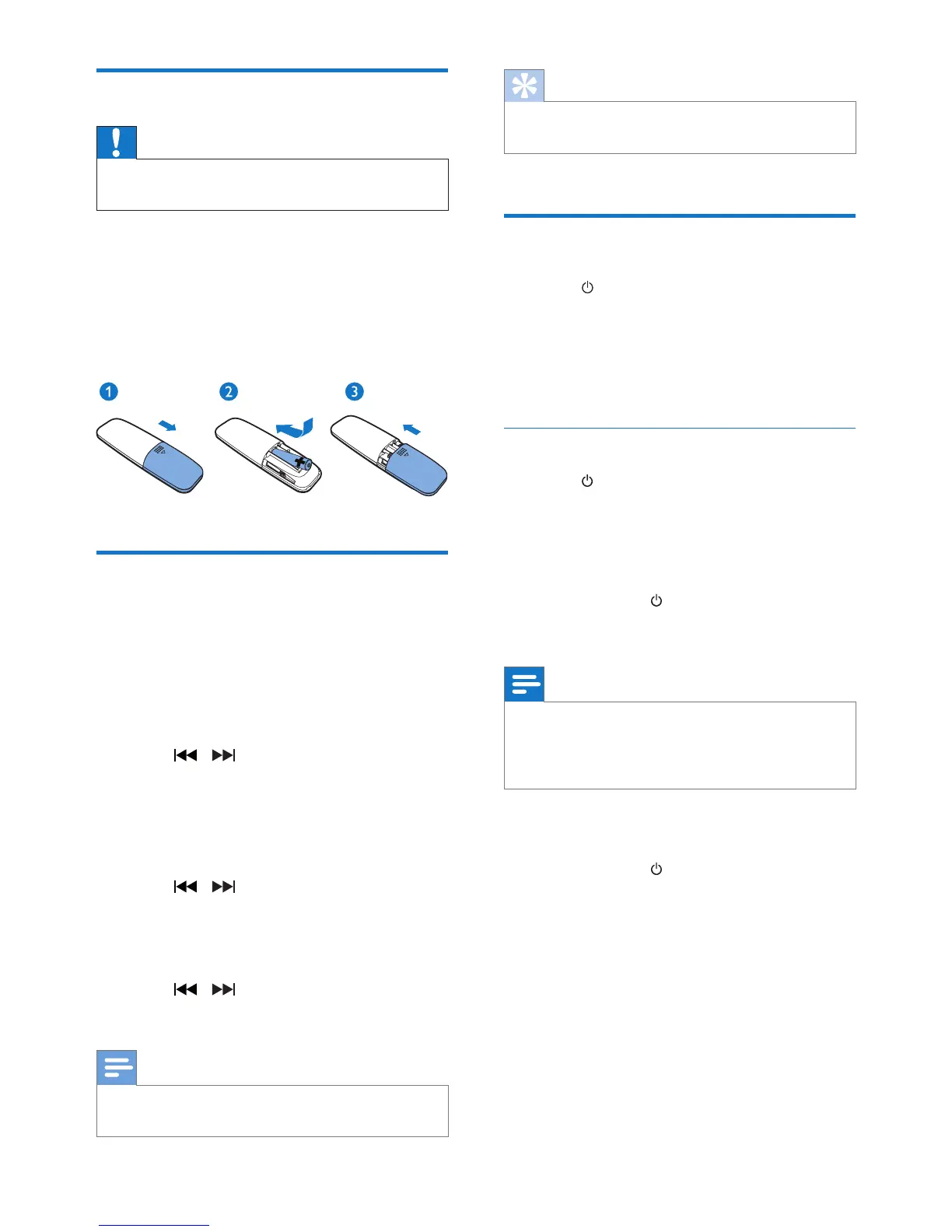
To insert the remote control battery:
1 Open the battery compartment.
2 Insert the supplied AAA battery with
correct polarity (+/-) as indicated.
3 Close the battery compartment.
Set clock
1
In power-on mode, press and hold
CLOCK on the remote control for 3
seconds.
» The [24H] or [12H] hour format is
displayed.
2 Press / to select the [24H] or
[12H] hour format.
3 Press CLOCK to conrm.
» The hour digits are displayed and begin
to blink.
4 Press / to select hour and press
CLOCKto conrm.
» The minute digits are displayed and
begin to blink.
5 Press / to select minute and press
CLOCK to conrm.
Note
•
If no button is pressed in 10 seconds, the system exits
clock setting mode automatically.
Tip
•
You can press CLOCK to view clock information in
power-on mode.
Turn on
• Press .
» The unit switches to the last selected
source.
» The signal strength indicators ash for
several seconds until the unit boots up.
Switch to standby mode
• Press again to switch the unit to standby
mode.
» The clock (if set) is displayed on the
panel.
Switch to ECO standby mode:
• Press and hold
for more than 3 seconds.
» The display panel is dimmed.
Note
•
The unit switches to Eco Power Standby mode after 15
minutes in standby mode.
• In group mode, the unit does not go to standby mode
automatically.
To switch between standby mode and ECO
standby mode:
• Press and hold
for more than 3 seconds.












 To Next Page