18 EN
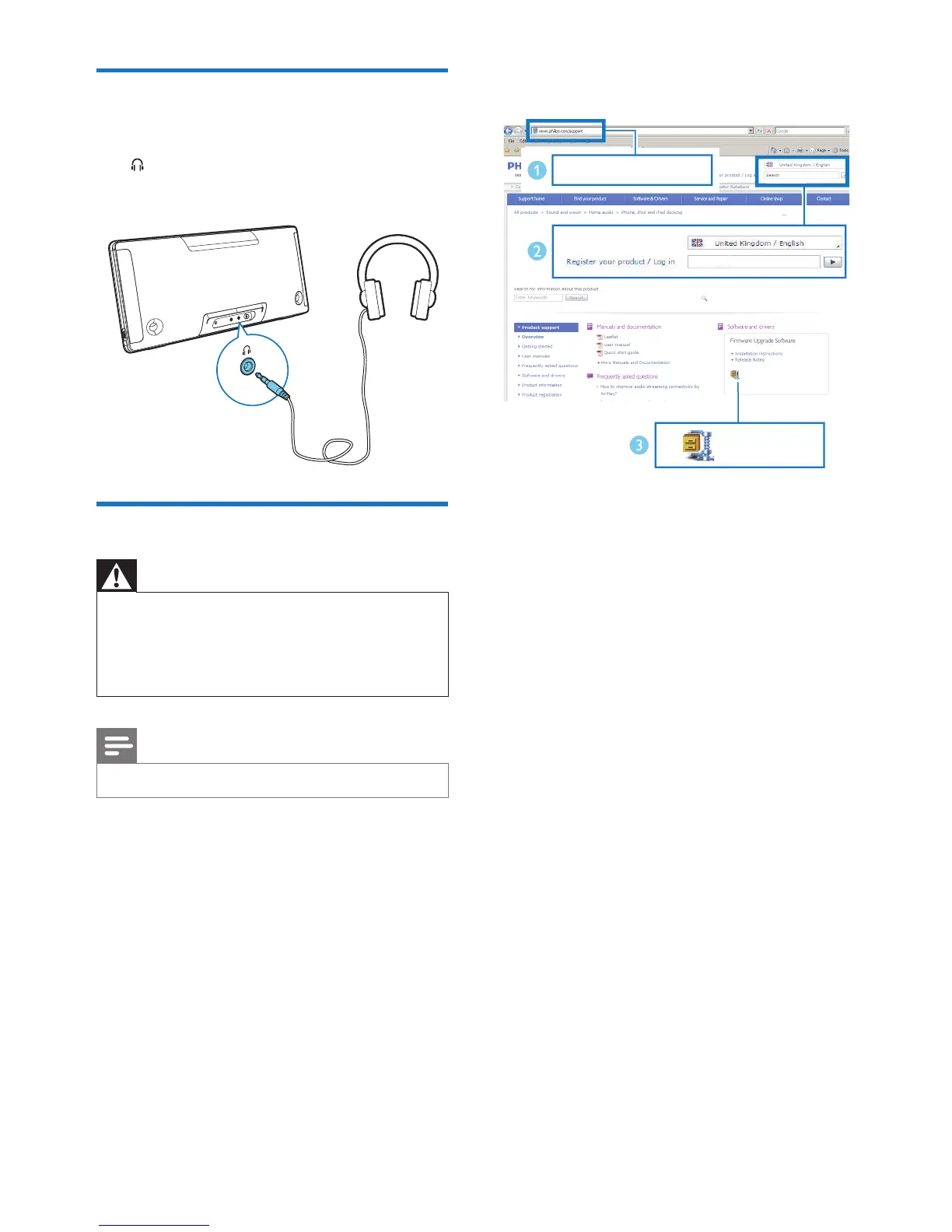
Listen through a headphone
• Plug a headphone (not supplied) into the
socket.
Update rmware
Warning
•
Always connect the speaker to AC power for rmware
upgrade.
• Never power off the speaker or unplug the USB mass
storage device before completion of the rmware
upgrade.
Note
•
Make sure that the USB stick is FAT16/32 formatted.
1 On your PC/Mac, go to www.philips.com/
support.
2 Enter the model number to nd the latest
rmware upgrade le available.
3 Unzip and save the upgrade le (BM50.bin)
to the root directory of a USB stick.
4 Press USB to select the USB source, then
plug the USB stick into the USB socket on
the back of the speaker.
5 Disconnect the AC power of the speaker.
6 Connect AC power again and turn on the
speaker.
7 Do not remove the USB stick, and wait for
around 3 to 4 minutes for completion of
the rmware upgrade.
» During rmware upgrade, 'UPGRADE'
is shown on the display panel.
» At completion of rmware upgrade,
'SUCCESS is shown on the display
panel.
www.philips.com/support
XXXX
XXXX. zip












 To Next Page