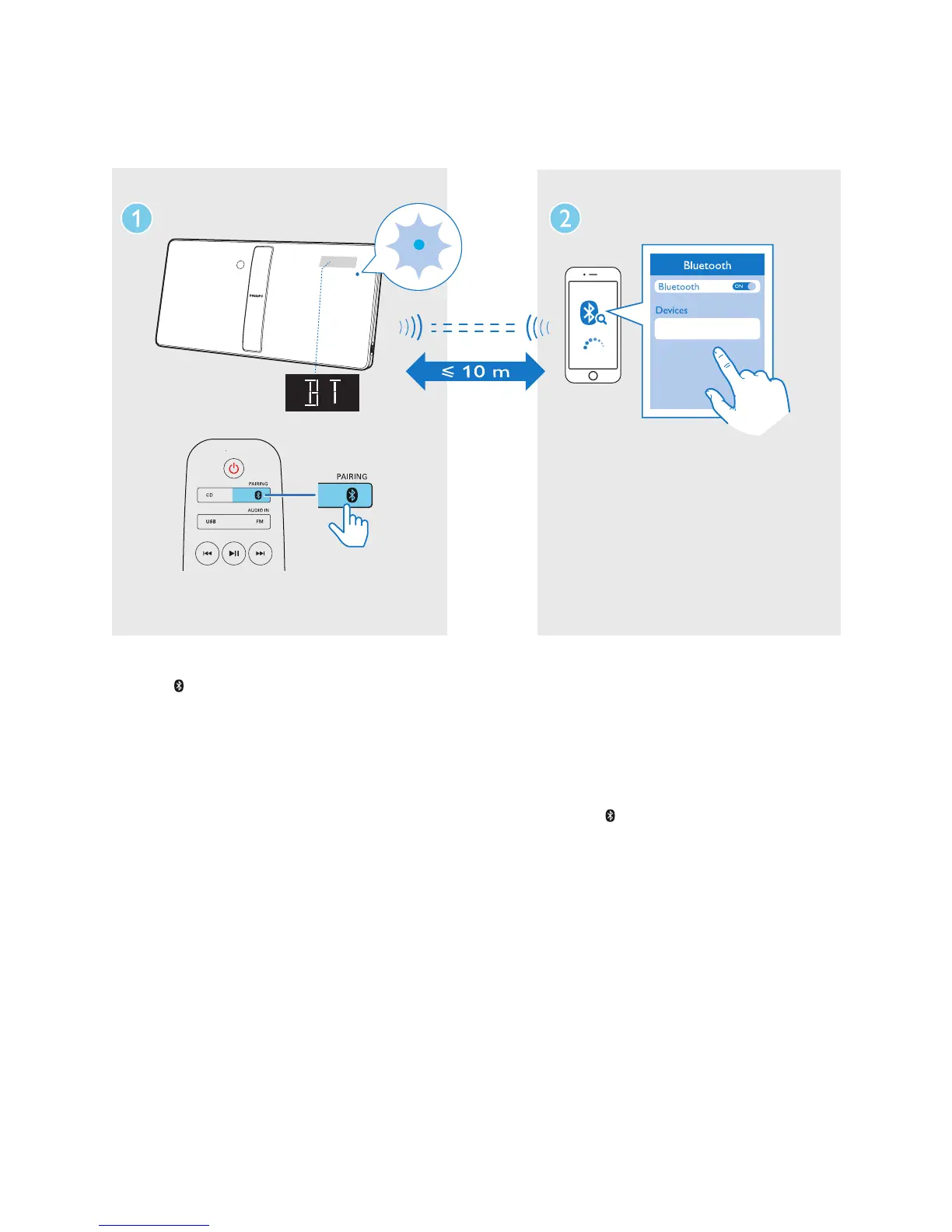
1 Press /PAIRING to select the Bluetooth
source.
» [BT] (Bluetooth) is displayed.
» The Bluetooth indicator ashes blue.
2 On your device that supports Advanced
Audio Distribution Prole (A2DP), enable
Bluetooth and search for Bluetooth devices
that can be paired (refer to the user
manual of the device).
3 Select 'Philips BM50' on your Bluetooth
enabled device and if necessary input
'0000' as the pairing password.
» After successful pairing and connection,
the Bluetooth indicator turns solid
blue, and the unit beeps.
» 'BT i s displayed.
Philips BM50 xxx
4 Play music on the connected device.
» Music streams from your Bluetooth
enabled device to this unit.
• If you fail to search for 'Philips BM50'
or cannot pair with this unit, press and
hold
/PAIRING for three seconds
until you hear a beep sound to enter
pairing mode.
To disconnect the current Bluetooth-enabled
device:
• Deactivate Bluetooth on your device; or
• Move the device beyond the
communication range.












 To Next Page