Note
•
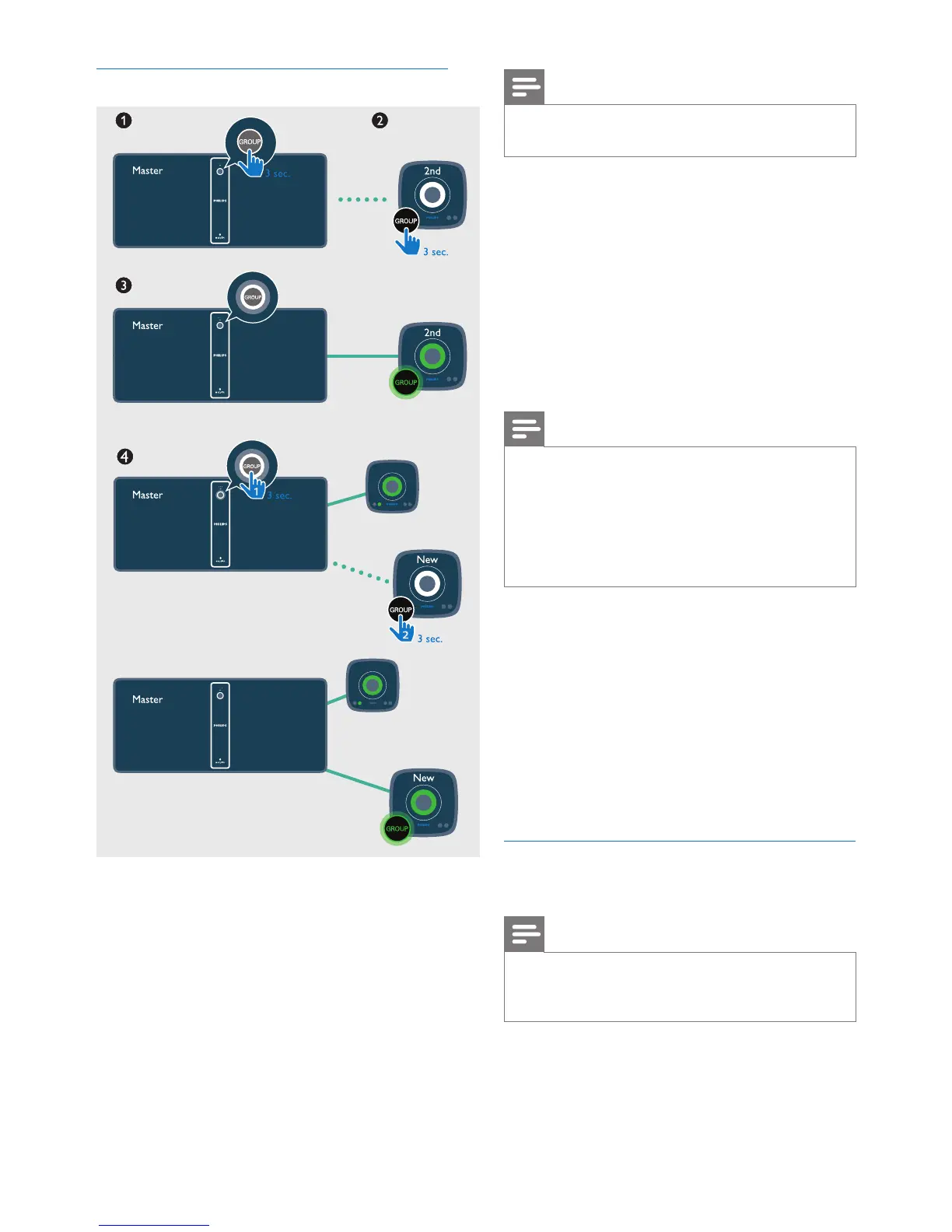
Whenever you create a group, the rst speaker that
you enable the group function will act as the master.
1 Hold GROUP on the rst speaker for 3
seconds (The master).
2 Hold GROUP on a second speaker for 3
seconds (The slave).
3 Wait for 15 to 30 seconds for connection
setup.
4 Repeat steps 1 to 3 to add more slave
speakers one by one.
Note
•
You can only add slave speakers one by one. Each time
when you add a slave speaker, rst press and hold
GROUP on the master speaker until the indicator on
the button ashes and the speaker beeps.
• If the signal strength indicator on a slave speaker shows
that the signal is poor, move it closer to the master
speaker.
You can add any of the following speakers into
the existing group or create a new group with
them:
• A speaker with factory default settings
• A master speaker that has no slave
connected to it
• A slave speaker that is disconnected
from its master (with the GROUP
indicator ashing)
Play from the master to the whole
group
Note
•
In Bluetooth mode, music play pauses when there is an
incoming call or video recording is in progress on the
connected mobile phone.
• If this speaker (BM50) acts as the master,
select a source and play to the whole
group of speakers.












 To Next Page