6 EN
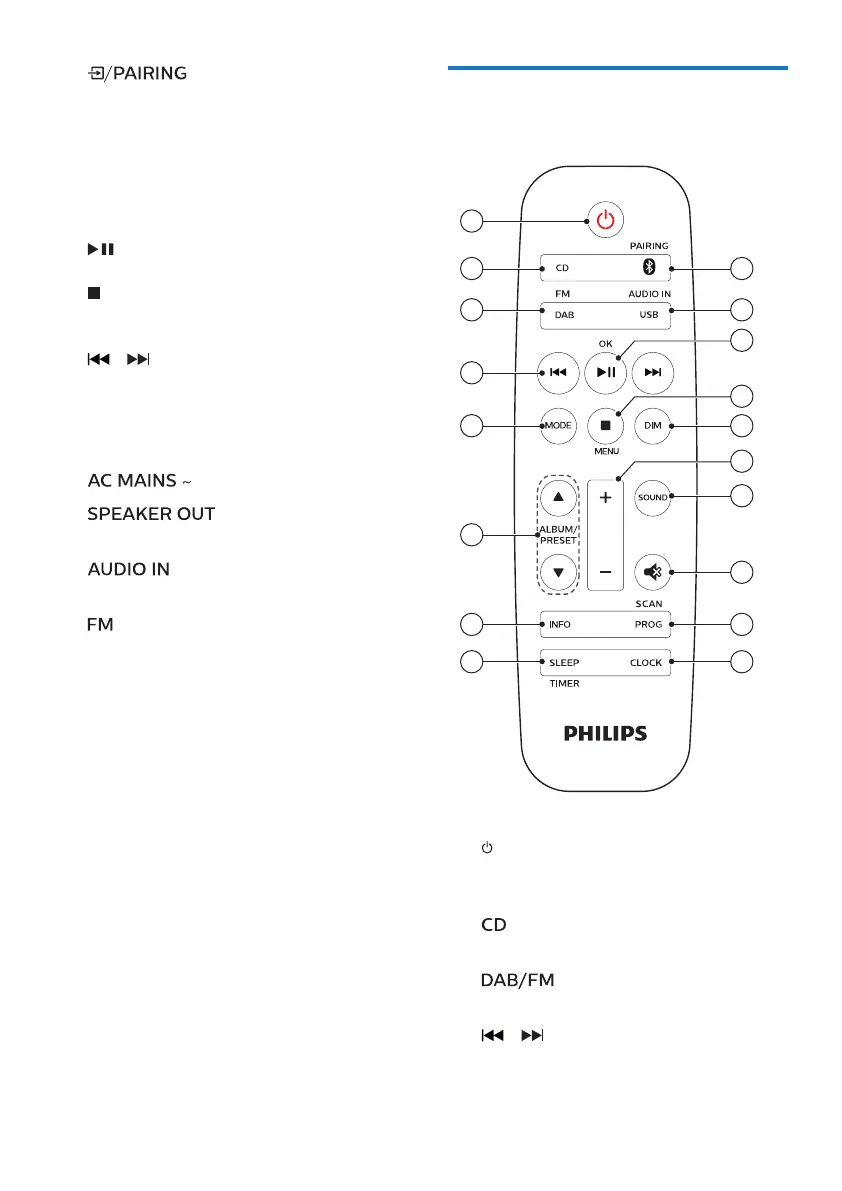
Overview of the remote
control
18
17
14
13
15
16
12
11
10
9
2
1
3
4
5
7
8
6
a
• Switch this product on or to
standby.
b
• Select CD source.
c
• Select FM or DAB+ source.
d
/
• Skip to the previous/next track.
• Search within a track/disc/USB.
i
• Press to select a source: DISC,
USB, TUNER, AUDIO IN, BT.
• In Bluetooth mode, press and
hold for more than 2 seconds
to disconnect the currently
connected device and enter
pairing mode.
• Start or pause play.
• Stop play.
• Erase a program.
/
• Skip to previous/next track.
• Search within a track/disc.
• Tune to a radio station.
• Adjust time.
j
k socket
• Connect with the speakers.
l
• Connect external audio devices.
m
antenna
• Improve FM radio reception.



 To Next Page