Detector Calibration
4-28 CardioMD Service Manual 1MAN0158-H11 04-2005 CSIP Level 1
Procedure Details
15. Click Exit to close the Uniformity Calibra-
tion page.
16. Replace the FOV mask with the collima-
tor.
17. Slide the collimator on the other detector
back in place.
18. Press the hand controller Collision Over-
ride button and wait for a minimum of 4
seconds.
19. Repeat the procedure outlined above to
calibrate the other detector.
20. Click Exit to close the Uniformity Calibra-
tion page.
Extrinsic Uniformity Calibration Procedure
Procedure Details
1. Ensure that the CardioMD system is in the
patient load position and that the acquisi-
tion PC is displaying the Persistence page.
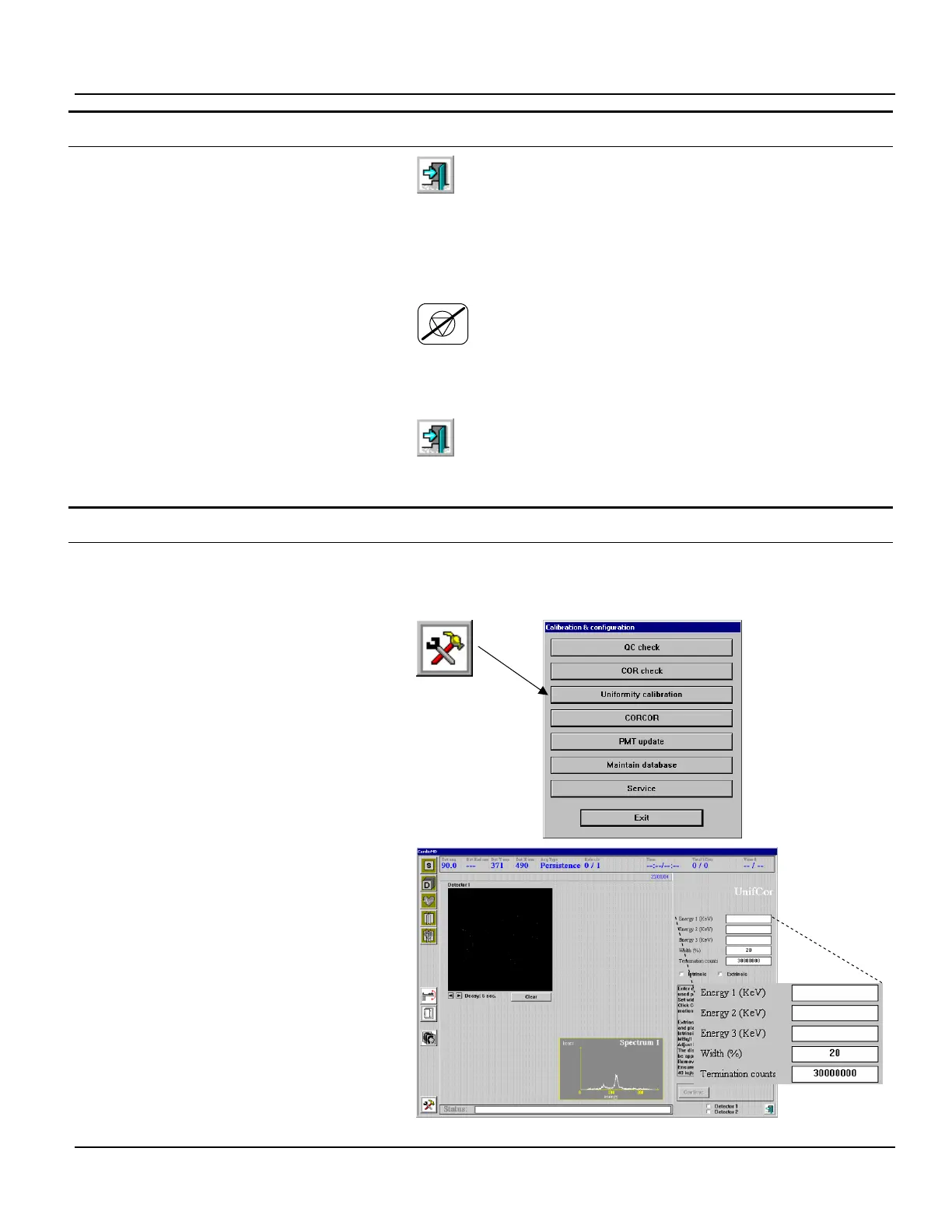
2. Click the Tools button.
The Calibration & Configuration menu ap-
pears.
3. In the Calibration & Configuration menu,
click Uniformity calibration.
The Uniformity Calibration page appears.
4. Specify the energy settings for the uni-
formity correction table to be acquired.
5. Select Extrinsic.
6. Select the detector to be calibrated.
The uniformity correction table is assigned a
filename of the form:
U.coll.ew1.ew2.ew3.detectorNum
Where:
coll is set to LEGP, LEHR or NONE, depending
on the collimator mounted on the detector.



 To Next Page