Your phone
7
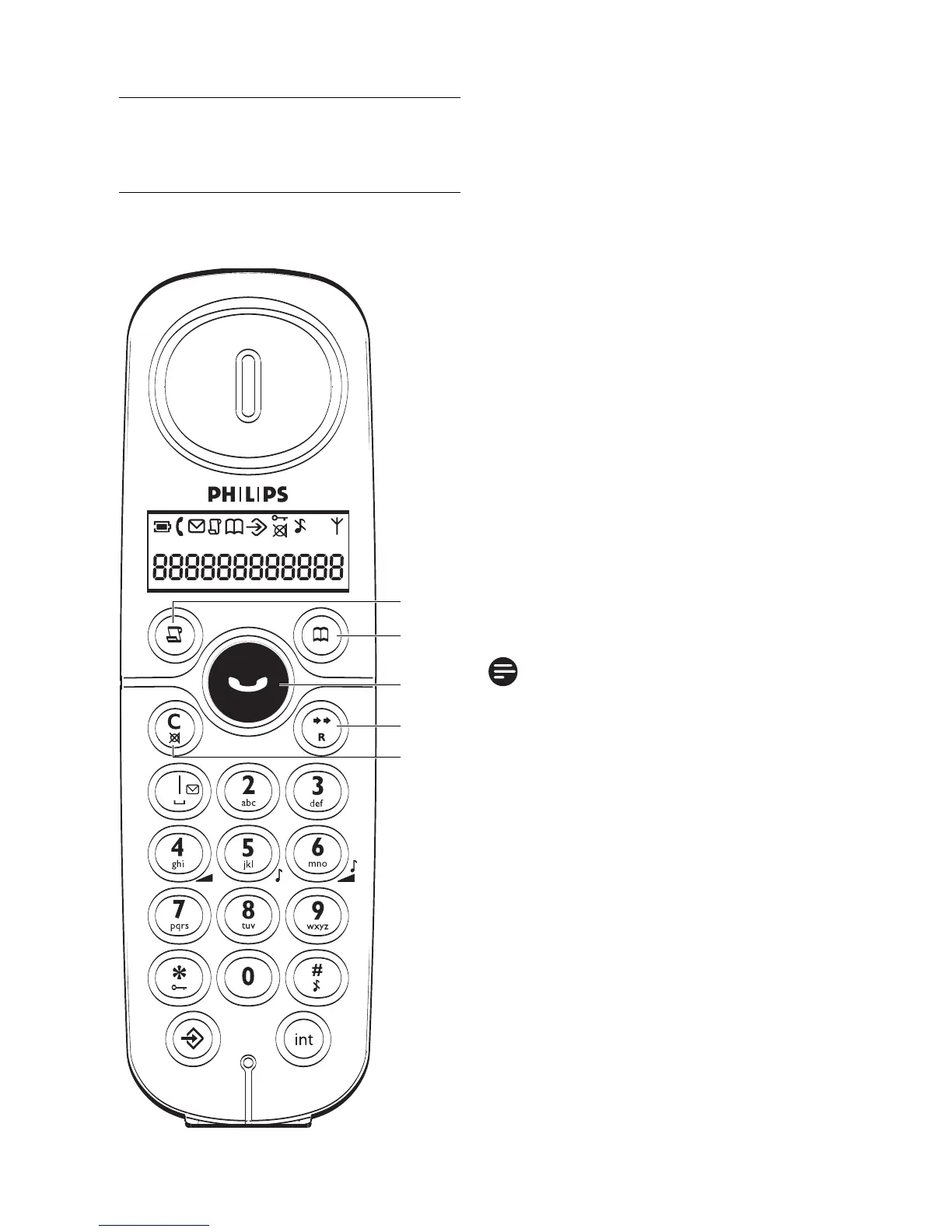
ACall Log key
In idle mode: Press to access
the call log list
B Phonebook key
In idle mode: Press to access
the phonebook
C Talk key
In idle mode: Press to answer
when there is an incoming call
In idle mode: Press to make a
call
During a call: Press to end a call
D Redial/Flash key
In idle mode: Press to access
the redial list
In predial mode: Press to insert
a flash
Note
The first digit cannot be a flash
during predialling.
E Clear/Back/Mute key
In editing mode/predialling
mode: Short press to delete
one character/digit
In editing mode/predialling
mode: Long press to delete all
the characters/digits
In phonebook review/call log
review/redial list review mode:
Press to exit to idle mode
In phone setting mode: Press to
exit to previous level
During call connection: Press to
mute the microphone
2.2 Overview of the
phone
2.2.1 Handset
A
B
C
D
E



 To Next Page