EasyManua.ls Logo

Philips CD911 - Page 15

Philips CD911
39 pages
Print Icon
To Next Page IconTo Next Page
To Previous Page IconTo Previous Page
Loading...
15
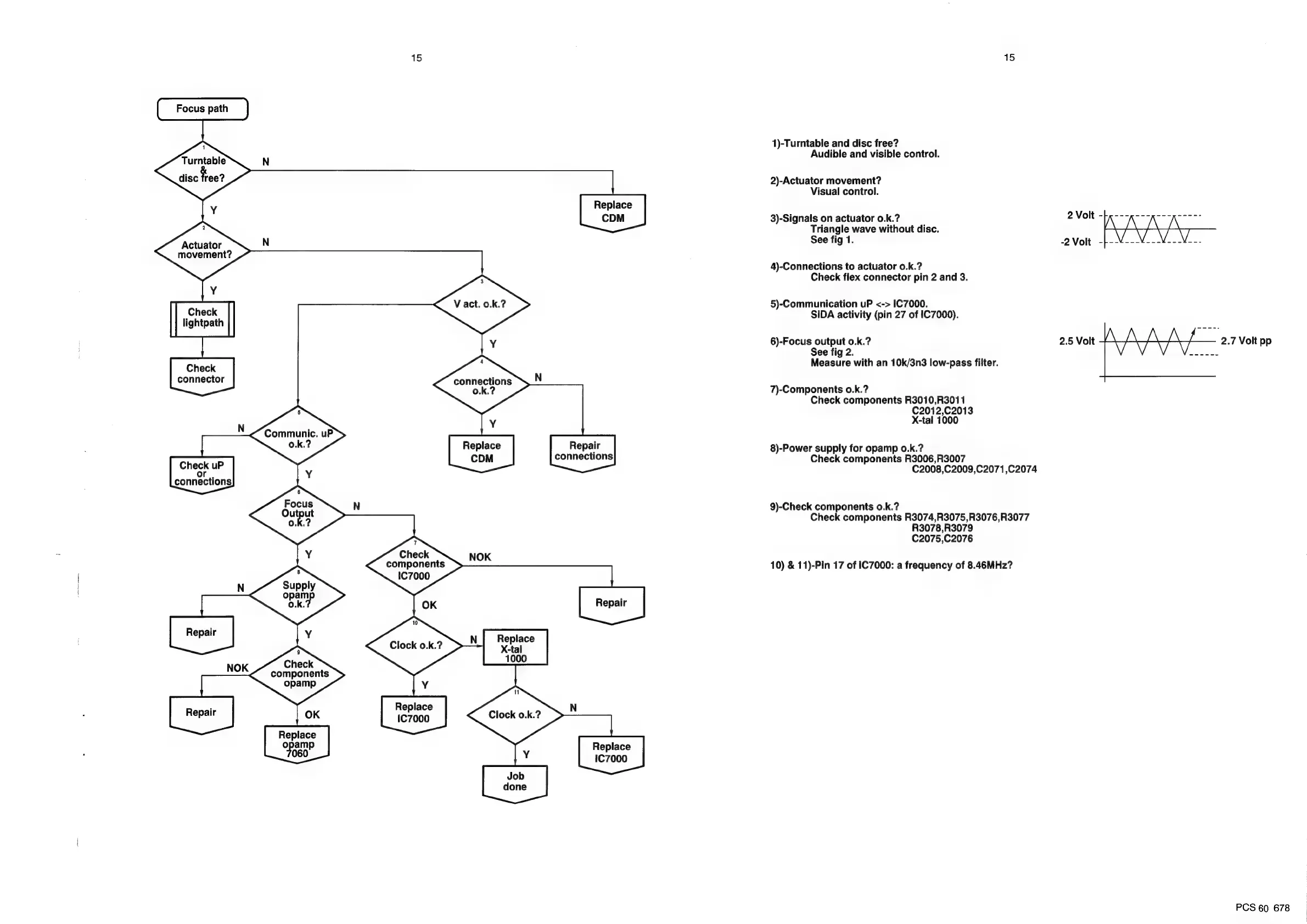
Turntable
disc
free?
Replace
Y
Actuator
movement?
Check
lightpath
Check
connector
Communic.
Y
0.k.?
Replace
Repair
connections
Check
uP
¥
eis
connections
Check
components
IC7000
components
Clock
o.k.?
ea
ai
1000
opamp
;
Replace
nepat
OK
=
Replace
opam
FOB"
Job
done
NOK
Repair
Check
NOK
ES
ES
1)-Turntable
and
disc
free?
Audible
and
visible
control.
2)-Actuator
movement?
Visual
control.
3)-Signals
on
actuator
0.k.?
Triangle
wave
without
disc.
See
fig
1.
4)-Connections
to
actuator
0.k.?
Check
flex
connector
pin
2
and
3.
5)-Communication
uP
<->
IC7000.
SIDA
activity
(pin
27
of
IC7000).
6)-Focus
output
o.k.?
See
fig
2.
Measure
with
an
10k/3n3
low-pass
filter.
7)-Components
o0.k.?
Check
components
R3010,R3011
C2012,
C2013
X-tal
1000
8)-Power
supply
for
opamp
o.k.?
Check
components
R3006,R3007
C2008,C2009,C2071,C2074
9)-Check
components
o.k.?
Check
components
R3074,R3075,R3076,R3077
R3078,R3079
C2075,C2076
10)
&
11)-Pin
17
of
IC7000:
a
frequency
of
8.46MHz?
2.5
Volt
2.7
Volt
pp
PCS
60
678

Related product manuals