18
18
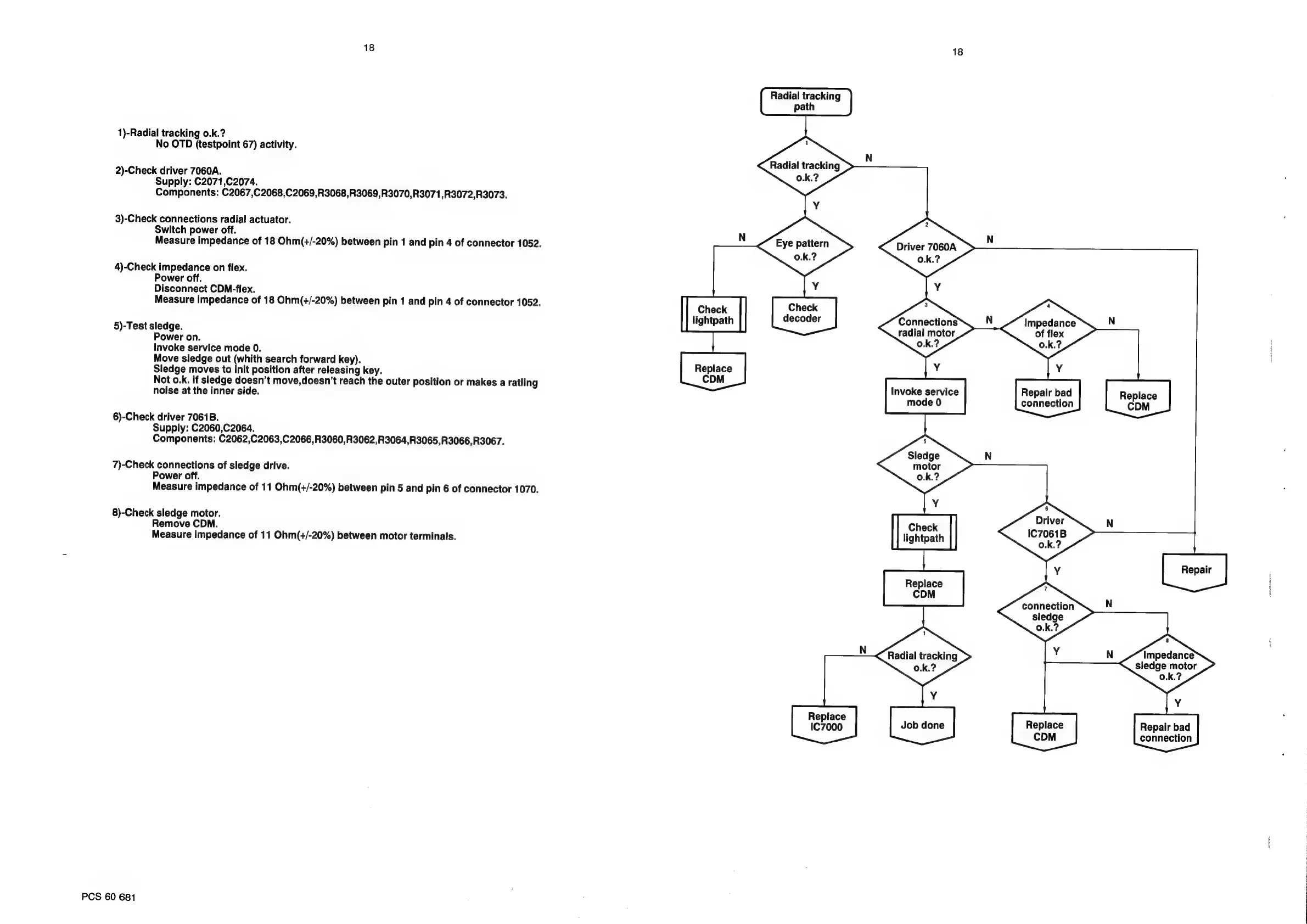
Radial
tracking
path
1)-Radial
tracking
0.k.?
No
OTD
(testpoint
67)
activity.
N
Radial
tracking
2)-Check
driver
7060A.
Supply:
C2071,C2074.
Components:
C2067,C2068,C2069,R3068,R3069,R3070,R3071,R3072,R3073.
.
3)-Check
connections
radial
actuator.
Switch
power
off.
N
Measure
impedance
of
18
Ohm(+/-20%)
between
pin
1
and
pin
4
of
connector
1052.
Eye
pattern
Driver
7060A
0.k.?
0.k.?
4)-Check
impedance
on
flex.
Power
off.
Y
Disconnect
CDN-flex.
Measure
impedance
of
18
Ohm(+/-20%)
between
pin
1
and
pin
4
of
connector
1052.
Check
Check
lightpath
decoder
Connections
Impedance
5)-Test
sledge.
radial
motor
of
flex
Power
on.
0.k.?
Invoke
service
mode
0.
Move
sledge
out
(whith
search
forward
key).
Repl
Sledge
moves
to
init
position
after
releasing
key.
Con”
Not
o.k.
if
sledge
doesn’t
move,doesn’t
reach
the
outer
position
or
makes
a
ratling
invoke
saniice
noise
at
the
inner
side.
nM
ode
o
6)-Check
driver
7061B.
Supply:
C2060,C2064.
Components:
C2062,C2063,C2066,R3060,R3062,R3064,R3065,R3066,R3067.
7)-Check
connections
of
sledge
drive.
Power
off.
Measure
impedance
of
11
Ohm(+/-20%)
between
pin
5
and
pin
6
of
connector
1070.
Y
8)-Check
sledge
motor.
Driver
Remove
CDM.
‘Check
IC7061B
Measure
impedance
of
11
Ohm(+/-20%)
between
motor
terminals.
lightpath
o.k.?
Replace
CDM
connection
N
sledge
o.k.?
N
Impedance
sledge
motor
0.k.?
Y
Y
Replace
:
IC7000
Job
done
Replace
Repair
bad
CDM
connection
PCS
60
681



 To Next Page