EasyManua.ls Logo

Philips CDP 200 - Track Programming; Programming Tracks; Playing a Program; Checking and Erasing Programs

Philips CDP 200
16 pages
Print Icon
To Next Page IconTo Next Page
To Previous Page IconTo Previous Page
Loading...
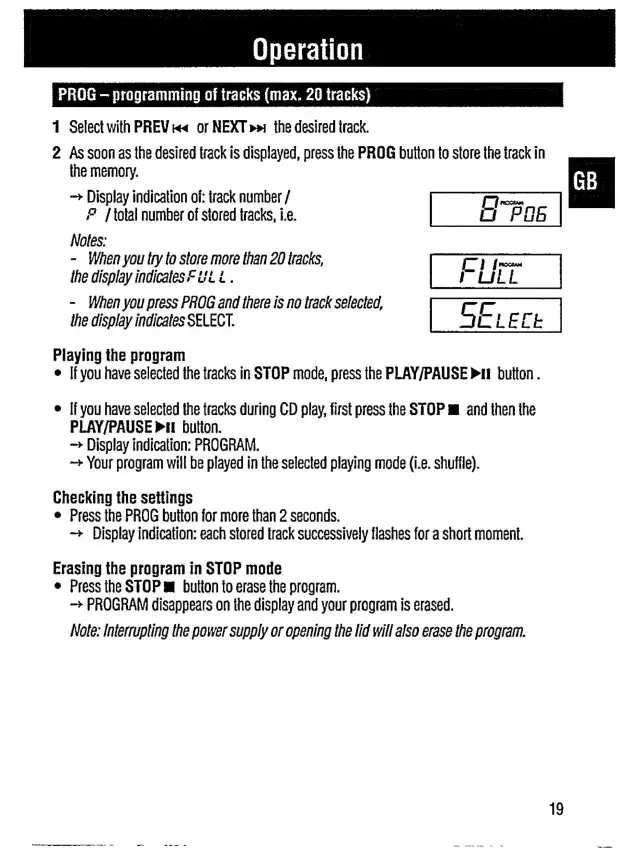
PROG
-
programming
of
tracks
(max.
20
tracks)
1
Select
with
PREV
ka
or
NEXT
»»
the
desired
track.
2
As
soon
as
the
desired
track
is
displayed,
press
the
PROG
button
to
store
the
track
in
the
memory.
Display
indication
of:
track
number
/
Fi
roma
2
[total
number
of
stored
tracks,
i.e.
Notes:
-
When
you
try
to
store
more
than
20
tracks,
ΓΙ
fr
the
display
indicates
Ft
L.
FULL
-
When
you
press
PROG
and
there
is
no
track
selected,
the
display
indicates
SELECT.
Piaying
the
program
If
you
have
selected
the
tracks
in
STOP
mode,
press
the
PLAY/PAUSE
P11
button
.
ο
If
you
have
selected
the
tracks
during
CD
play,
first
press
the
STOP
m
and
then
the
PLAY/PAUSE
pH
button.
Display
indication:
PROGRAM.
Your
program
will
be
played
in
the
selected
playing
mode
(i.e.
shuffle).
Checking
the
settings
ο
Press
the
PROG
button
for
more
than
2
seconds.
Display
indication:
each
stored
track
successively
flashes
for
a
short
moment.
Erasing
the
program
in
STOP
mode
e
Press
the
STOP
m
button
to
erase
the
program.
->
PROGRAM
disappears
on
the
display
and
your
program
is
erased.
Note:
interrupting
the
power
supply
or
opening
the
lid
will
also
erase
the
program.
1
co

Related product manuals