8 EN
3 Getting started
Installing the fan base
Remove all packaging materials before rst use.
Note: Make sure the fan is unplugged from the electrical outlet before installing the base.
1
2
1
2
1
2
2
1
3
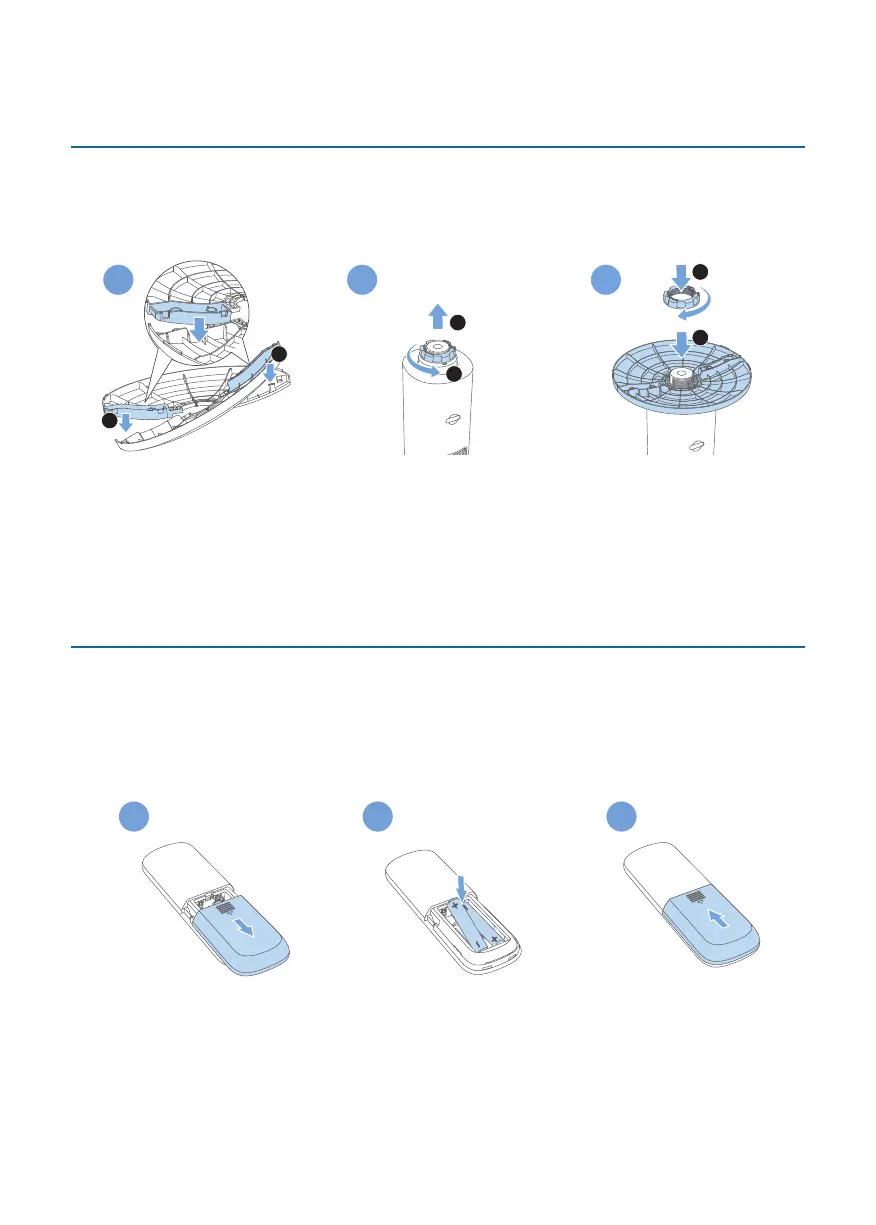
1 Hold two base halves in a crossed position, and securely interlock the pegs into
holes.
2 Invert the Tower Fan gently. Remove the plastic nut located at the bottom of
the Tower Fan by unscrewing it.
3 Fit the base to the Tower Fan. Tightly screw the plastic nut back on.
4 Place the Tower fan right side up.
Usingtheremotecontrolforthersttime
Caution:
•
Risk of product damage! When the remote control is not used for long periods,
remove the battery.
•
Battery contains chemical substances, so they should be disposed of properly.
1 2
LR03-AAA-1.5Vx2
3
1 Open the battery compartment
2 Insert 2 Alkaline, type LR03-AAA-1.5V batteries with correct polarity (+/-) as
indicated.
3 Close the battery compartment.



 To Next Page