8 EN
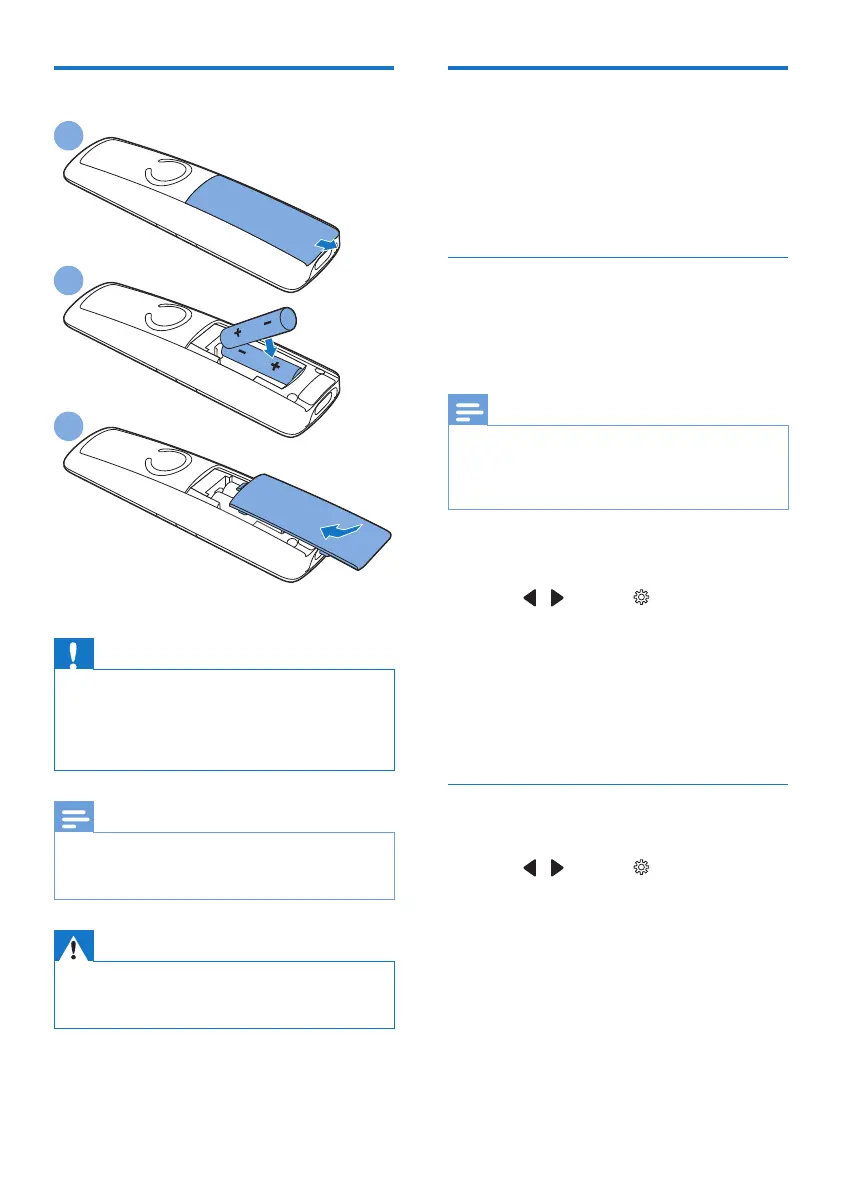
Install the supplied batteries
Caution
• Risk of explosion! Keep batteries away from heat,
sunshine or re. Never discard batteries in re.
• Use only the supplied batteries.
• Risk of decreased battery life! Never mix different
brands or types of batteries.
Note
• Charge the batteries for 8 hours before rst use.
• If the handset becomes warm when the batteries are
charging, it is normal.
Warning
• Check the battery polarity when inserting in the
battery compartment. Incorrect polarity may damage
the product.
2
3
Congure your phone
(country dependent)
1 When using your phone for the rst time,
you see a welcome message.
2 Press [OK].
Set the country
Select your country, then press [OK] to
conrm.
» The country setting is saved.
Note
• The country setting option is country dependent. If no
welcome message is displayed, it means the country
setting is preset for your country. Then you can set the
date and time.
To set the language, see the following steps.
1 Select [Menu].
2 Press / to select , then press
[Select].
3 Select [Language], then press [OK] to
conrm.
4 Select a language, then press [OK] to
conrm.
» The setting is saved.
Set the date and time
1 Select [Menu].
2 Press / to select , then press
[Select].
3 Select [Date & time], then press [OK] to
conrm.
4 Select [Set date]/[Set time], then press
[OK] to conrm.
5 Press the numeric buttons to enter the
date and time.



 To Next Page