Direction of Use
7-1
*The following excerpt of the DFU/QSG serves as an introduction to the set.
The Complete Direction for Use can be download in different languages from
the internet site of Philips Customer care Center : www.support.philips.com
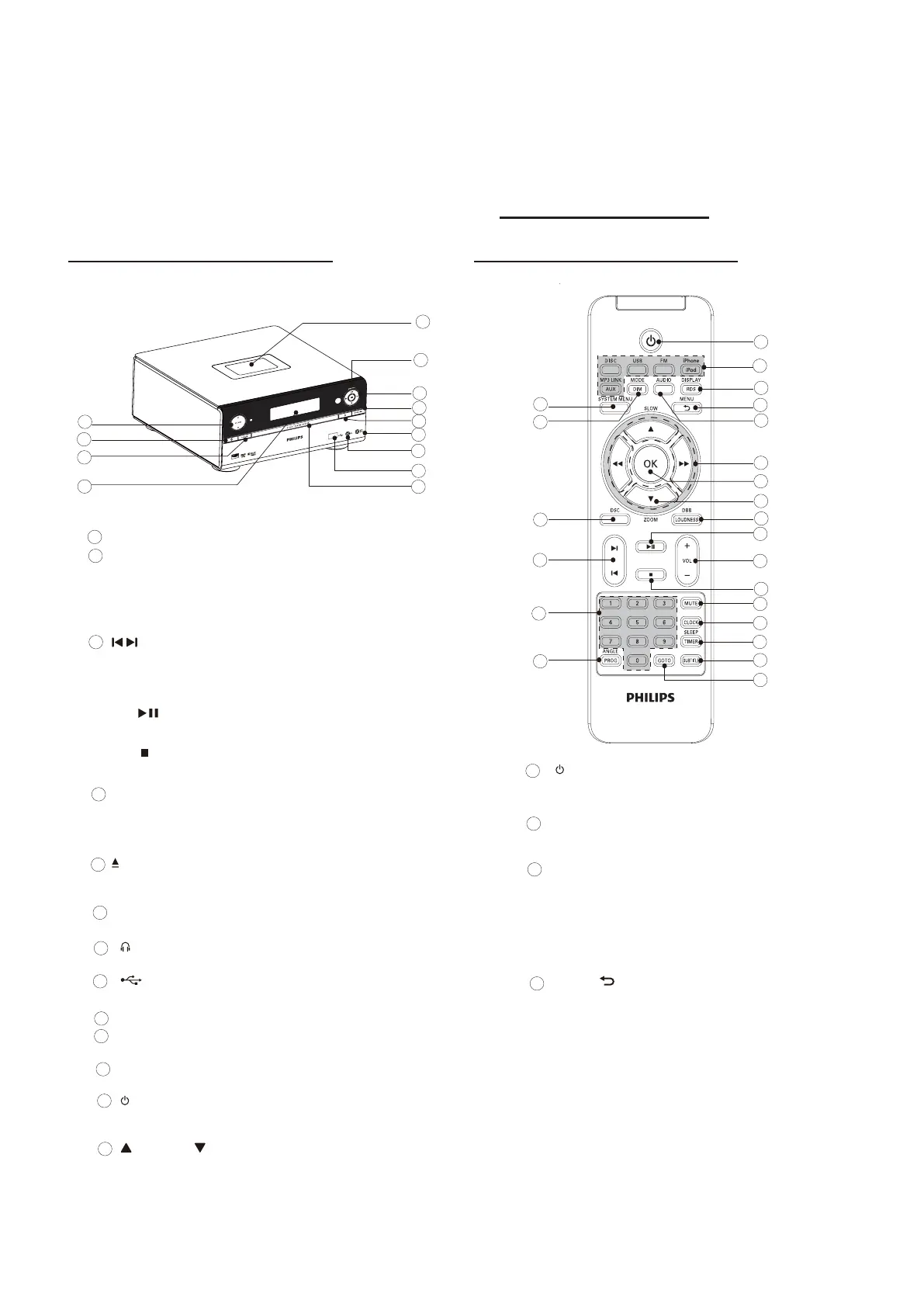
Remote control
Headphone socket.
USB socket.
Disc compartment
Display panel
Display current status.
SOURCE
Select a source.
Turn on the apparatus or switch to
the standby mode.
VOLUME
Adjust volume.
Adjust time.
Overview of the main unit
Dock for iPod/iPhone
DBB/LOUDNESS
Turn on or off dynamic bass
enhancement.
Turn on or off automatic loudness
control.
/
Skip to the previous/next track, title,
or chapter.
Select a preset radio station.
Start or pause play.
Stop play or erase a program.
MODE/DIM
Select repeat/shufÀeplaymodes.
Select a brightness level for the
display screen.
Open or close the disc
compartment.
MP3-LINK
Jack foranexternalaudiodevice.
1
1
2
3
4
5
6
7
8
9
10
11
12
13
14
15
16
17
1
2
3
4
18
19
20
21
22
23
2
3
4
5
6
7
8
9
1
2
3
4
5
6
7
8
9
10
11
12
13
10
11
12
13
Turn on the apparatus or switch to
the standby mode.
Source selection keys
Select a source.
DISPLAY/RDS
Display play information on a
connected TV.
ForselectedFMradiostations:
display RDS information.
Synchronize clock with RDS.
MENU/
For video discs: access or exit the
disc menu.
Forvideodiscswithplayback
control(PBC):turnon/offPBC.
Access or exit the menu of iPhone/
iPod.
Returntothepreviousmenu.



 To Next Page