Direction of Use
1 Connect component video cables (red/
blue/green - not supplied) to:
the COMPONENT (Pr/Cr Pb/Cb Y)
sockets on this unit.
the component input sockets on the TV.
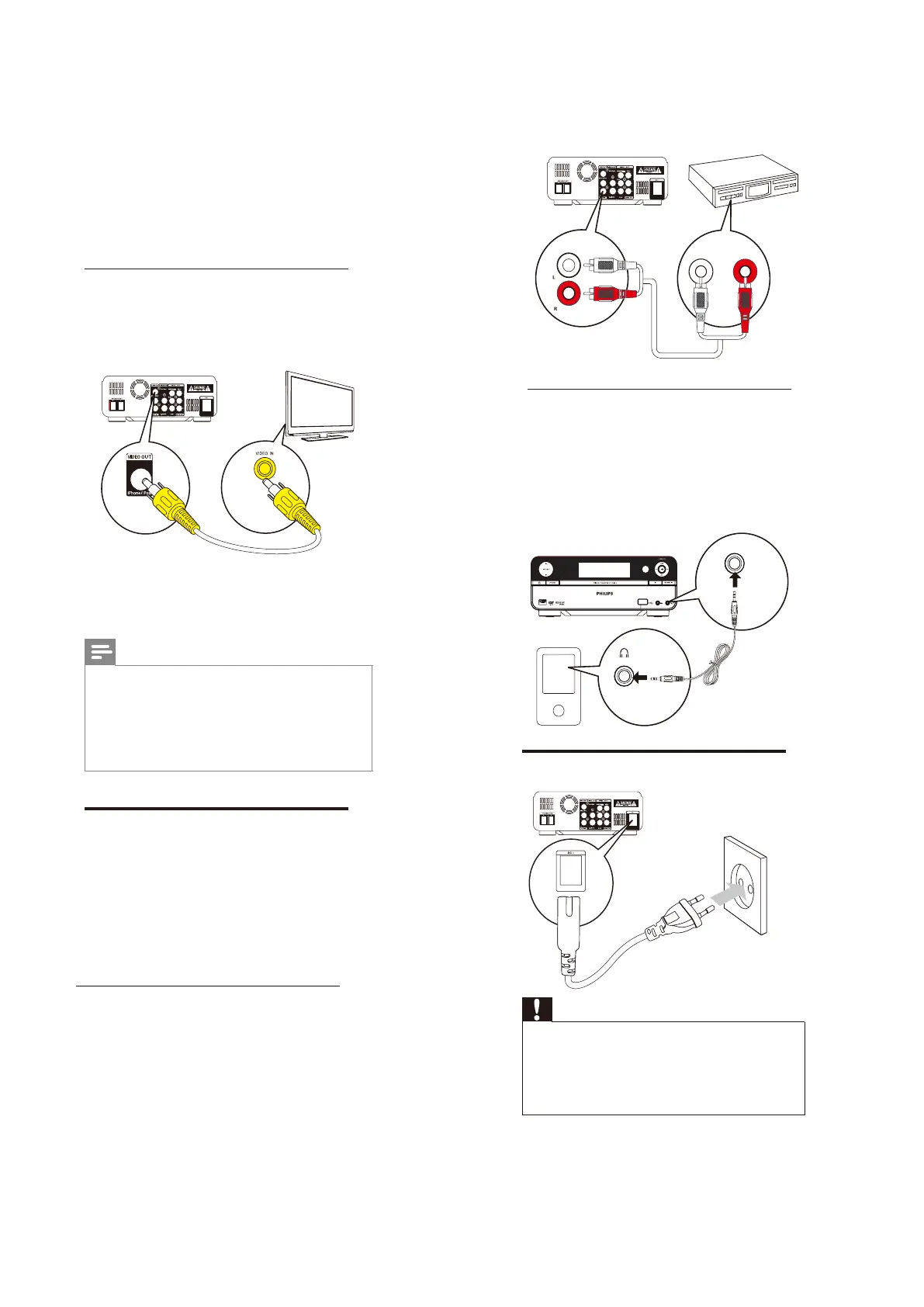
Option 4: Connect through the
iPhone/iPod socket
You can view video ¿Oesthatarestoredon
youriPhone/iPodonyourTV.
1 Connect a composite video cable to:
the iPhone/iPodsocket on this unit.
thevideoinputsocketontheTV.
Note
To play audio only through the speakers of this
apparatus, mute the TV and other connected
audio devices.
See“PlayiPhone/iPod”forhowtocontrolthe
play.
SeetheusermanualofyourTVforhowto
selecte the correct viewing channel.
Connect an external audio
device (optional)
You can also listen to an external audio device
through this unit.
Option 1:Connect through the AUX IN
sockets
Option 2: Connect through the MP3-
LINK socket
TV
Option 1: Connect through the AUX
IN sockets
1 Connect audio cables (red/white) to:
the AUXIN (LandR)socketson
this unit.
theaudiooutputsocketsonthe
external audio device.
Option 2: Connect through the MP3-
LINK socket
1 Connect an MP3 link cable to:
the MP3-LINKsocket on this unit.
the headphone socket on the
external audio device.
AUDIO OUT
MP
3
-
LINK
Connect power
Caution
Risk of product damage! Ensure that the
power supply voltage corresponds to the
voltageprintedonthebackortheunderside
of the unit.
Before connecting the AC power cord, ensure
you have completed all other connections.
1 ConnecttheACpowercordto
the AC ~ socket on this apparatus.
thewallpowersocket.
7-5



 To Next Page