9
Connect audio cables
To hear audio from other audio devices as well
as the accompanied speakers, select a preferred
audio connection:
• Option 1 : Connect through a coaxial
cable
• Option 2 : Connect through analog audio
cables
Option 1: Connect through a coaxial
cable
You can enjoy multi-channel surround sound
from this apparatus when it is connected to a
digital audio device.
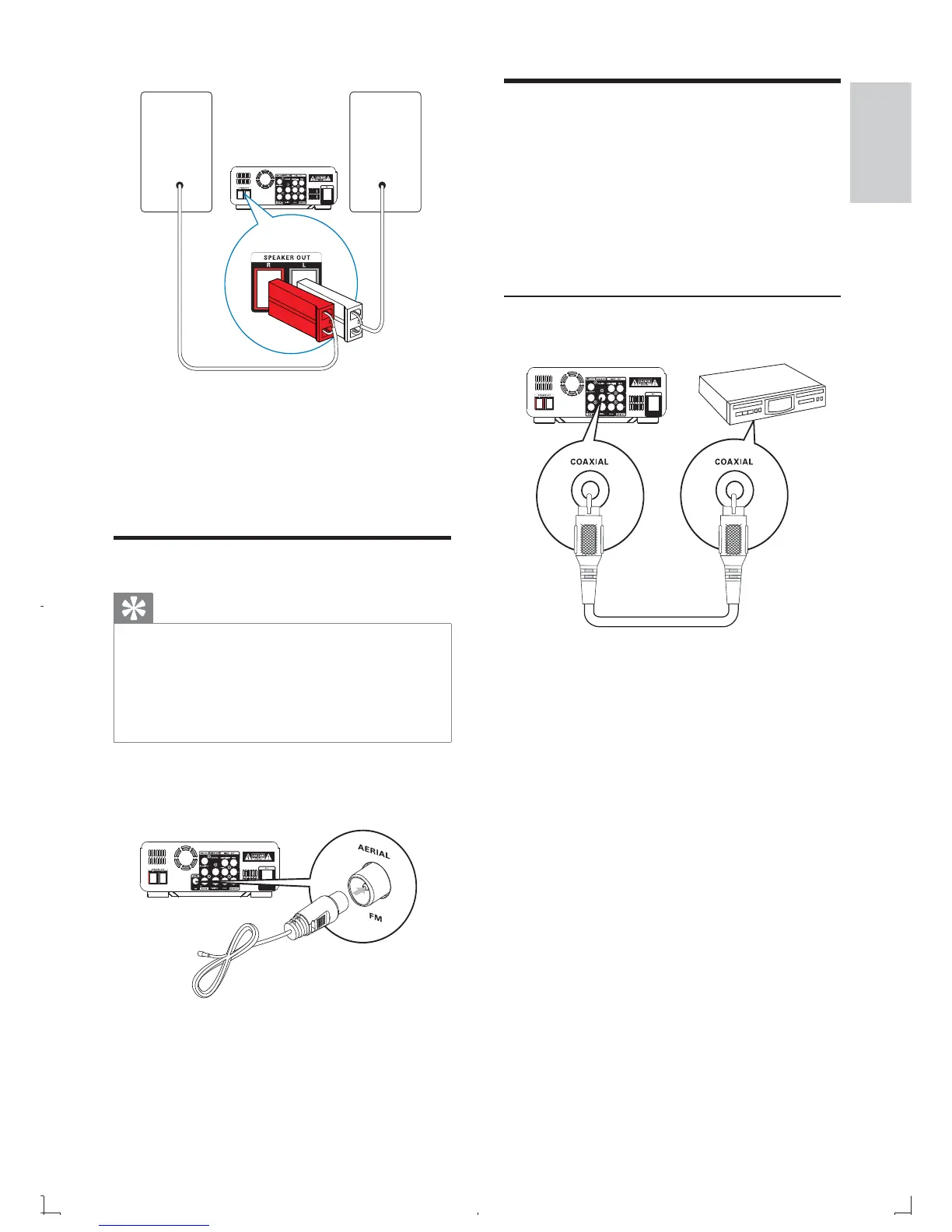
1 Connect a coaxial cable (not supplied) to
the • COAXIAL socket on this
product.
the COAXIAL/DIGITAL input socket •
on the device.
1 Insert the speaker plugs to SPEAKER
OUT ( L and R ) sockets.
The red plug to • R .
The white plug to • L .
Connect FM antenna
Tip
For optimal reception, fully extend and adjust •
the position of the antenna.
For better FM stereo reception, connect an
•
outdoor FM antenna to the FM AERIAL jack.
The unit does not support MW radio
•
reception.
1 Connect the supplied FM wire antenna to
the FM AERIAL socket on the unit.
English
EN



 To Next Page