12 EN
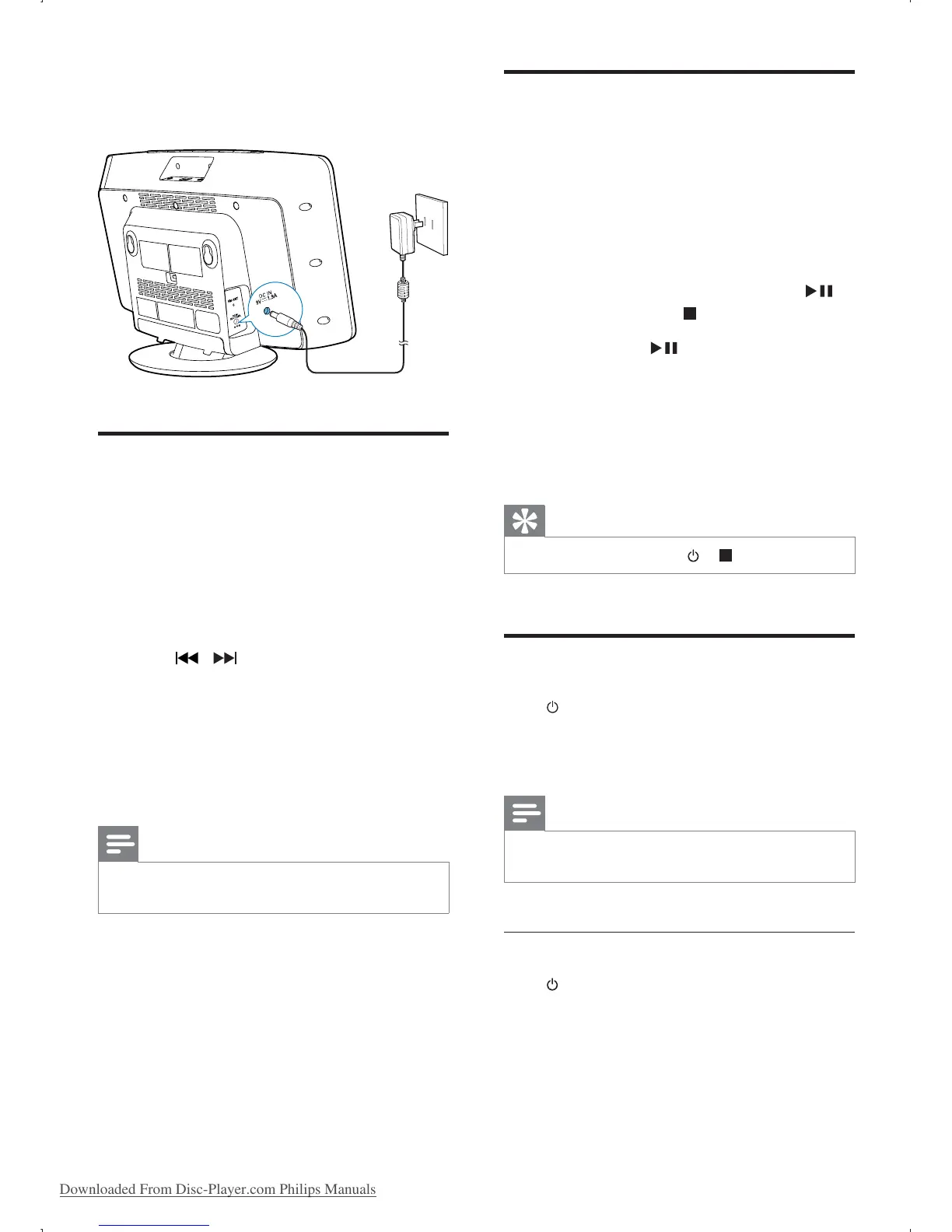
Connect the power adapter to:
the
DC IN
socket on the main unit.
the wall socket.
Set clock
1
In standby mode, press and hold CLOCK
SET on the remote control for two
seconds.
» [SET CLOCK] (set clock) scrolls on
the display, then the 12/24 hour format
blinks.
2 Press / repeatedly to select an hour
format.
3 Press CLOCK SET
» The hour digits blink.
4 Repeat steps 2-3 to set the hour and
minute respectively.
Note
If the system is idle for 90 seconds, it exits clock setting
mode automatically.
Store FM radio stations
automatically
When the unit turns to FM tuner mode, and
no radio stations are stored, the unit begins to
store FM radio stations automatically.
1 Connect the unit to the power supply.
»
[AUTO INSTALL - PRESS PLAY, STOP
CANCEL]
(to auto install, press
;
to cancel, press
) is displayed.
2 Press and hold for 3 seconds to start
full scan.
» The unit automatically stores FM radio
station.
Tip
To exit storing mode, press or .
Turn on
Press .
» The unit switches to the last selected
source.
Note
To select a source, press SOURCE repeatedly or the
source selection buttons on the remote control.
Switch to standby mode
Press again to switch the unit to standby
mode.
» The clock (if set) appears on the
display panel.
Downloaded From Disc-Player.com Philips Manuals



 To Next Page