6 EN
e PROG
• In Disc/USB source, tap and hold to
program tracks.
• In tuner source, tap and hold to
program radio stations.
• In standby mode, tap and hold to set
the clock.
f SUB VOL
• Adjust subwoofer volume.
g Disc compartment
h LED indicator
i
• Eject the disc.
j Display panel
• Show current status.
k VOL +/-
• Adjust volume.
l /
• In Disc/USB/Dock source, tap to skip
to the previous/next track.
• In Disc/USB/Dock source, tap and hold
to search within a track.
• In tuner source, tap to tune to a radio
station.
• Tap to set clock and timer.
m
• Stop play or erase a program.
n
• Start or pause play.
o PULL
• Pull to open the protective panel.
p AUX
• Connect an external audio device.
q
• USB socket.
r FM AERIAL
• Connect FM antenna.
s AC MAIN~
• Power supply socket.
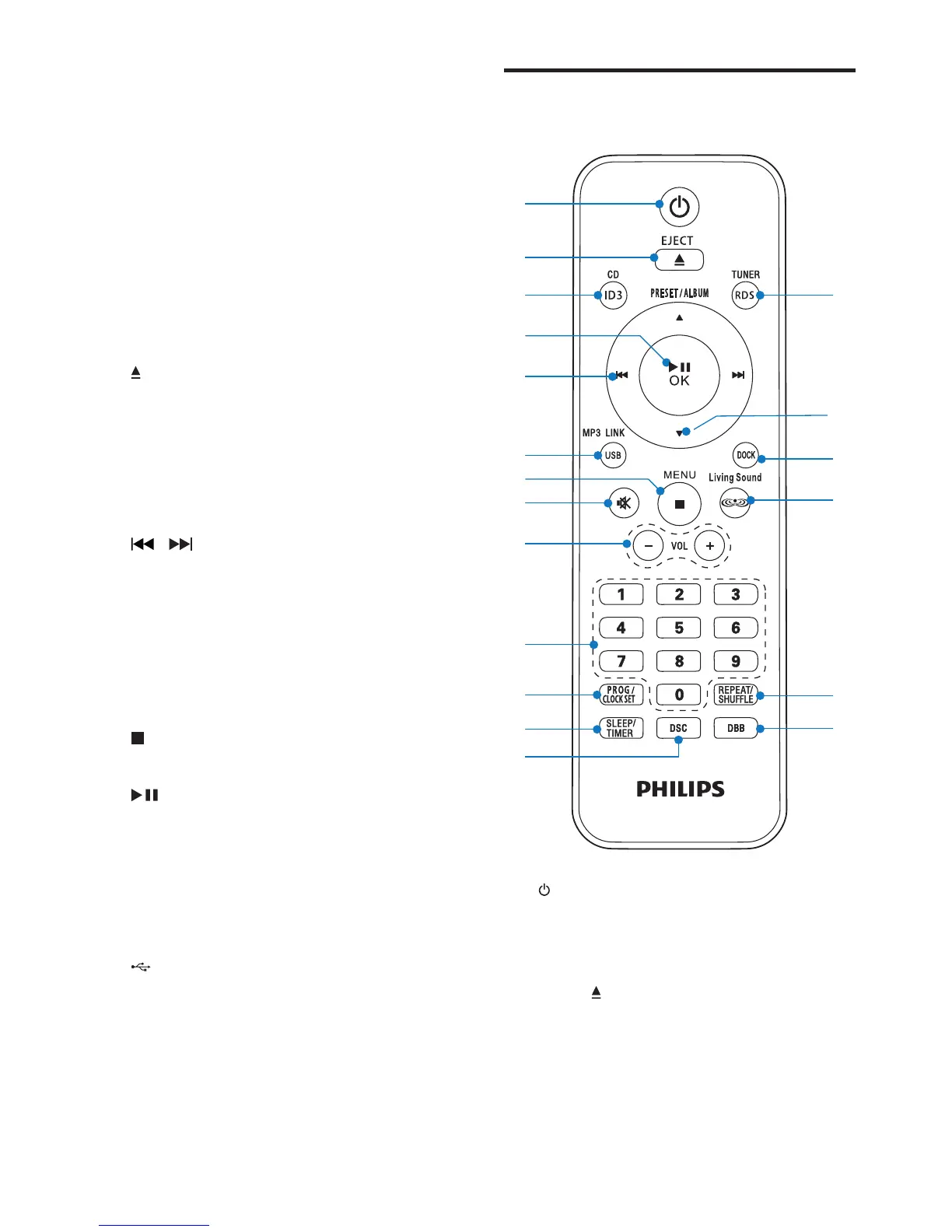
Overview of the remote
control


 To Next Page