6
English
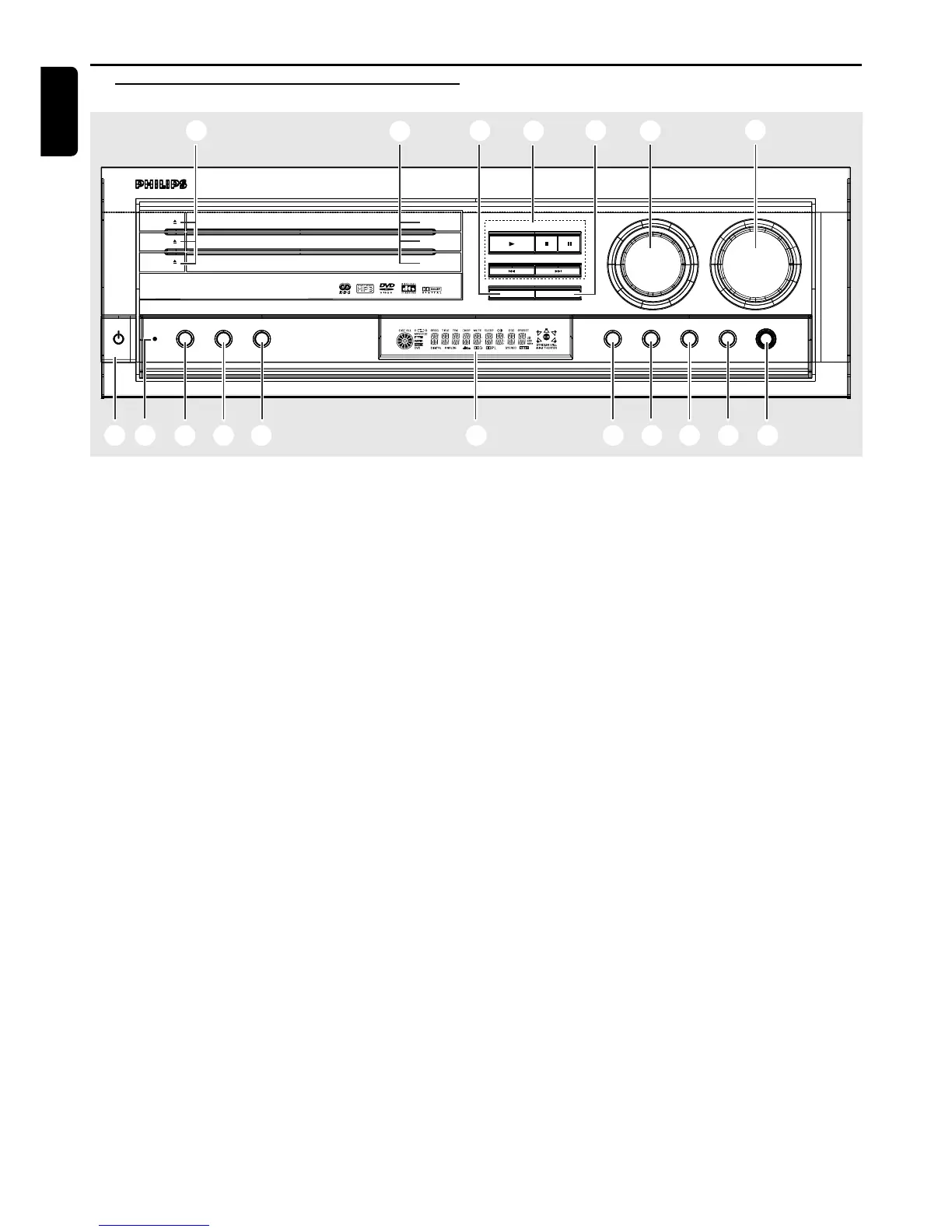
1 POWER / STANDBY ON B
– to switch between power on and standby modes.
2 OPEN•CLOSE 0 (in Disc mode only)
– to open or close the disc tray.
3 Disc Trays
4 DISC SKIP
– in Disc mode, to select another discs.
5 Mode selection
PLAY £
– to play the disc.
STOP•CLEAR Ç
– to stop playing the disc.
PAUSE Å
– to freeze the sound and picture.
SEARCH•PREV S / SEARCH•NEXT T
– in Disc mode, press to skip to the previous/next
chapter/track.
– in Disc mode, hold down to fast reverse/forward the
disc.
– in Tuner mode, to tune to a lower or higher radio
frequency.
– in Philips TV mode, to tune channel up/down.
6 TUNING•PRESET
– to switch between preset and tuning mode.
7 SOURCE
– to select the desired source or external input source
(DVD/CD, TV/AV, TUNER (FM/MW), CDR, AUX, SAT
or VCR).
(on the remote control only)
– to switch on the system.
– in Disc mode, press DISC to select another disc tray.
– in Tuner mode, press TUNER to select FM or MW
band.
Functional Overview
Front panel
STANDBY
ON
POWER RDS REPEAT PROGRAM
SOURCE VOLUME
SURROUND
ON/
OFF
VIRTUAL TONE NIGHT PHONES
OPEN•CLOSE
MX 5000D 3 DVD VIDEO DIGITAL SURROUND SYSTEM
PLAY
DISC SKIP TUNING•PRESET
SEARCH•PREV SEARCH•NEXT
STOP•CLEAR PAUSE
DISC 1
DISC 2
DISC 3
7
8
6
5
4
2
3
$ # @ 0 9%1 & ^* !
OPEN•CLOSE
OPEN•CLOSE
8 VOLUME (+/-)
– to adjust the master volume.
– to adjust Philips television’s volume level.
– in Tone mode, to adjust the treble/bass tone level.
9 PHONES
– to connect headphones.
0 NIGHT (in Dolby Digital mode only)
– to optimise the dynamic of the sound output.
! TONE
– to select Bass/Treble adjustment mode.
@ VIRTUAL
– to select the virtual sound effect : STADIUM, HALL or
THEATER
# SURROUND
– to select multichannel surround (Dolby Digital, DTS
or Dolby ProLogic) or stereo sound effect.
$ Display screen
– to display details for user’s information.
% PROGRAM
– in Disc mode, to programme disc tracks.
– in Tuner mode, to programme preset radio stations.
^ REPEAT
– to repeat chapter, track, title, disc(s).
– to repeat a specific section on a disc.
& RDS
– in Tuner (FM) mode, to select RDS information.
* Standby LED indicator
– to indicate standby mode.
FUNCTIONAL OVERVIEW










 To Next Page