English
18
Product Overview (continued)
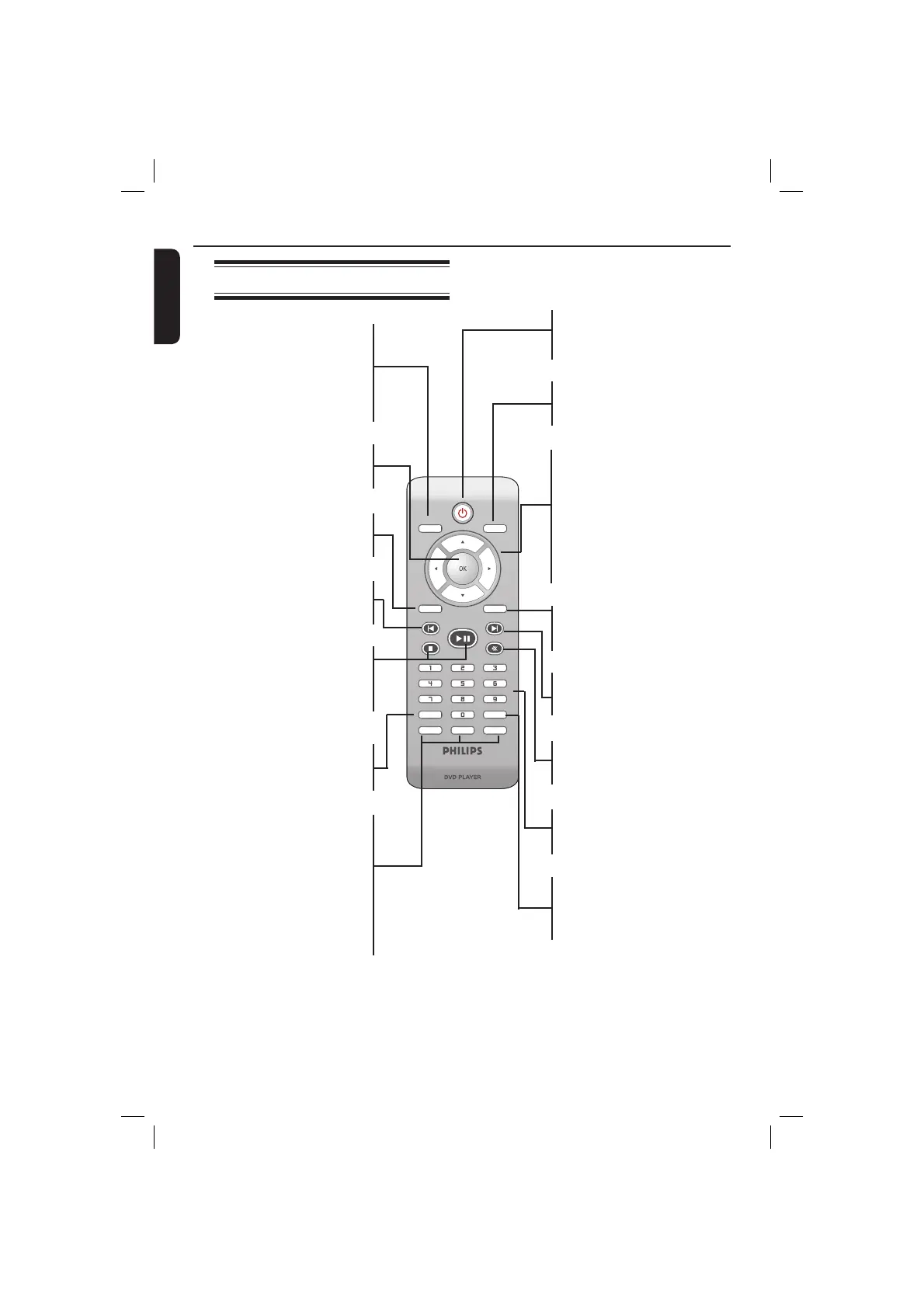
Remote Control
SUBTITLE
ZOOM
AUDIO
REPEAT
REPEAT A-B
STOP
PLAY/PAUSE
MUTE
SETUP
TITLE
RETURN
MENU
DISC
DISPLAY
NEXT
PREV
DISC MENU
– Enters or exits the disc
contents menu
– Switches on or off the
playback control mode (for
VCD 2.0 only)
OK
– Con rms an entry or
selection
RETURN/TITLE
– To go back to previous
menu/ show title menu
PREV í
– Skips to the previous title/
chapter/ track
STOP
– Stops playback
u PLAY/PAUSE
– Starts or pauses playback
SUBTITLE
– Selects a subtitle language of
the playing disc (DVD)
ZOOM
– Enlarge a picture on the TV
screen
REPEAT
– Select various repeat mode
REPEAT A-B
– Repeat playback a speci c
section on a disc
2
– To switch the DVD player
to standby mode or ON
DISPLAY
– Displays information on TV
screen during playback
W X
– Cursor buttons for moving
to the left or right, do a fast
forward/reverse search.
S T
– Cursor buttons for moving
up/down, do a slow
forward/backward
SETUP
– Enters or exits the system
setup menu
NEXT ë
– Skips to the next title/
chapter/track
MUTE
– Disables or enables sound
output
Alphanumeric keypad
– Selects numbered items in
a menu
AUDIO
– Selects an audio language
(DVD/VCD) or an audio
channel
01-53_dvp3960_37_eng2.indd 1801-53_dvp3960_37_eng2.indd 18 2006-12-28 11:24:43 AM2006-12-28 11:24:43 AM



 To Next Page