13
7 Select an audio track, and then press OK.
To select another track, repeat step 7.•
To select all tracks, select • [Select all] in
the menu, and press OK.
To deselect all tracks, select • [Deselect
all] in the menu, and press OK.
8 Select [Start] in the menu, and then press OK
to start to convert.
Once complete, a new folder is created »
automatically in the USB fl ash drive to store
all the new MP3 fi les.
To exit the menu, select • [Exit], and then
press OK.
Note
When you convert, never press any button.•
DTS CDs and copy-protected CDs cannot be converted.•
Writer-protected or password-protected USB fl ash •
drives cannot be used to store MP3 fi les.
7 Adjust settings
Note
If the setup option is grayed out, it means the setting •
cannot be changed at the current state.
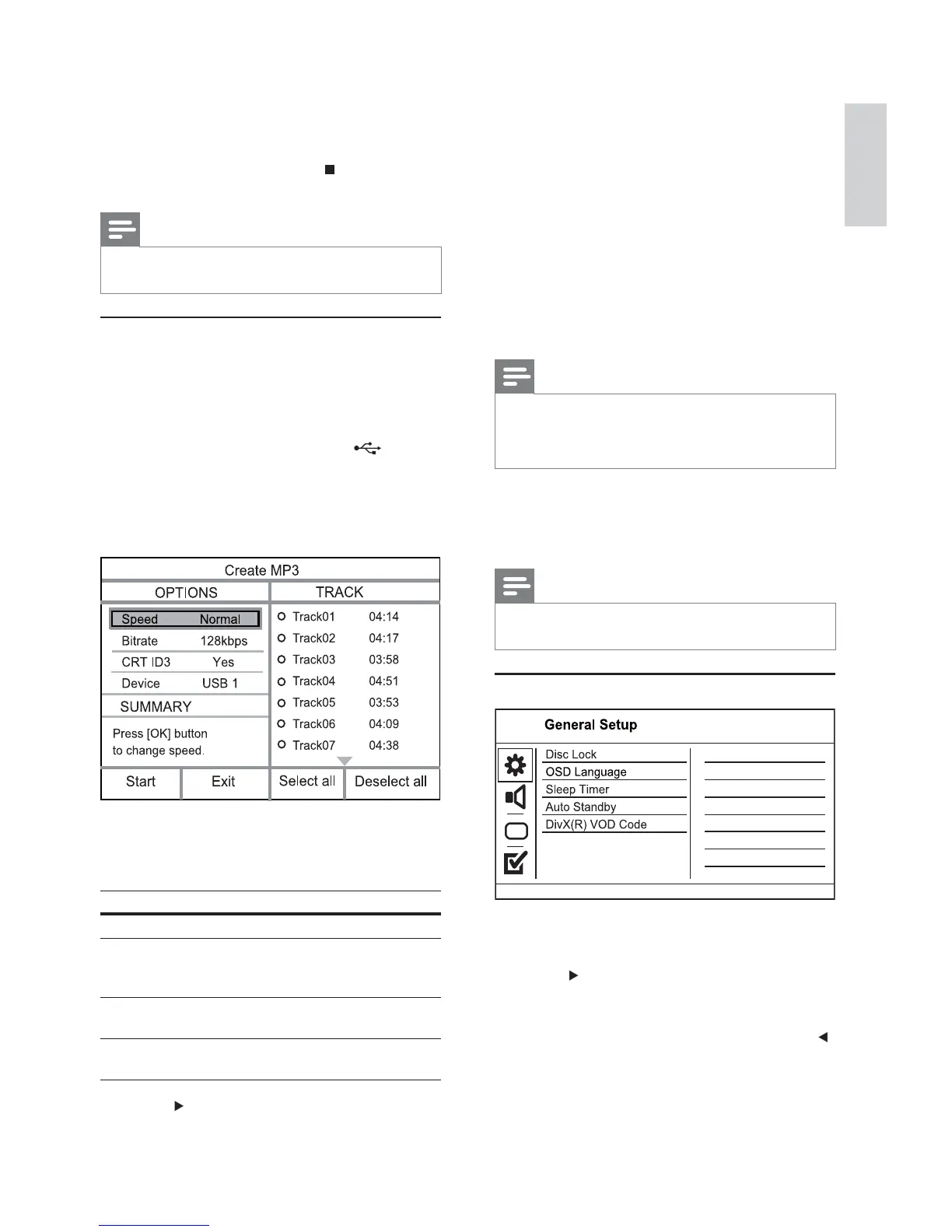
General setup
1 Press SETUP.
» [General Setup] menu is displayed.
2 Press .
3 Select an option, and then press OK.
4 Select a setting, and then press OK.
To return to the previous menu, press •
.
To exit the menu, press • SETUP.
[Disc Lock]
Set the play restriction for a disc which is loaded in
the disc compartment (maximum 20 discs can be
locked).
Once complete, a new folder is created »
automatically in the USB fl ash drive to store
all the new fi les.
5 To stop copy progress, press , then press
OK.
Note
When you copy, never press any button.•
Copy-protected media cannot be copied.•
Create MP3 fi les
With this product, you can convert audio CDs into
MP3 audio fi les. The created MP3 audio fi les are saved
in the USB fl ash drive.
1 Insert an audio CD.
2 Connect a USB fl ash drive to the jack on
this product.
3 During disc play, press AUDIO/CREATE MP3.
The MP3 creation menu is displayed.»
4 Select [Yes] in the menu, and then press OK.
5 Select a conversion option in the [OPTIONS]
panel, and then press OK repeatedly to select
an item.
Option Description
[Speed] Select a copying speed.
[Bitrate] Select a quality level.
Higher bitrate for better sound
quality and bigger fi le size.
[CRT ID3] Copy track information into the
MP3 fi le.
[Device] The created fi les can only be saved
in a USB fl ash drive.
6 Press to access the [TRACK] panel.
English
EN



 To Next Page