15
[TV System]
Change this setting if the video does not appear
correctly. By default, this setting matches the most
common setting for TVs in your country.
• [PAL] - For a PAL-system TV.
• [Multi] - For TV that is compatible with both
PAL and NTSC.
• [NTSC] - For an NTSC-system TV.
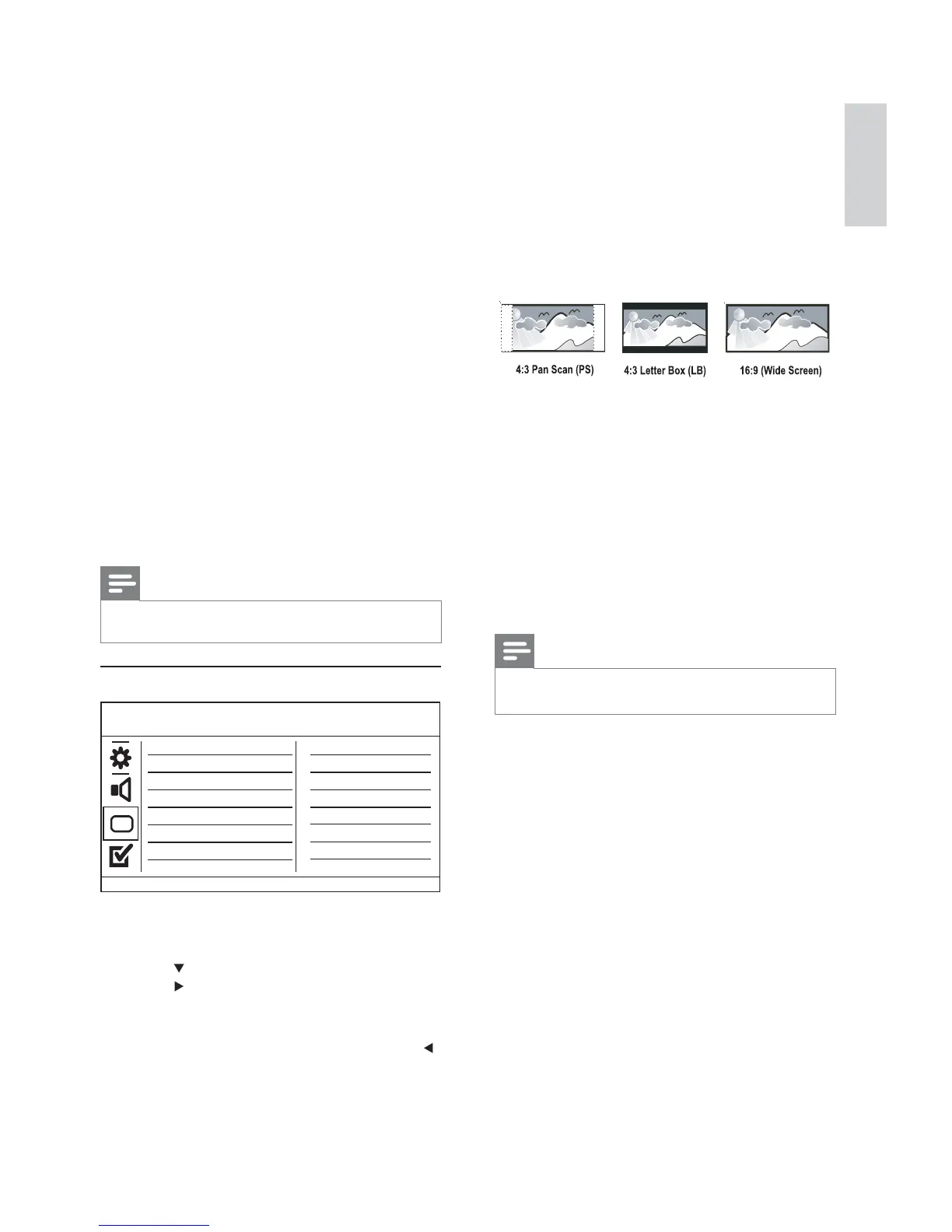
[TV Display]
Select a display format:
• [4:3 Pan Scan] - For a 4:3 screen TV: full-height
display with the trimmed sides.
• [4:3 Letter Box] - For a 4:3 screen TV: wide-
screen display with black bars on the top and
bottom of the screen.
• [16:9] - For a wide-screen TV: display ratio
16:9.
[Progressive]
If a progressive scan TV is connected to this
product, turn on the progressive scan mode.
• [On] - Turn on progressive scan.
• [Off] - Turn off progressive scan mode.
Note
For more detailed description, see “Get started” > •
“Turn on progressive scan”.
[Picture Setting]
Select a predefi ned set of picture color settings or
customize the personal setting.
• [Standard] - Original color setting.
• [Bright] - Vibrant color setting.
• [Soft] - Warm color setting.
• [Personal] - Customize the color setting. Set
the level of brightness, contrast, tint and color
saturation, then press OK.
[My Wallpaper]
Select a picture as the wallpaper.
• [Default picture] - The default wallpaper
preset as the Philips logo.
• [Saved picture] - A captured video image or
JPEG photo.
• [Current picture] - Capture a video image or
JPEG photo and save it on the product.
[Sound Mode]
Select a preset sound effect to enhance the audio
output.
• [3D] - Select a virtual surround sound effect
that is produced from the left and right audio
channels.
• [Movie Mode] - Select a sound effect for
movies.
• [Music Mode] - Select a sound effect for
music.
[CD Upsampling]
For better sound quality in stereo mode, convert
the music CD to a higher sampling rate.
• [Off] - Turn off CD-upsampling.
• [88.2kHz] - Convert to twice the original
sampling rate.
• [176.4kHz] - Convert to four times the original
sampling rate.
[Night Mode]
Make loud sound level softer and soft sound level
louder so that you can watch the DVD movies at a
low volume, without disturbing others.
• [On] - Enjoy quiet viewing at night.
• [Off] - Enjoy surround sound with a full
dynamic range.
Note
Applicable only to Dolby Digital encoded DVDs.•
Video setup
1 Press SETUP.
» [General Setup] menu is displayed.
2 Press to select [Video Setup], and then
press
.
3 Select an option, and then press OK.
4 Select a setting, and then press OK.
To return to the previous menu, press •
.
To exit the menu, press • SETUP.
Video Setup
Picture Setting
Component Video
Wall paper Setting
TV Display
TV System
Progressive
HD JPEG
HDMI Setup
English
EN



 To Next Page