15
First steps
4.3 Initial installation process
When using for the first time, you must set the display language as well
as the date and time of the device.
4.3.1 Language selection
Follow the description in the chapter "Select language" (see also
chapter 9.2.1 Select language, page 32).
Note
• Your language might not be available. Select an alternative one.
4.3.2 Set date & time
Follow the description in the chapter "Set date & time" (see also
chapter 9.3.1 Set date & time, page 33).
4.4 Enabling/disabling the keypad lock
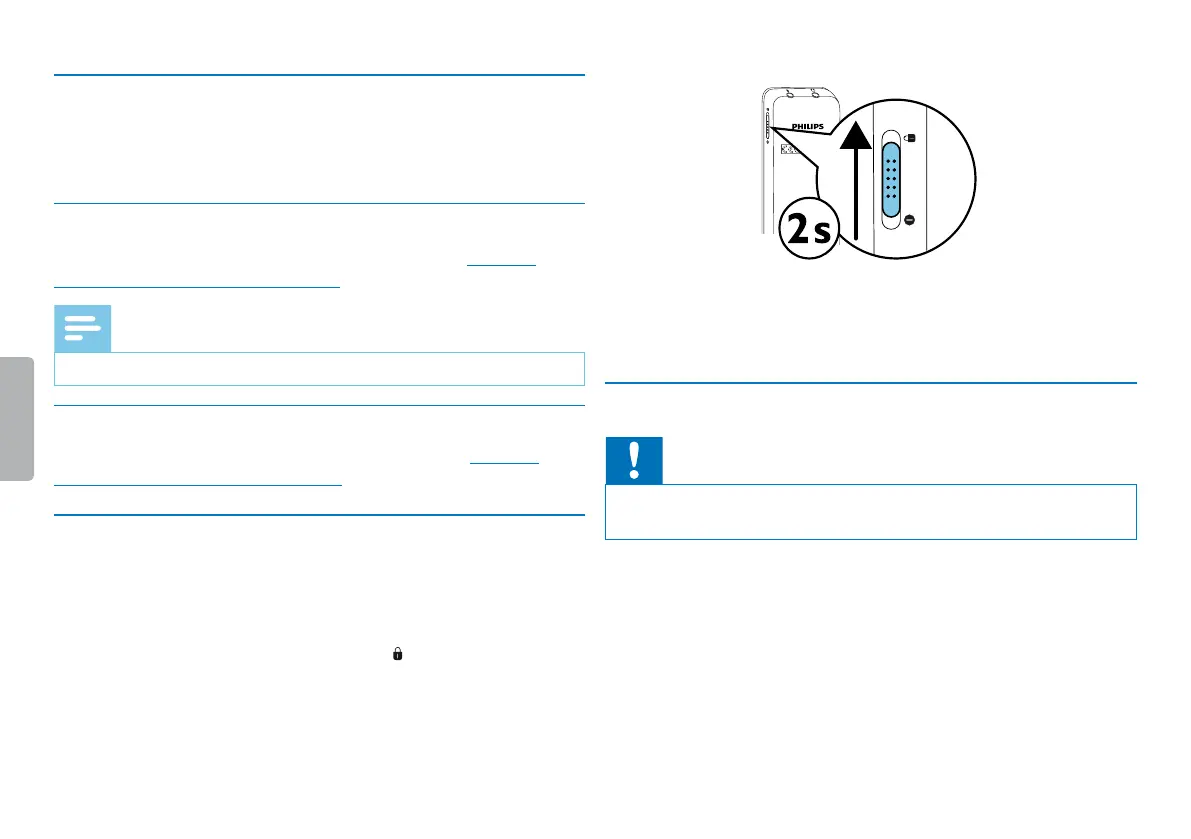
The keypad lock deactivates all keys on the device. The timer function
of the device continues to function.
1
Slide the on/o switch switch up into the position to lock the
keypad of the device.
X The display briefly shows ‘Hold’.
2
Slide the Power on/o switch down to the O position to
disengage the keypad lock.
4.5 Inserting a microSD card
Caution
• Do not remove the memory card while recording is in progress. If
you do this, data may be damaged or lost.
1
Flip the memory card slot cover to the side.
2
Insert the microSD card into the card slot with the contacts facing
upwards.













 To Next Page