EasyManua.ls Logo

Philips FR 910 - Page 6

Philips FR 910
25 pages
Print Icon
To Next Page IconTo Next Page
To Previous Page IconTo Previous Page
Loading...
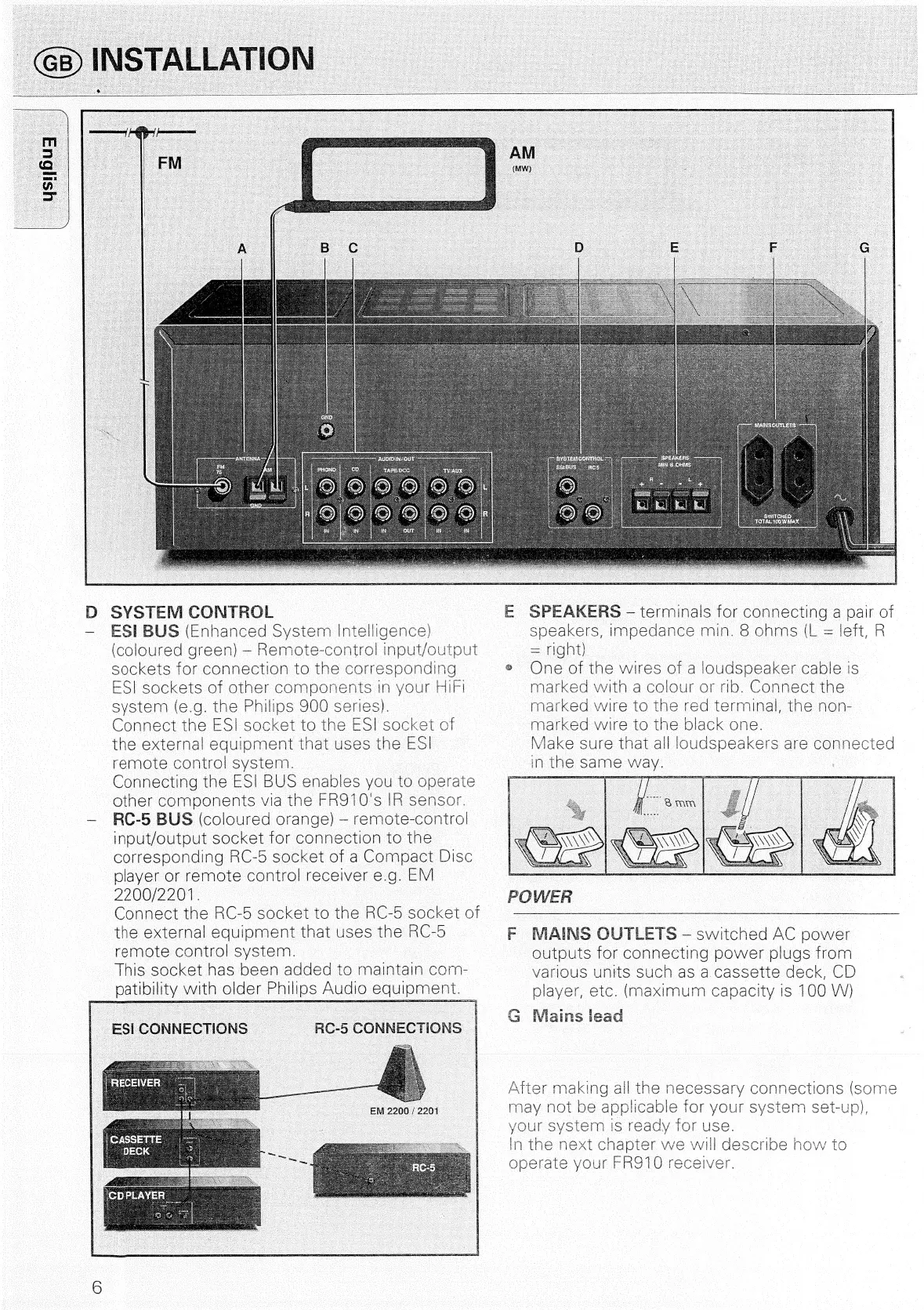
D
SYSTEM
CONTROL
ESI
BUS
(Enhanced
System
Intelligence)
(coloured
green)
Remote-control
input/output
sockets
for
connection
to
the
corresponding
ESI
sockets
of
other
components
in
your
HIF!
system
(e.g.
the
Philips
900
series).
Connect
the
ES!
socket
to
the
ESI
socket
of
the
external
equipment
that
uses
the
ES!
remote
control
system.
Connecting
the
ESI
BUS
enables
you
to
operate
other
components
via
the
FR910's
IR
sensor.
RC-5
BUS
(coloured
orange)
remote-control
inout/output
socket
for
connection
to
the
corresponding
RC-5
socket
of
a
Compact
Disc
player
or
remote
control
receiver
e.g.
EM
2200/2201
Connect
the
RC-5
socket
to
the
RC-5
Socket
of
the
external
equioment
that
uses
the
RC-
remote
control
system.
This
socket
has
been
added
to
maintain
corn-
patibility
with
older
Philips
Audio
equipment.
SPEAKERS
-—
terminals
for
connecting
a
pair
of
speakers,
impedance
min.
8
ohms
(L
=
left,
R
right)
®
we
of
the
wires
of
a
loudspeaker
cable
is
marked
with
a
colour
or
rib.
Connect
the
marked
wire
to
the
red
terminal,
the
non-
ees
wire
to
the
black
one.
Make
that
all
loudspeakers
are
connected
in
the
same
way.
POWER
Ci
aacmesnincaninivaimssvononnint
heme
eALioa
ran
Se
enreanenta
at
aatateeteamte
eden
cael
F
MAINS
OUTLETS
—-
switched
AC
power
outputs
for
connecting
power
plugs
trom
various
units
such
as
a
cassette
deck,
CD
player,
etc.
(maximum
capacity
is
100
VV)
G
(WVlains
lead
may
not
be
appli
your
system
Is
ready
fo
In
the
next
chapter
we
wi
operate
your
FR910
receiver
After
making
ail
the
necessary
connections
(some
©
)
1)
CD
any
ee
i
~<
©
ws
~—
Cp
cnr
(D
ms
Cp)
D
ae
ee
7)

Related product manuals