10
English
CONNECTIONS
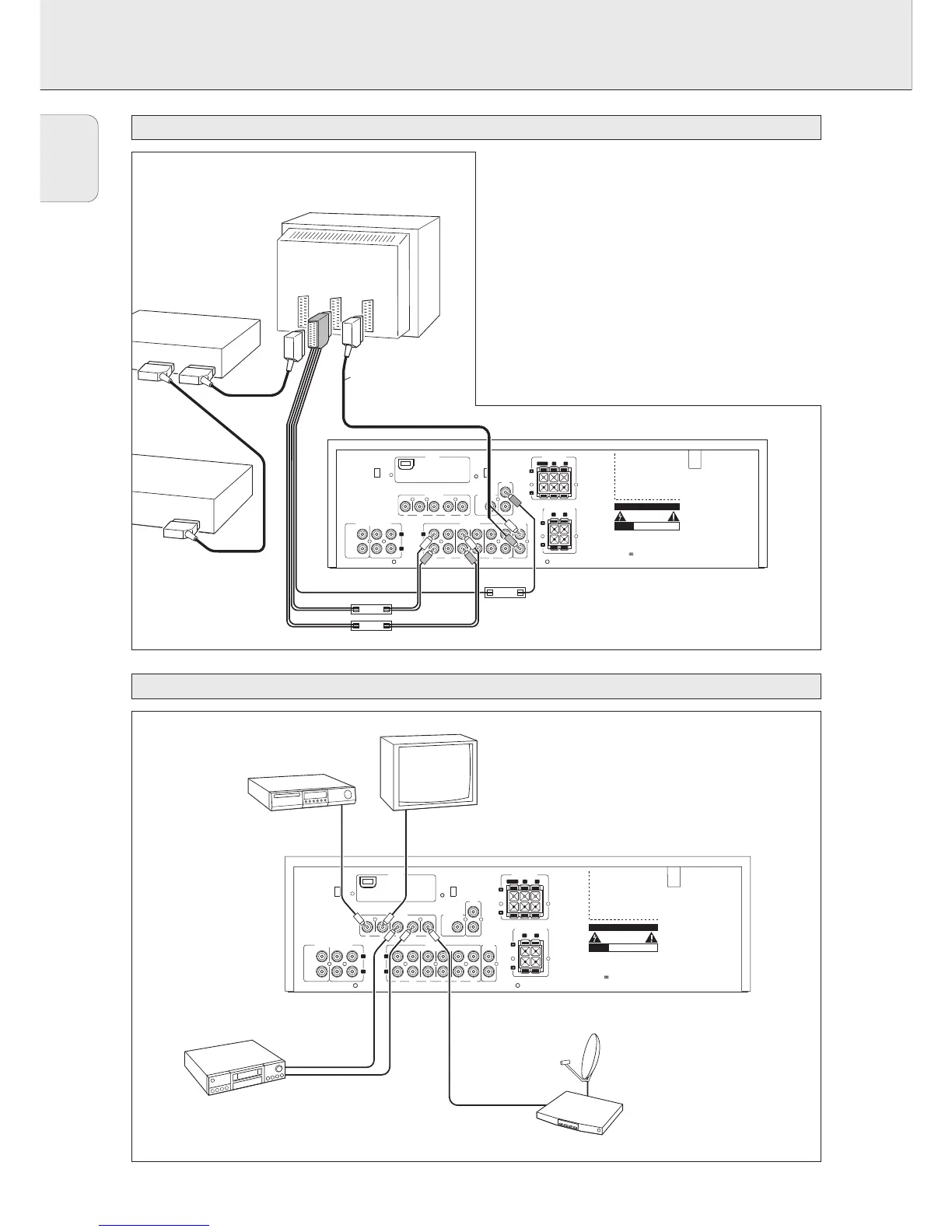
System control bus, CINEMA LINK
Video connections (FR 760 only)
VIDEO IN/OUT
DVD MON TV/SAT
IN OUT
OUT
REC
IN
IN
PLAY
TV CD CDR/TAPE
AUDIO IN/OUT
L
R
IN
PLAY
OUT
REC
IN IN
IN
PLAY
OUT
REC
PRE-OUT
CENTER
6 CHANNEL / DVD INPUT
FRONTSURR.
CENTER
SUB-
WOOFER
VCR
L
R
VCR
IN
CINEMA
LINK
SUBWOOFER
PRE-OUT
ANTENNA
AM LOOP
FRONT SPEAKERS
L
R
EACH SPEAKER ≥ 6 Ω
CENTER
Designed and developed by Philips in the
European Community
CAUTION
RISK OF ELECTRIC SHOCK
DO NOT OPEN
AVIS
RISQUE DE CHOC
ELECTRIQUE
Manufactured under licence from Dolby
Laboratories Licencing Corporation.
"DOLBY", "PRO-LOGIC" and the Double-D
Symbol are Trademarks of Dolby
Laboratories Licencing Corporation.
R
L
EACH SPEAKER ≥ 6 Ω
SURROUND SPEAKERS
DVD PLAYER
MONITOR / TV
VIDEO IN
VIDEO OUT
VCR
SAT RECEIVER
VIDEO IN/OUT
DVD MON TV/SAT
IN OUT
OUT
REC
IN
IN
PLAY
TV CD CDR/TAPE
AUDIO IN/OUT
L
R
IN
PLAY
OUT
REC
IN IN
IN
PLAY
OUT
REC
PRE-OUT
CENTER
6 CHANNEL / DVD INPUT
FRONTSURR.
CENTER
SUB-
WOOFER
VCR
L
R
VCR
IN
CINEMA
LINK
SUBWOOFER
PRE-OUT
ANTENNA
AM LOOP
FRONT SPEAKERS
L
R
EACH SPEAKER ≥ 6 Ω
CENTER
Designed and developed by Philips in the
European Community
CAUTION
RISK OF ELECTRIC SHOCK
DO NOT OPEN
AVIS
RISQUE DE CHOC
ELECTRIQUE
Manufactured under licence from Dolby
Laboratories Licencing Corporation.
"DOLBY", "PRO-LOGIC" and the Double-D
Symbol are Trademarks of Dolby
Laboratories Licencing Corporation.
R
L
EACH SPEAKER ≥ 6 Ω
SURROUND SPEAKERS
TV to AMP
AUX to AMP
TV
AUX
EXT 1 EXT 2 EXT 3
DVD PLAYER
VCR
TV
optional
(TV = CENTER)
CINEMA LINK
A
If the receiver and your Philips TV (or even better in
addition a Philips VCR or DVD player) with Cinemalink are
connected with the CINEMA LINK system bus control, some
extra system benefits are offered:
– Upon starting a source, the system will automatically
switch to that input.
– You may control the system via the TV screen. Depending
on the language of the TV, this can be done in your
preferred language.
– The TV can function as the center speaker of your system,
making a separate center speaker unnecessary. (The cable
A has to be purchased separately.)
– By pressing the standby button on the remote control you
can switch the complete system to standby.


 To Next Page