12
English
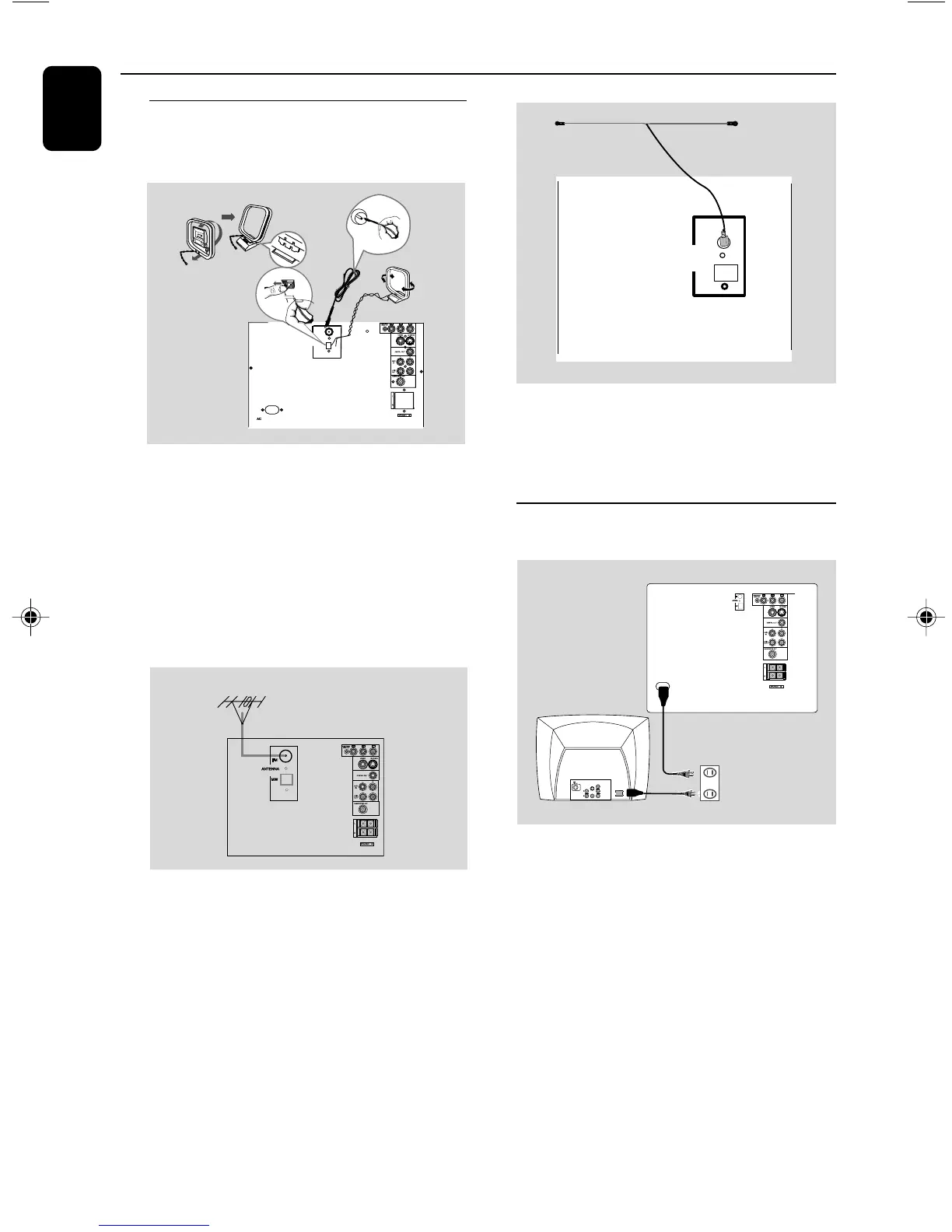
Step 4: Connecting FM/MW
antennas
● Connect the supplied MW loop antenna to the
MW jack. Place the MW loop antenna on a
shelf or attach it to a stand or wall.
● Connect the supplied FM antenna to the FM
jack. Extend the FM antenna and fix its end to
the wall.
For better FM stereo reception, connect an
outdoor FM antenna to the FM ANTENNA
terminal.
Notes:
– Adjust the position of the antennas for optimal
reception.
–Position the antennas as far as possible from
your TV set, VCR or other radiation sources to
prevent unwanted interference.
● Connect the T-TYPE antenna (not for all
countries) to the FM jack at the back panel of
the unit, and then fix it to the wall as shown.
Note:
–For better reception, please make sure that the
two pronges of the T-TYPE antenna are in
alignment with each other.
Step 5: Connecting the power
cord
After everything is connected properly,
plug in the AC power cord to the power
outlet.
Never make or change any connection with the
power switched on.
On the DVD Mini Hi-Fi System
“AUTO INSTALL PRESS PLAY” may appear
on the display panel. Press 2; on the front panel
to search and store all available radio stations or
press 9 to exit.
T - TYPE
ant enn a
FM
MW
ANTENNA
~ AC MAINS
AUDIO
OUT
Pr/Cr
Pb/Cb
Y
S-VIDEO
IN
VIDEO IN
COMPONENT
VIDEO IN
8
AC 110-240V~50-60HZ
Connections
FM
antenna
MW
antenna
fix the claw
into the slot
8
110-240 V~50 -60 HZ
12 mm
B
C
A
FM
MW
ANTENNA
8
FWD185 final IFU ( v1.1) 1/1/32, 3:24 AM12


 To Next Page