20
English
Disc Operations
To cancel Shuffle mode:
● Press MODE repeatedly to select “REPEAT
OFF” mode.
Notes:
– In Tuner or Tape mode, this button does not
function.
– When the disc tray is opened, Shuffle/Repeat
function will be cancelled automatically.
– For SVCD and VCD discs, the Repeat function is
not available when the PBC function is set to “ON”.
Repeating a section within a chapter/
track
You can play a specific section in a chapter/track
repeatedly.
1 Press REPEAT A-B at your chosen start point.
2 Press REPEAT A-B again at your chosen end
point.
➜ The passage will now repeat continuously.
3 To resume normal play, press REPEAT A-B
again.
Note:
– The REPEAT A-B function can only be set within
the same chapter or track.
Programming favorite tracks
You can play the contents of the disc in the
order you want.
For DVD/VCD/SVCD/CD
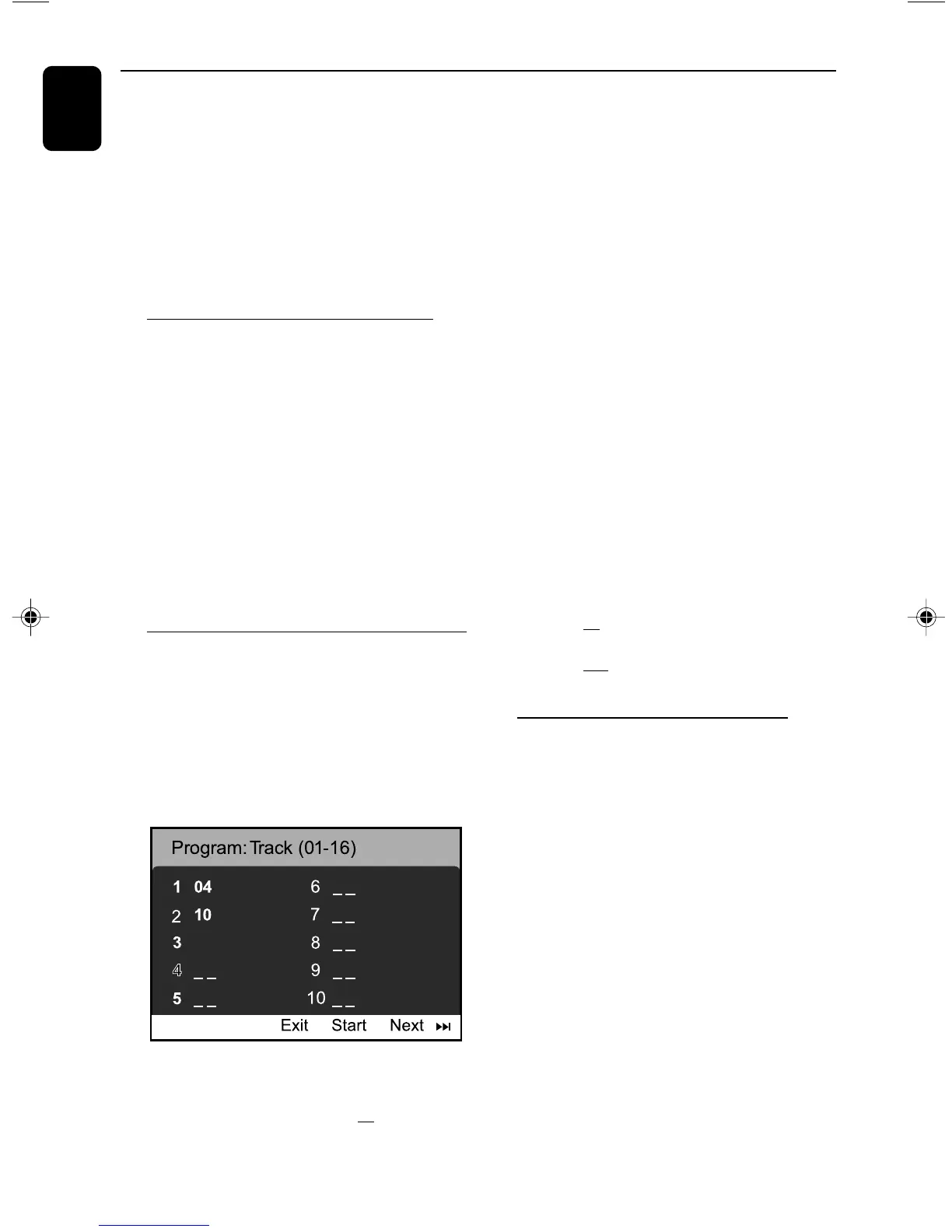
1 Press PROGRAM on the system or PROG on
the remote control.
➜The programming menu appears.
12
2 Use the numeric keys (0-9) to input the track
(title) /chapter number in the order you want.
(must enter two-digital, such as 04)
➜ If there are more than ten programmed
tracks, select {NEXT} on the screen and press
OK (or press ¡I on the remote control) to
access the next programming page.
3 Once completed, select {Start} on the screen
and press OK to play the program.
4 To stop playback, press 7 once.
5 To exit the programming mode, select {Exit} in
the menu and press OK
– Or press PROG on the remote control to
exit the programming mode.
For MP3/JPEG
1 Press 5 / 4 to select a track/picture on the
disc menu. then press PROGRAM to add the
track/picture to playlist.
➜”Add To Playlist” will show on the disc menu.
2 Press MENU repeatedly to select playlist menu.
3 Press 5 / 4 to select a track/picture and press
OK to start playback.
➜In programming playlist, you can select a track/
picture and press PROGRAM to move it
4 Press STOP to stop program playback .
5 Press MENU to return to File list.
Notes:
- At most 20 tracks can be stored for DVD/
VCD/SVCD/CD.
- At most 100 tracks can be stored for MP3/
JPEG.
Playing in slow motion mode
For DVD
1 Press 5 / 4 repeatedly to select the required
slow motion speed:
Press 4 : I 2 1/2 pI 2 1/4 pI 2 1/8 pI 2 1/16
p 2 (PLAY)......
Press 5 : 1 I 1/2 p1 I 1/4 p1 I 1/8 p1 I 1/16
p 2 (PLAY)......
I 2 = slow forward
1 I = slow reverse
For VCD (can slow reverse function is
available)
2 Press 4 to select the required slow motion
speed:
I 2 1/2 pI 2 1/4 p I 2 1/8 pI 2 1/16 p
2 (PLAY)......
3 Press 38 to cancel the slow function.
Note:
– This function is not available for CD, MP3 or Divx
discs.
FWD185 final IFU ( v1.1) 1/1/32, 3:24 AM20


 To Next Page