English
26
Clock/Timer
Clock setting
The clock can be set in either 12-hour or
24-hour mode ("AM 12:00" or "00:00" for
example).
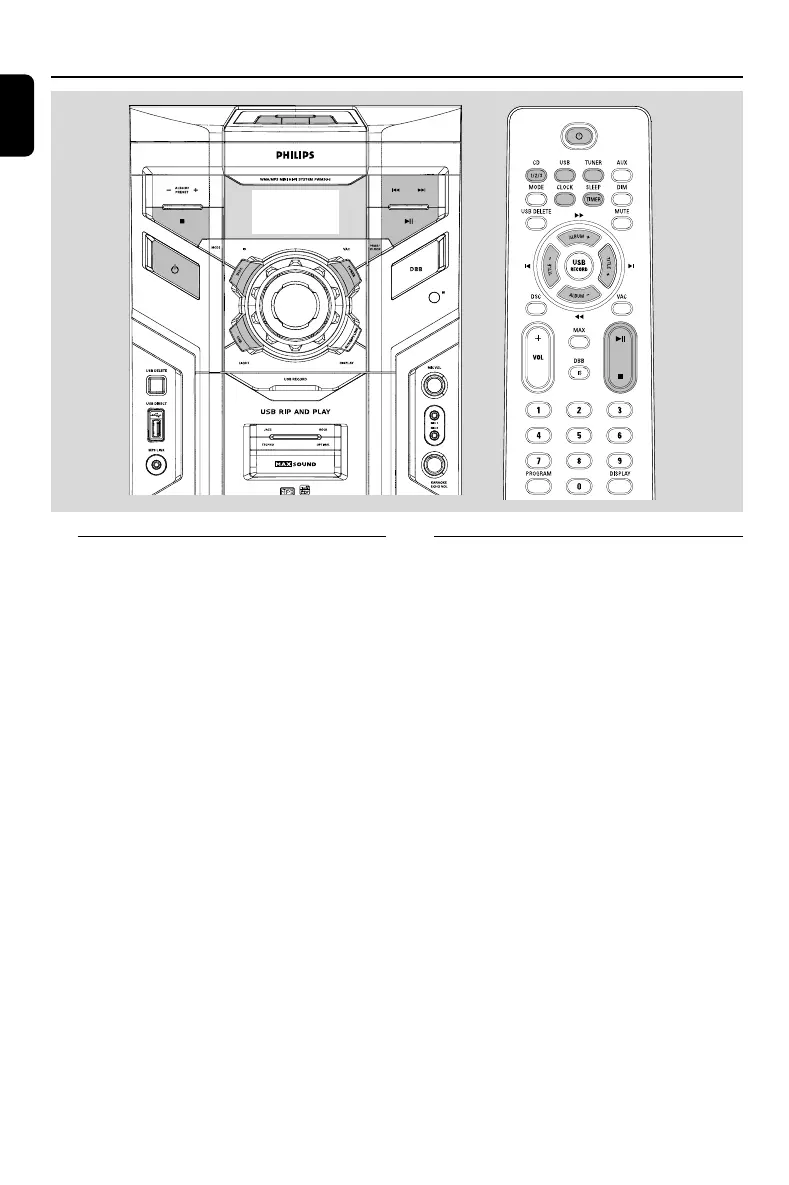
1 In standby or view clock mode, press PROG/
CLOCK (or CLOCK on the remote control).
2 Press ALBUM/PRESET -/+ (or ALBUM -/+
(à / á) on the remote control) to select
clock mode.
3 Press PROG/ CLOCK (or CLOCK on the
remote control)
to activate to adjust clock time.
4 Press ALBUM/PRESET +/- (or ALBUM +/-
(à / á) on the remote control) repeatedly to
set the hour.
5 Press S / T (or TITLE +/- (í / ë) on
the remote control ) repeatedly to set the minute.
6 Press PROG/ CLOCK (or CLOCK on the
remote control) again to store the setting.
➜ The clock starts working.
To exit without storing the setting
● Press Ç.
Notes:
– The clock setting will be cancelled when the power
cord is disconnected or if a power failure occurs.
– During clock setting, if no button is pressed
within 30 seconds, the system will exit clock setting
mode automatically.
Timer setting
The system can switch on to DISC, TUNER or
USB mode automatically at a preset time, serving
as an alarm to wake you up.
IMPORTANT!
– Before setting the timer, ensure that the
clock is set correctly.
1 In standby or view clock mode, press and hold
SLEEP/TIMER on the remote control for
more than two seconds to select timer mode.
➜ The last timer setting star ts flashing.
➜ The selected source will be lighted.
2 Press DISC (or DISC 1/2/3, CD 1/2/3),
TUNER or USB to select the desired source.
● Before setting timer, make sure the music source
has been prepared.
CD – Load the disc(s).
TUNER – tune to the desired radio station.
3 Press SLEEP/TIMER on the remote control
to activate to adjust time.
4 Press ALBUM/PRESET +/- (or ALBUM +/-
(à / á) on the remote control) repeatedly to
set the hour for the timer to start.
FWM996_85_Eng 9/18/08, 16:1126



 To Next Page