11EN
4 Play
Play from a Bluetooth-
enabled device
Note
• The effective operation range between the unit and
your Bluetooth enabled device is approximately 10
meters (30 feet).
• Any obstacle between the unit and the Bluetooth
enabled device can reduce the operational range.
• Compatibility with all Bluetooth devices is not guaranteed.
• The unit can memorize up to 4 previously connected
Bluetooth devices.
To enjoy music through the unit wirelessly, you
need to pair your Bluetooth enabled device
with the unit.
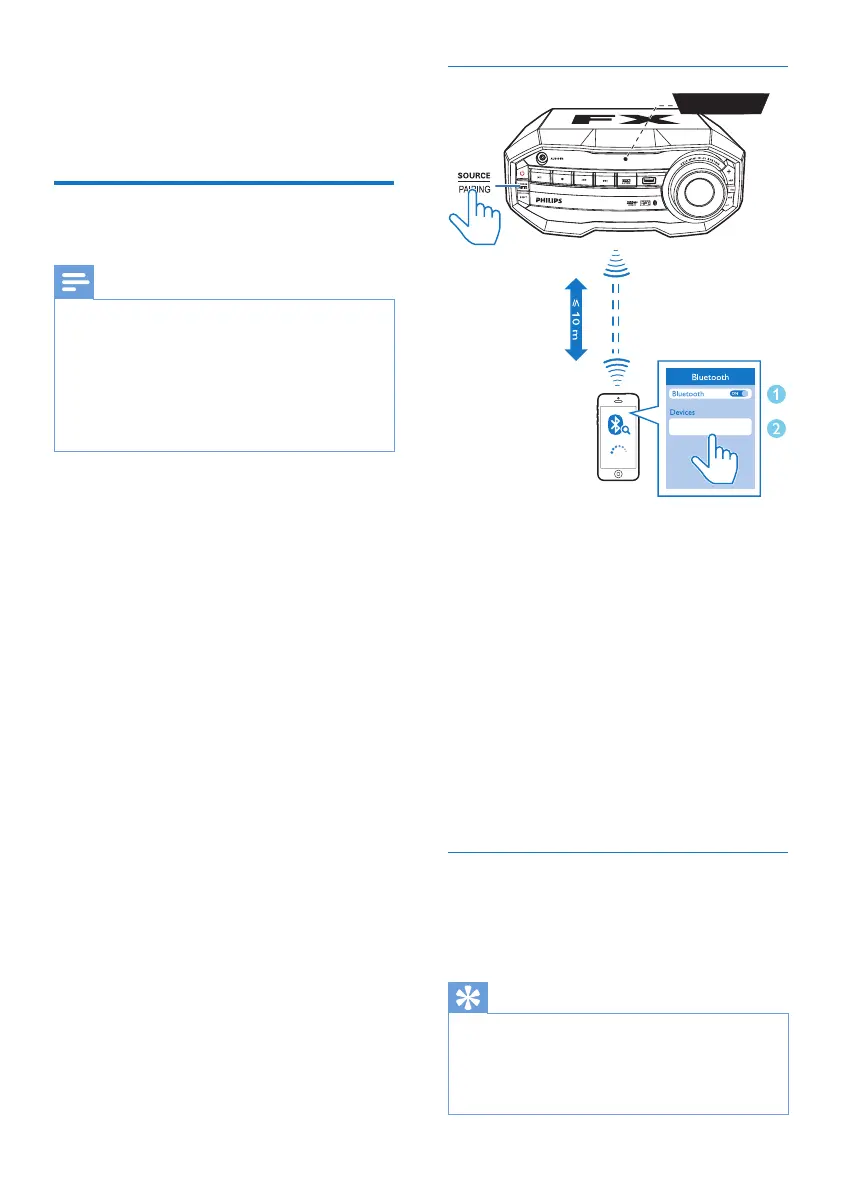
• Before pairing and connection, you need
to:
a press SOURCErepeatedly to select
the Bluetooth source.
» [BT] (Bluetooth) ashes on the
screen.
b enable the Bluetooth feature on your
external device.
Pair and connect
1 On the Bluetooth enabled device, search
for Bluetooth devices that can be paired
(see the user manual of the device).
2 Select 'Philips FX10' on your Bluetooth
enabled device and if necessary input
'0000' as the pairing password.
» After successful pairing and connection,
'BT CONNECTED' (BT connected)
scrolls on the screen once.
» If you fail to nd "Philips FX10'' for
pairing, press and hold PAIRING for
three seconds to enter pairing mode.
The Bluetooth indicator will ash blue
quickly.
Stream music through Bluetooth
• Play audio on the Bluetooth device
connected to the unit.
» Audio streams from your Bluetooth
enabled device to the unit.
Tip
• If the Bluetooth enabled device also supports AVRCP
(Audio Video Remote Control Prole), you can use
some basic operation buttons of the unit (such as the
play/pause, stop and previous/next buttons) to control
music play.
Philips FX10
BT


 To Next Page