12 EN
To disconnect the Bluetooth-enabled device:
• Press and hold PAIRING for three seconds.
• Deactivate Bluetooth on your device; or
• Move the device beyond the
communication range.
To clear Bluetooth pairing history:
• Press and hold on the remote control
for 8 to 10 seconds.
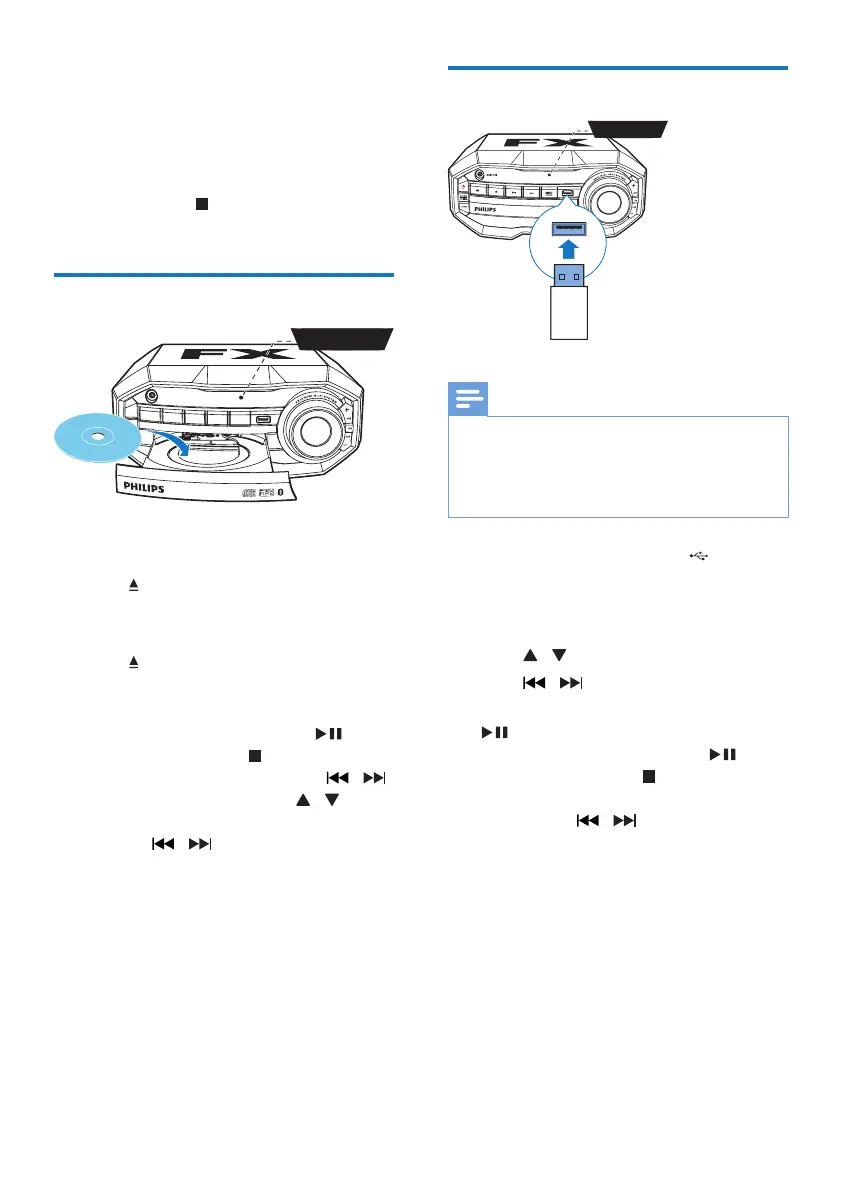
Play a disc
1 Press SOURCE repeatedly to select the
disc source.
2 Press to open the disc compartment.
3 Load a disc onto the disc tray, with the
printed side facing up.
4 Press again to close the disc
compartment.
» Play starts automatically.
• To pause/resume play, press .
• To stop play, press .
• To select another track, press / .
• To select an album, press / .
• To search within a track, press and
hold / , then release to resume
normal play.
DISC
Play from USB
Note
• Make sure that the USB device contains playable audio
contents in supported formats. The NTFS le format is
not supported.
• A USB hub is not supported.
• Some card readers may not be supported.
1 Plug the USB device into the socket on
the main unit.
2 Press SOURCErepeatedly to select the
USB source.
3 Press / to select a folder.
4 Press / to select an audio le.
5 If play does not start automatically, press
.
• To pause/resume play, press .
• To stop play, press .
• To search within an audio le, press
and hold / , then release to
resume normal play.
USB


 To Next Page