7EN
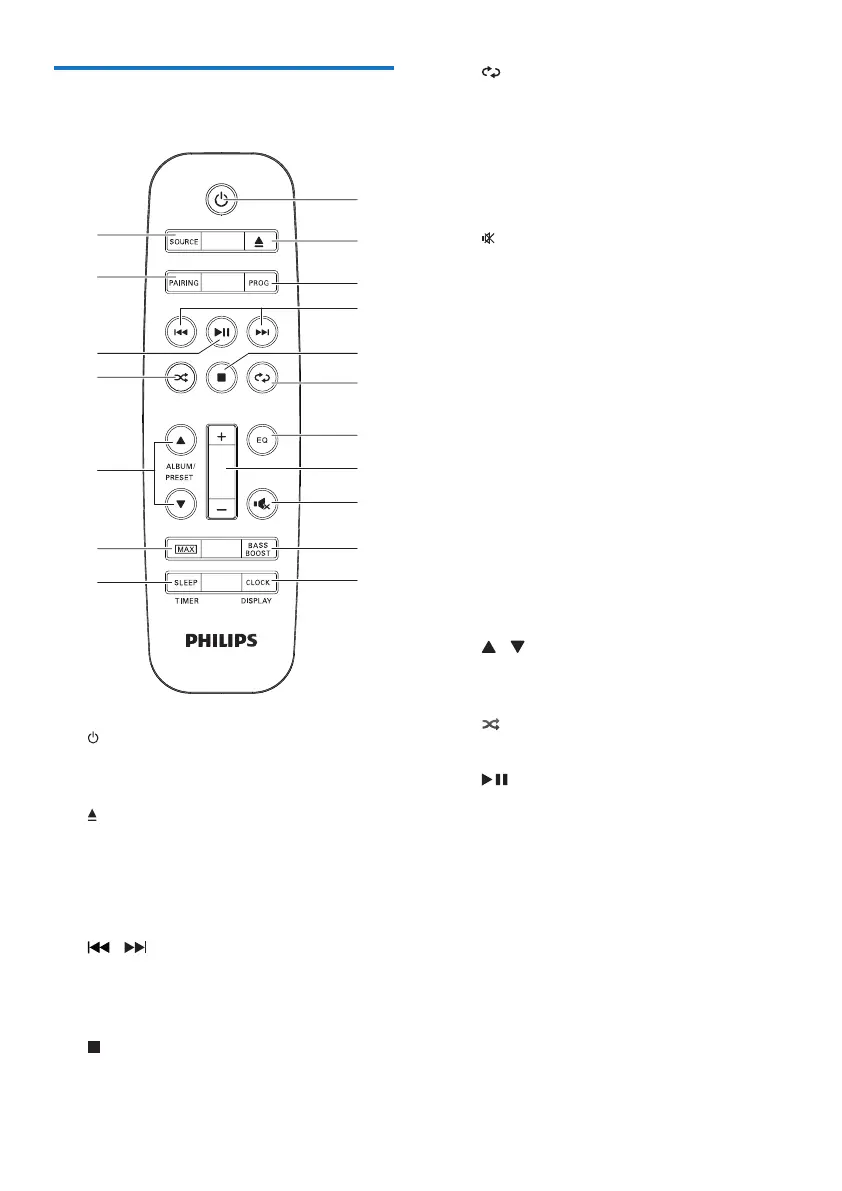
Overview of the remote
control
a
• Turn on the unit.
• Switch to standby mode.
b
• Open or close the disc compartment.
c PROG
• Program tracks.
• Program radio stations.
d /
• Skip to the previous/next track.
• Search within a track/disc/USB.
• Tune to a radio station.
e
• Stop play or erase a program.
a
r
q
p
o
n
m
l
b
f
e
g
i
j
k
c
d
h
f
• Select repeat play.
g EQ
• Select a preset sound equalizer setting.
h +/-
• Adjust speaker volume.
i
• Mute or restore sound output.
j BASS BOOST
• Turn on or off dynamic bass
enhancement.
k CLOCK/DISPLAY
• Set the clock.
• View the set clock.
• Select display information.
l SLEEP/TIMER
• Set the sleep timer.
• Set the alarm timer.
• Turn on or off sleep/alarm timer.
m MAX
• Turn on or off instant power boost for
sound.
n / ALBUM/PRESET
• Skip to the previous/next album/folder.
• Select a preset radio station.
o
• Select random play.
p
• Start, pause, or resume play.
q PAIRING
• In Bluetooth mode, press and hold for
three seconds to enter pairing mode.
r SOURCE
• Select a sound source: DISC, USB, FM,
AM, AUDIO IN, AUX IN or BT.


 To Next Page