English
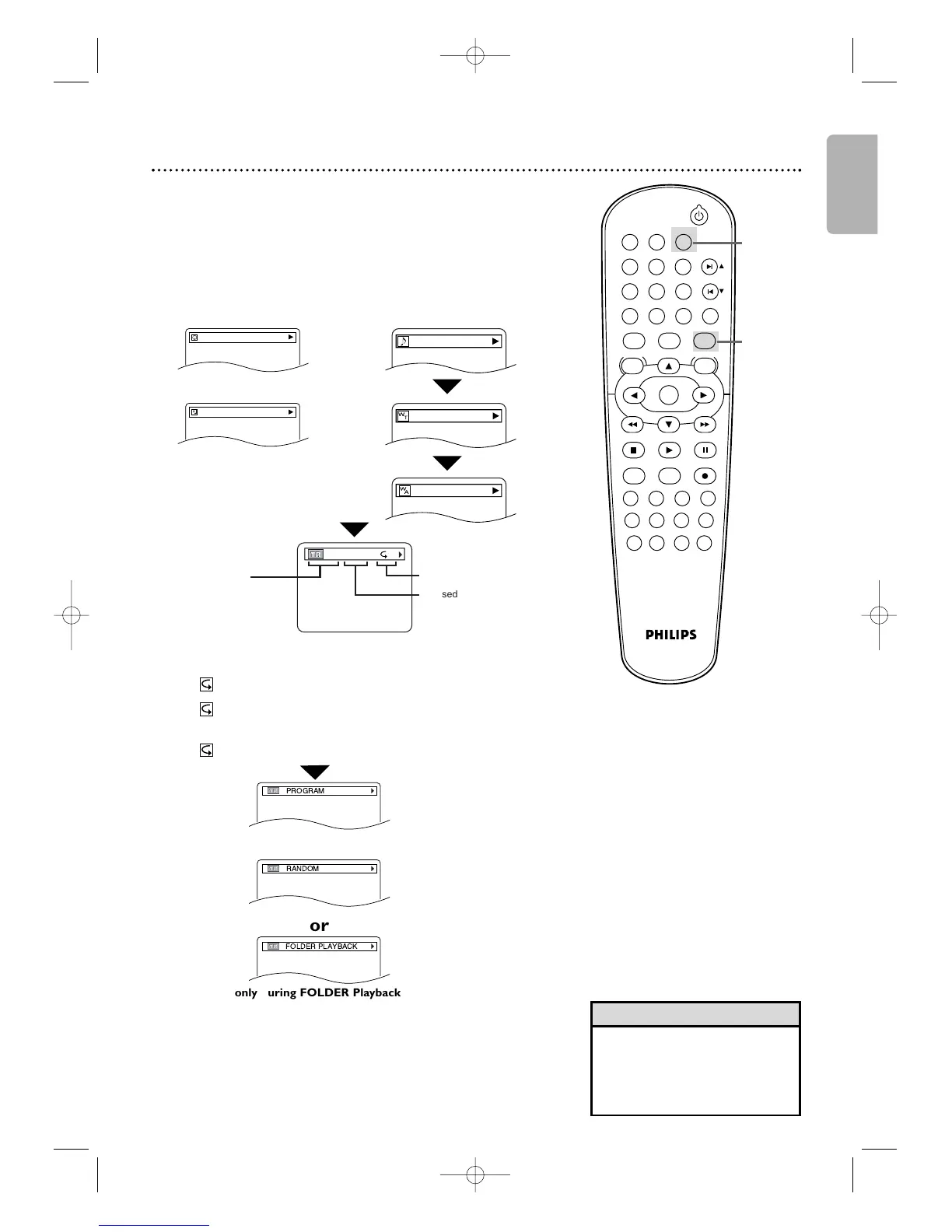
only during PROGRAM Playback
only during RANDOM Playback
On-Screen Displays (cont’d) 49
The following may appear to indicate Repeat playback.
T: The current track will play repeatedly.
G: tracks in the current folder (group) will play
repeatedly.
A: All tracks will play repeatedly
● Program and Random Playback is available only when
DUAL PLAYBACK is OFF.
● Folder Playback is available only when DUAL
PLAYBACK is ON.
3
Press
DISPLAY
again to remove the display.
only during FOLDER Playback
•For MP3 files recorded with
Variable Bit Rate (VBR), the
elapsed time displayed on the
screen may vary from the
actual elapsed time.
Helpful Hint
2-3
1
MP3/Windows Media
TM
Audio/JPEG Displays
Review MP3 and JPEG track information during playback.
1
Press DVD to put the DVD/VCR in DVD mode.
DVD light will appear on the front of the DVD/VCR.
2
Press
DISPLAY
until the current track or file
information appears.









 To Next Page