12
EN
8 The multicooker will be in keep-warm
mode automatically.
»The keep-warm indicator lights up.
Note
• The cooking time begins once the water is boiling,
and the time is displayed as a countdown.
Tip
• You can press the cancel button (Off/Chaud) or
unplug the multicooker to turn off the keep-warm
function or when not in use.
• The default cooking time is 30 minutes. You can
select the cooking time between 5 to 30 minutes.
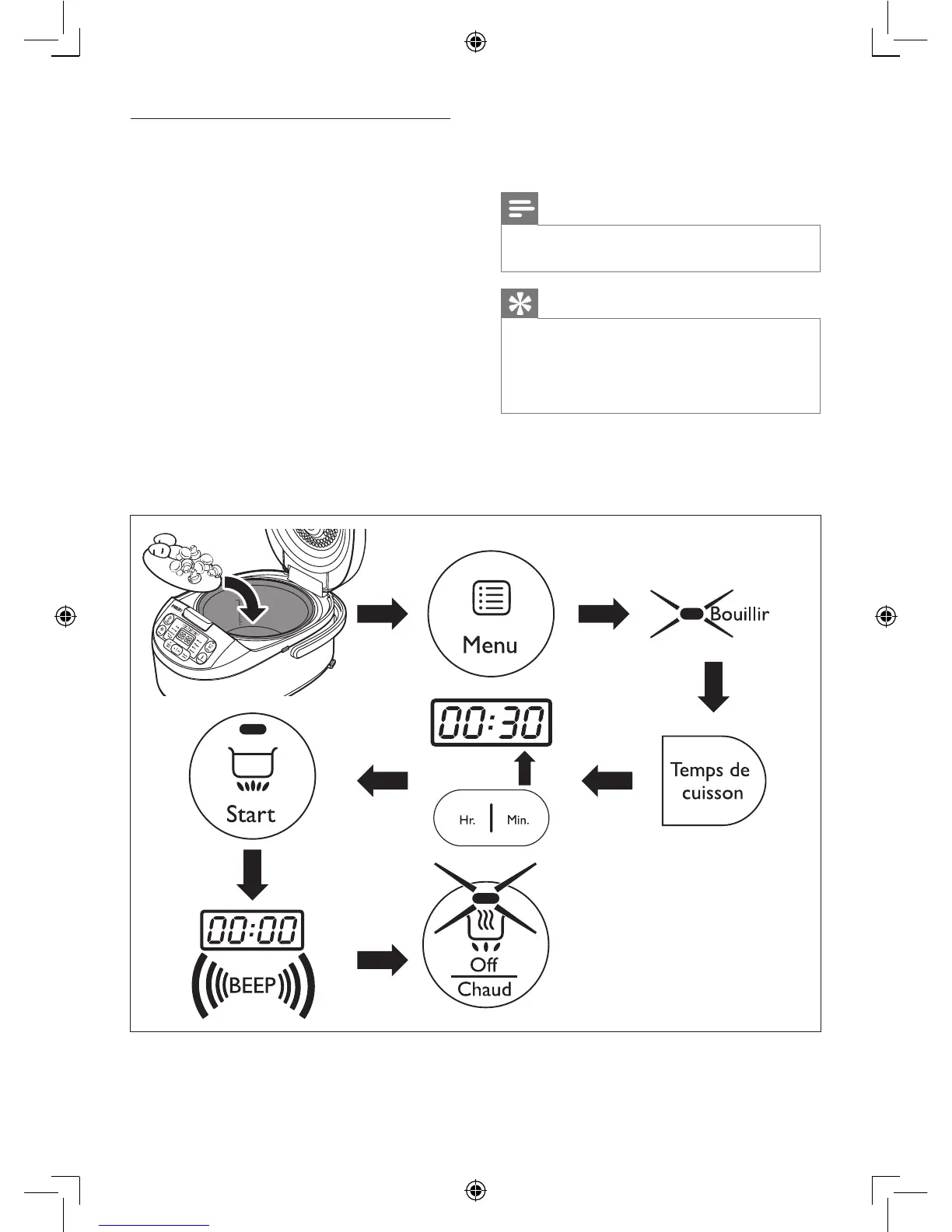
Boiling
1 Put food and ingredients into the inner pot.
2 Follow steps 6 and 7 in “Preparations
before cooking”.
3 Press the menu button (Menu) unitl the
boiling function (Bouillir) is selected.
4 Press the cooking time button (Temps de
cuisson), and the minute unit starts ashing
on the display.
5 Press the minute button (Min.) to set a
desired minute unit.
6 Press the start button (Start) to start
cooking.
7 When the cooking is nished, you will
hear a few beeps and the selected cooking
function light will be off.


 To Next Page