18 ENGLISH
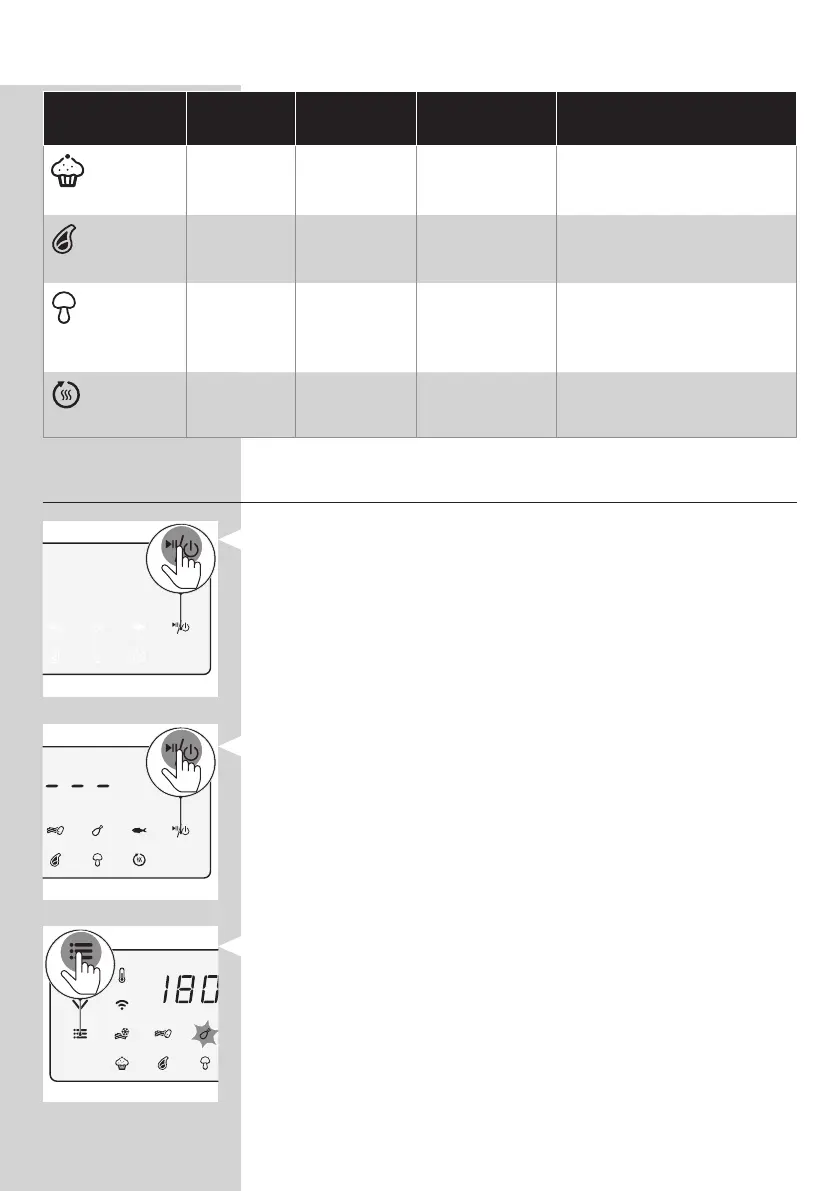
Preset
Preset time
(min)
Preset
temperature
Weight(Max.) Information
Mun
13 180°C/350°F
50 g/1.8 oz per
mun
• 7 muns in one go
Meat chops
13 200°C/400°F 300 g/11 oz
• Up to 2 meat chops
without bone
Mixed
vegetables
20
180°C/350°F 600 g/21 oz
• Roughly chopped
• Use the XL baking
accessory
Keep warm
30 80°C/175°F N/A
• Temperature cannot be
adjusted
Changing to another preset
1 DuringthecookingprocesslongpressthepowerOn/O
buttontostopthecookingprocess.Thedeviceisthenin
stand-bymode.
2 PresstheOn/Obuttonagaintoturnonthedevice.
3 Press the menu button as often as your needed preset is
blinking.




 To Next Page