19
English
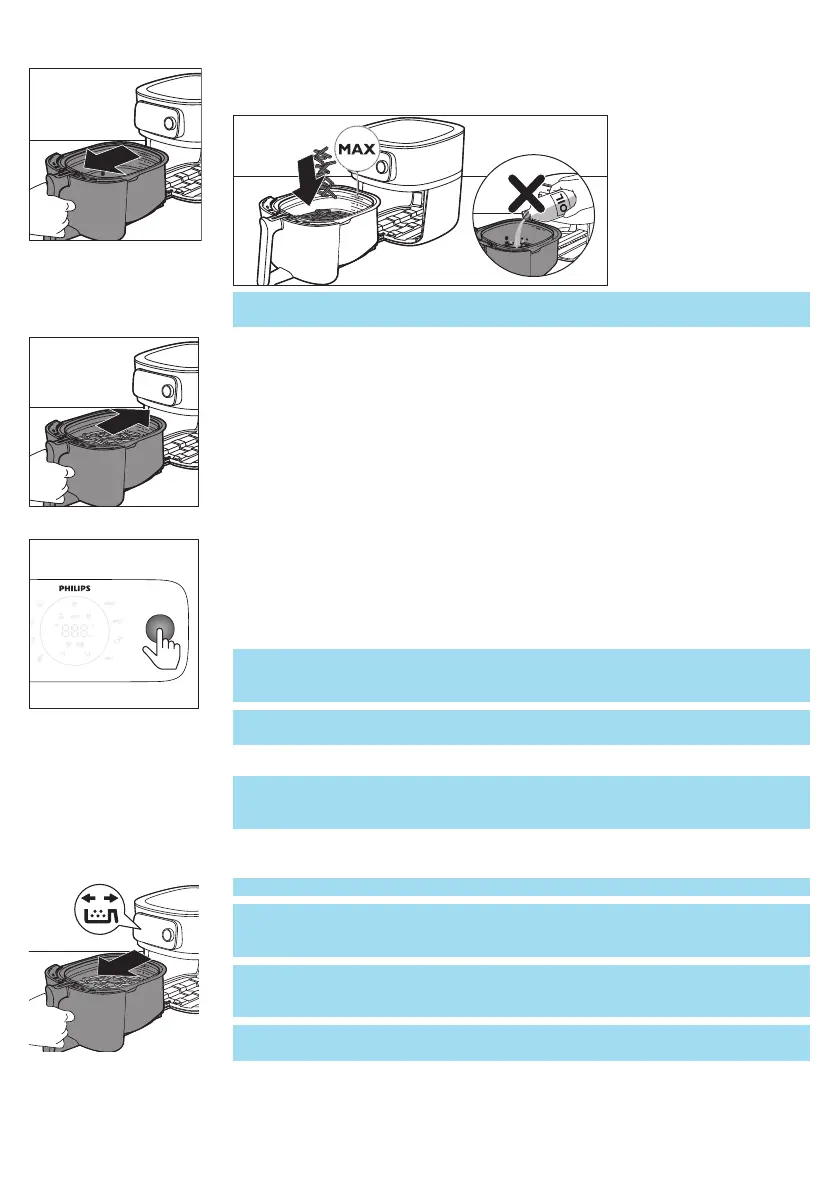
4 Open the drawer by pulling the handle.
5 Put the ingredients in the basket.
Note: Do not overfill the basket beyond the "MAX" indication as this could
affect the quality of the end result.
6 Slide the drawer back into the Airfryer.
7 Press the rotary button to turn on the appliance.
8 Select the cooking mode you would like to use (see chapter “Cooking
Modes”).
9 Decide whether you want to use the manual mode or choose an auto-cook
program.
Caution: Never use the pan without the basket in it. If you heat up the
appliance without basket, use oven gloves to open the drawer. The
edges and inside of the drawer become very hot.
Caution: Do not touch the pan and basket during and for some time
after use, as they get very hot.
10 Press the rotary button to start cooking.
Note: You can press the rotary button to pause cooking process and turn it to
change the cooking settings. Press the rotary button again to resume
cooking.
11 When you hear the timer bell, it is time to shake your food or the cooking
time has elapsed.
Note: Always make sure that your food is fully cooked before serving.
Note: Some Auto-Cook programs notify you when shaking or turning of your
food is required. The Airfryer will send out a sound signal when it is time to
shake or turn.
Note: The best way to shake is to open the drawer and lift the basket out of
the pan and shake it. Then slide the pan with the basket back into the
appliance. The appliance will automatically resume cooking.
Note: To cancel any ongoing process, go back to the main menu by pressing
the return button.


 To Next Page