9
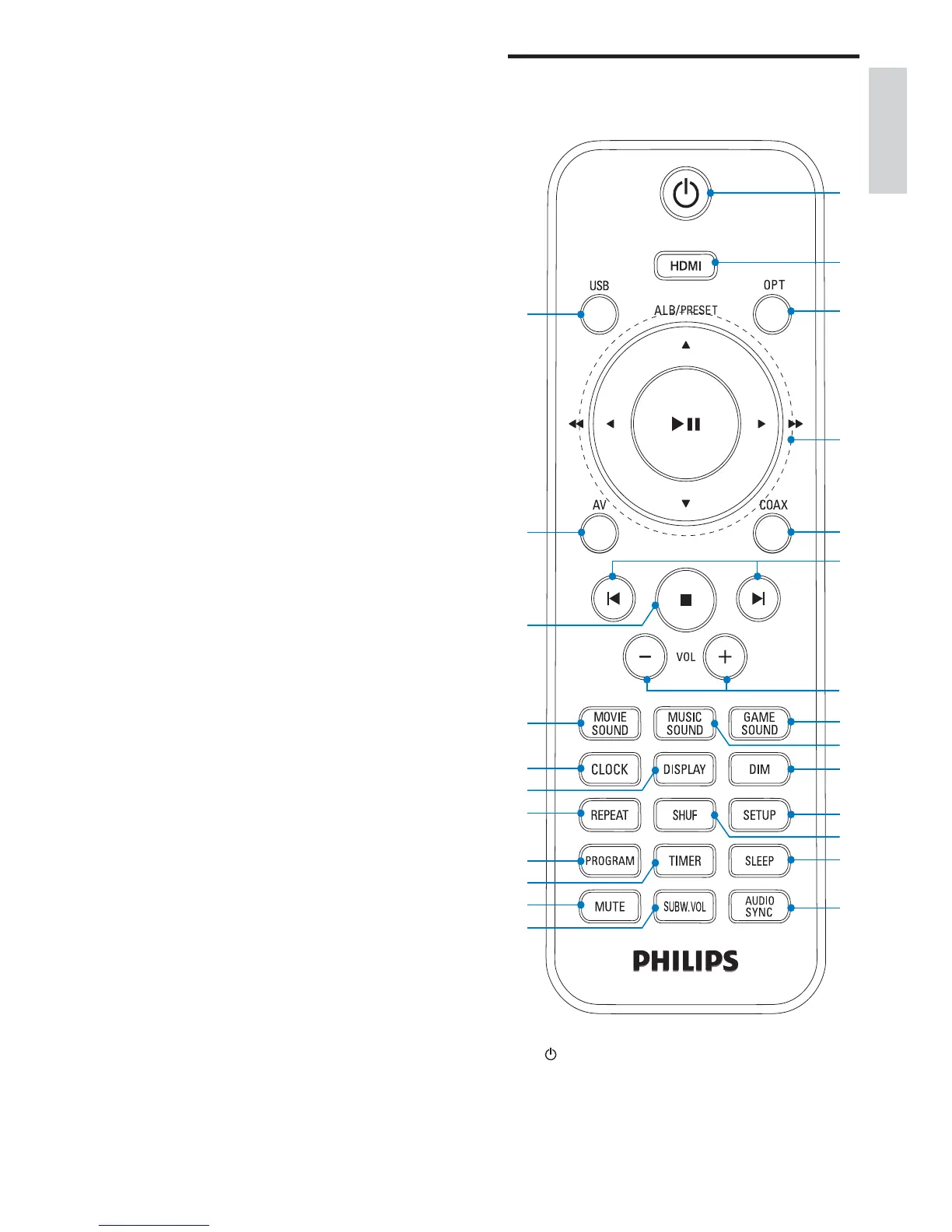
Overview of the remote
control
a
Turn on the unit, switch it to standby •
mode, or switch it to Eco Power
Standby.
y
p
r
s
u
v
q
o
t
w
x
c
d
e
f
h
j
k
m
n
b
a
i
l
g
i SOURCE
Select a source.•
j PRESS
Detach speakers from the main unit.•
k DC IN
Power supply socket.•
l SUBWOOFER OUT
Subwoofer out socket.•
m DIGITAL IN - OPTICAL
Optical audio input socket.•
n DIGITAL IN - COAXIAL
Coaxial audio input socket.•
o VIDEO OUT
Socket for composite video output.•
p HDMI IN 1
HDMI input socket.•
q AV1 IN ( VIDEO ,AUDIO L/R )
AV input sockets.•
r HDMI IN 2
HDMI input socket.•
s HDMI OUT
HDMI output socket.•
t AV2 IN ( VIDEO ,AUDIO L/R )
AV input sockets.•
English
EN











 To Next Page