16
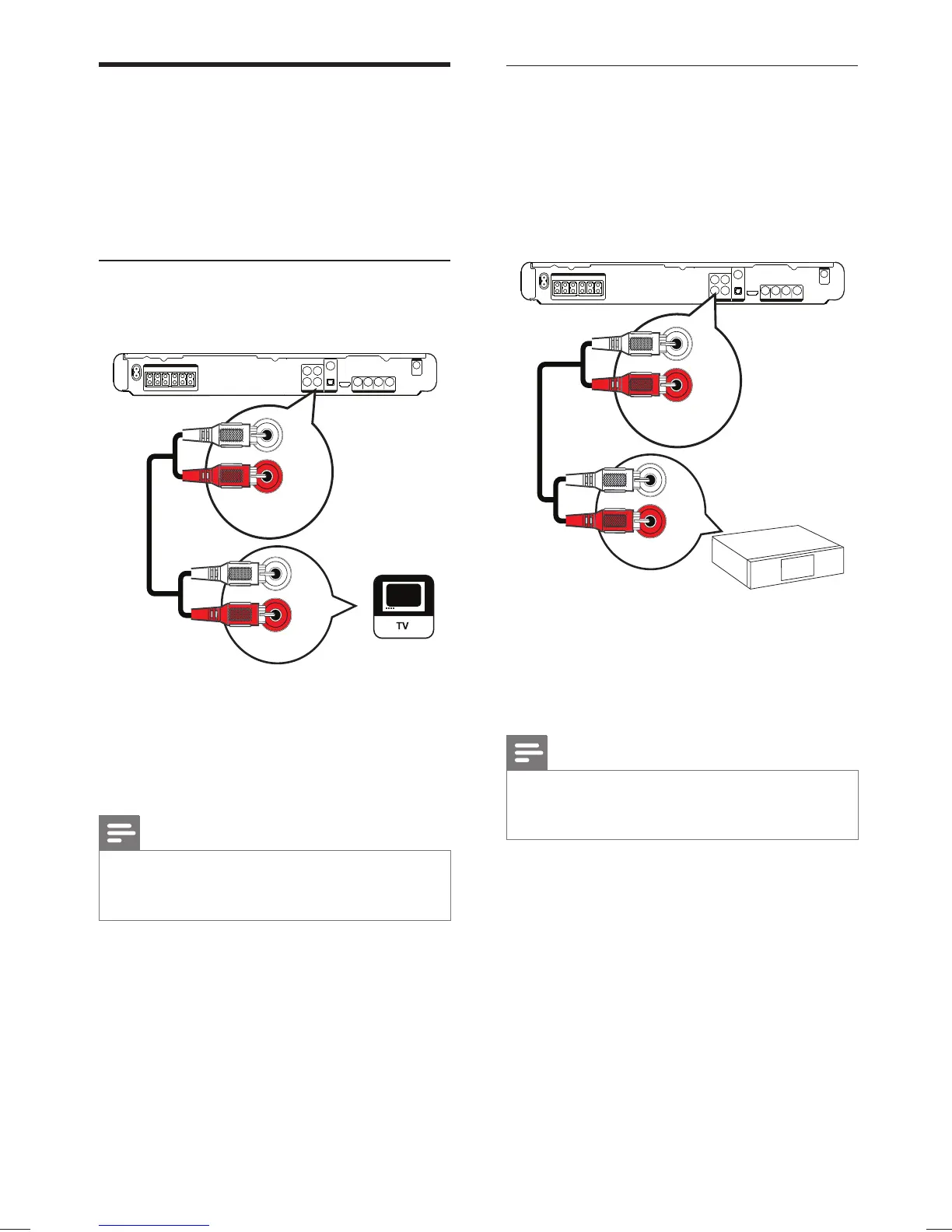
Connect audio from cable box/
recorder/game console
You can choose to connect to analogue or
digital jacks depending on the device capabilities.
Connect to analogue jacks
1 Connect the audio cables (not supplied) to
the AUDIO IN-AUX2 jacks on the Home
Theater System and the AUDIO output
jacks on the device.
Note
To listen to the audio output from this connection, •
press AUDIO SOURCE repeatedly until ‘AUX2’ is
displayed on the display panel.
AUX 2
AUDIO OUT
AUDIO IN
Connect audio cables/other
devices
Route the audio from other devices to this
Home Theater System to enjoy audio play with
multi-channel surround capabilities.
Connect audio to TV
(also used for EasyLink control)
1 Connect the audio cables (not supplied) to
the AUDIO IN-AUX1 jacks on the Home
Theater System and the AUDIO output
jacks on the TV.
Note
To listen to the audio output from this connection, •
press AUDIO SOURCE repeatedly until ‘AUX1’ is
displayed on the display panel.
AUDIO OUT
AUX 1
AUDIO IN
EN
1_hts3571-78W_98_en.indd 161_hts3571-78W_98_en.indd 16 2/4/2009 4:04:48 PM2/4/2009 4:04:48 PM


 To Next Page