38
General setup
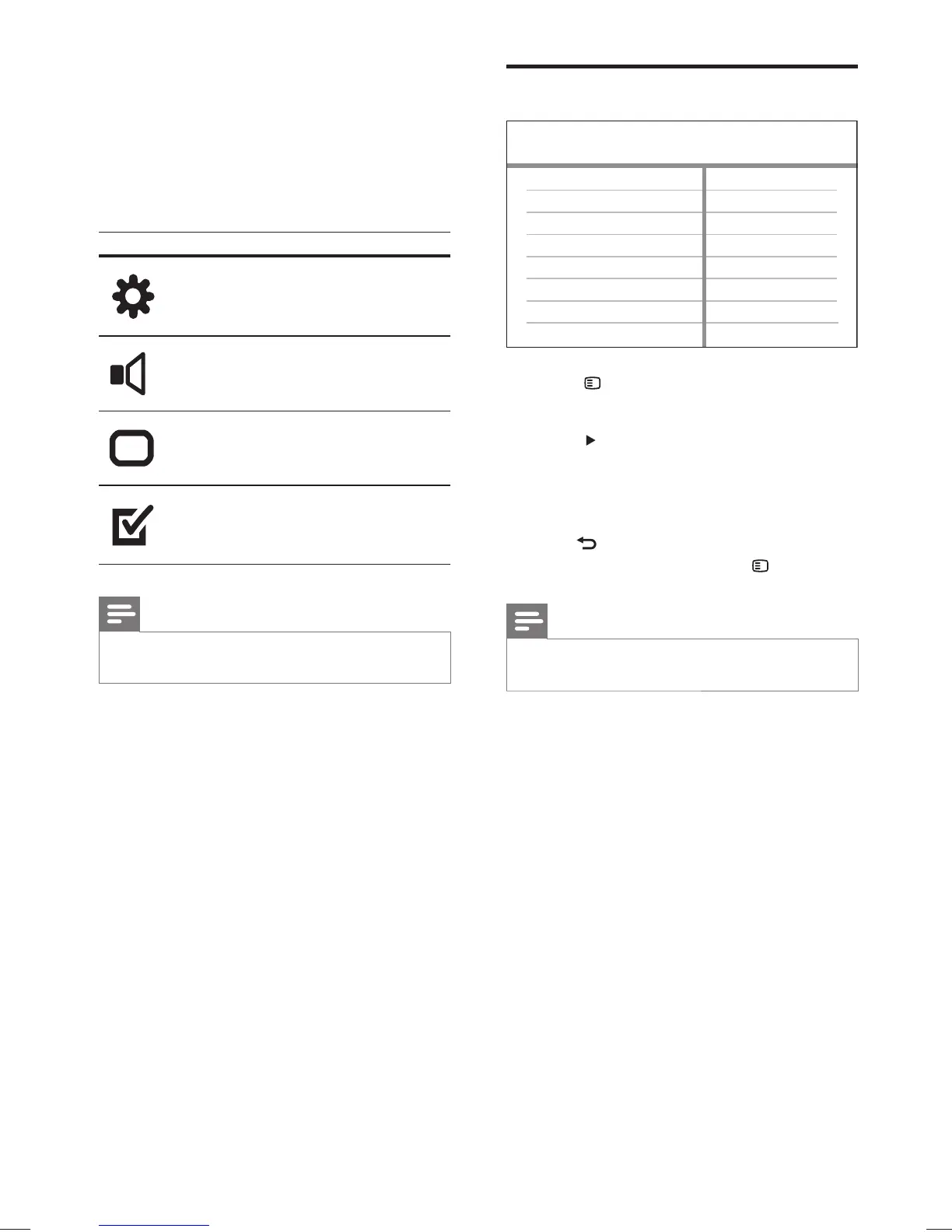
1 Press SETUP .
» [General Setup] menu is displayed.
2 Press .
3 Select an option, then press OK .
4 Select a setting, then press OK .
To return to the previous menu, press •
BACK .
To exit the menu, press •
SETUP .
Note
See the explanations of the above options in the •
following pages.
OSD Language
Sleep Timer
Screen Saver
Disc Lock
EasyLink Setup
Display Dim
General Setup
DivX(R) VOD Code
8 Adjust settings
You can customise various kinds of settings as
you prefer. Refer to the following instructions to
navigate through the setup menus.
Symbol Options
[General Setup]
[Audio Setup]
[Video Setup]
[Preferences]
Note
If the setup option is greyed out, it means the setting •
cannot be changed in the current state.
EN
1_hts3571-78W_98_en.indd 381_hts3571-78W_98_en.indd 38 2/4/2009 4:04:52 PM2/4/2009 4:04:52 PM


 To Next Page