7
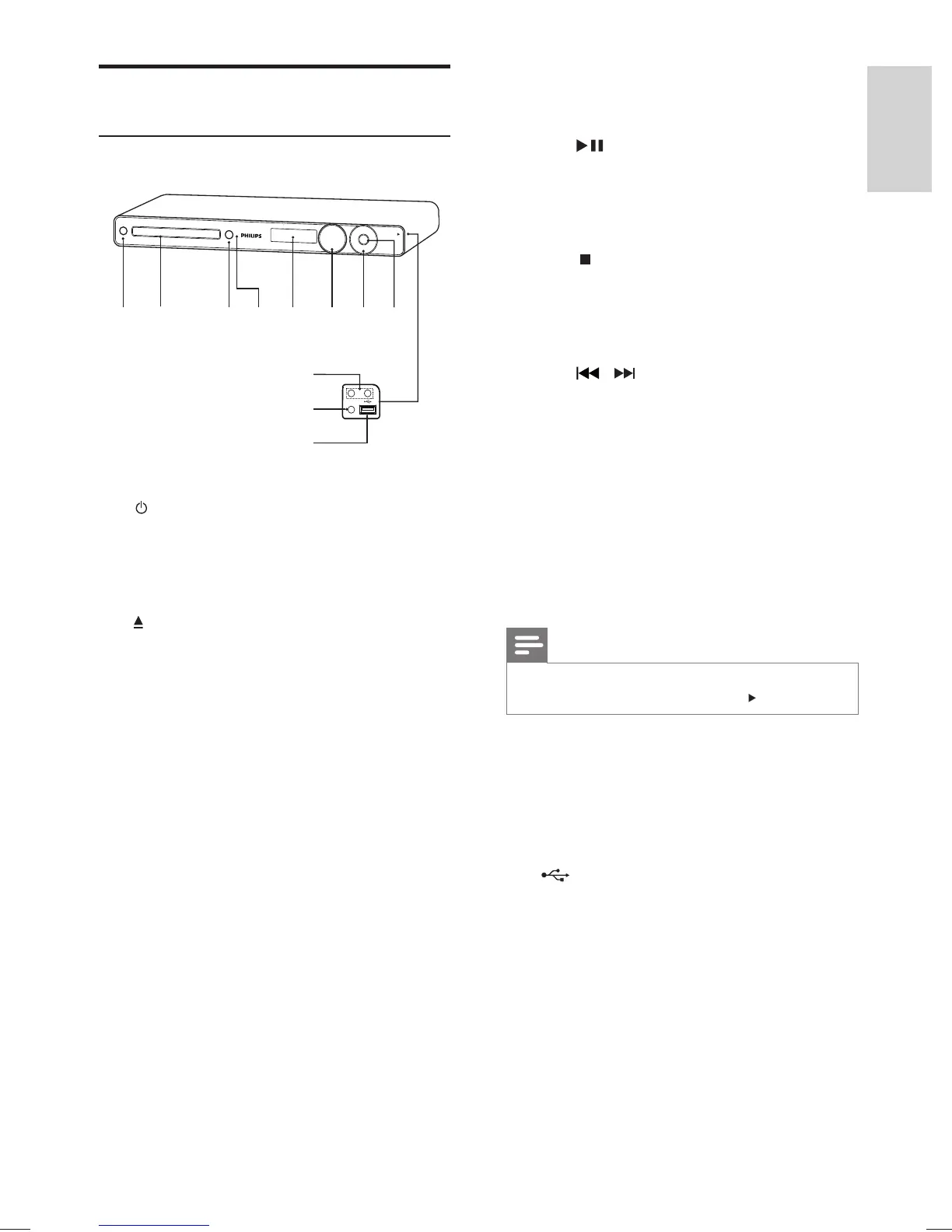
g Play/Pause , Stop , Fast Reverse / Fast
Forward
•
( Play/Pause )
Starts, pauses or resumes disc play.•
In radio mode, automatically tunes •
radio stations during fi rst-time setup.
•
( Stop )
Stops disc play.•
In radio mode, erases the current •
preset radio station.
•
/ ( Fast Reverse / Fast Forward )
Skips to the previous or next title, •
chapter or track.
Press and hold for fast reverse or •
forward search.
In radio mode, selects a preset radio •
channel.
h SOURCE
Selects a media to play or listen to •
audio from the connected device.
Note
The following sockets are under the fl ap, in the right- •
hand corner of the main unit ( OPEN ).
i MIC 1 / MIC 2
Connects a microphone.•
j MP3 LINK
Connects a portable audio player•
k
( USB )
Connects a USB supported device.•
Product overview
Main unit
a ( Standby-On )
Turns on the Home Theater System •
or switches to standby mode.
b Disc compartment
c
( Open/Close )
Opens or closes the disc •
compartment.
d IR sensor
Detects signals from the remote •
control. Point the remote control at
the IR sensor.
e Display panel
Displays the current status or disc •
information.
f VOLUME
Increases or decreases volume.•
ab c
j
k
i
e
ghfd
Your Home Theater System
English
EN
1_hts3571-78W_98_en.indd 71_hts3571-78W_98_en.indd 7 2/4/2009 4:04:46 PM2/4/2009 4:04:46 PM


 To Next Page