8
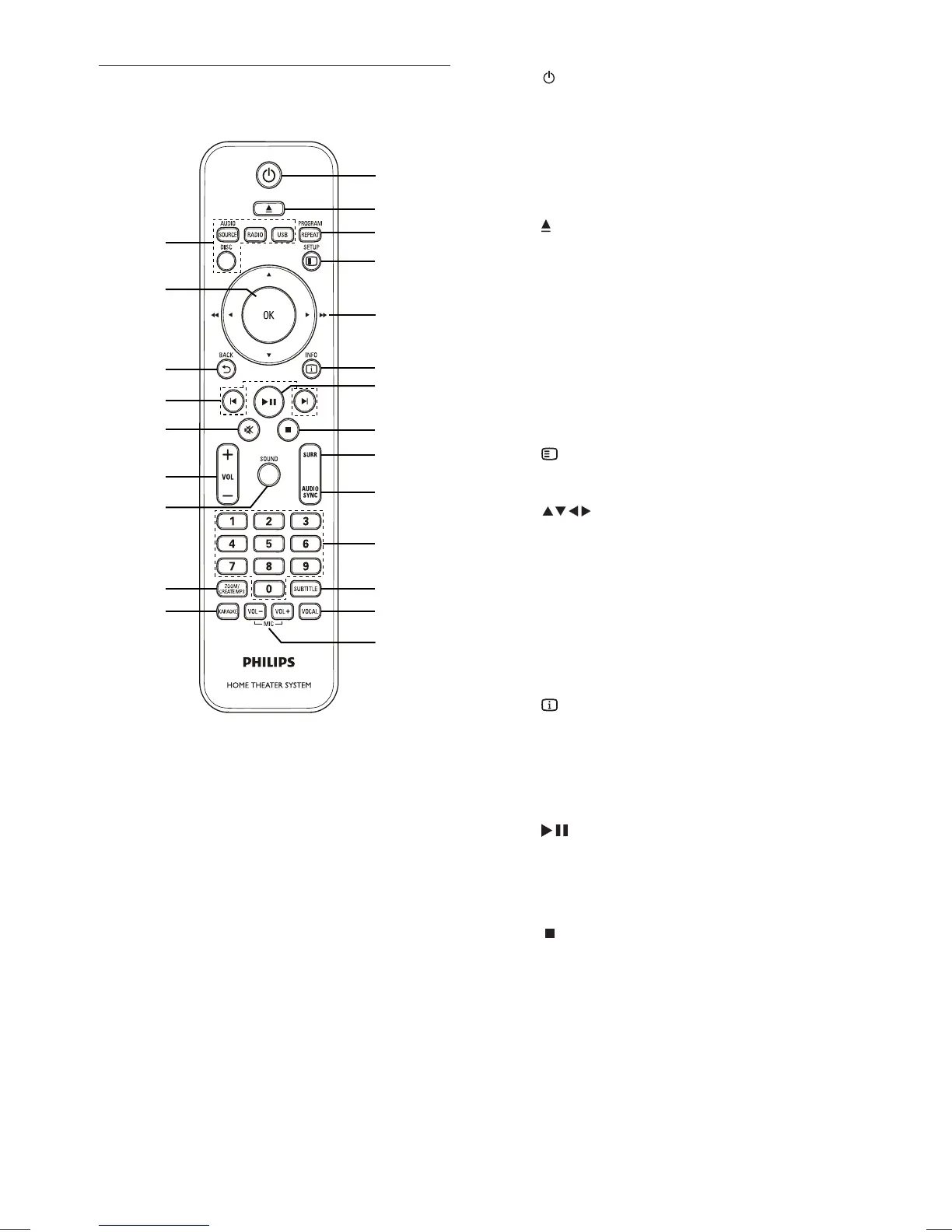
a ( Standby-On )
Turns on the Home Theater System •
or switches to standby mode.
Press and hold to turn off the Home •
Theater System and all HDMI CEC
compliant devices.
b
( Open/Close )
Opens or closes the disc •
compartment.
c PROGRAM / REPEAT
In radio mode, resets the list of preset •
stations: press to manually reset; press
and hold to automatically reset.
Selects or turns off repeat or shuffl e •
mode.
d
SETUP
Accesses or exits the setup menu.•
e
( Navigation buttons )
Navigates through the menus.•
Press left and right for fast backward •
or forward search.
In radio mode, press up and down to •
tune the radio frequency.
In radio mode, press left or right to •
start auto search.
f
INFO
For discs, displays information about •
the current status or the disc.
For slideshows, displays a thumbnail •
view of photo fi les.
g
( Play/Pause )
Starts, pauses or resumes disc play.•
In radio mode, automatically tunes •
radio stations during fi rst-time setup.
h
( Stop )
Stops disc play.•
In radio mode, erases the current •
preset radio station.
Remote Control
n
q
p
o
r
s
t
u
v
w
m
a
b
c
d
e
f
g
h
i
j
k
l
EN
1_hts3571-78W_98_en.indd 81_hts3571-78W_98_en.indd 8 2/4/2009 4:04:47 PM2/4/2009 4:04:47 PM


 To Next Page