34
[Auto Standby]
Turns off or turns on standby switching mode.
It is an energy saving feature.
• [On] - Switches to standby after 30
minutes of inactivity (for example, in
pause or stop mode).
• [Off] - Disables auto standby mode.
[PBC]
Turns off or on the content menu of VCDs/
SVCDs with PBC (playback control) feature.
• [On] - Displays the index menu when you
load a disc to play.
• [Off] - Skips the menu and starts play
from the fi rst title.
[Sleep Timer]
Switches to standby automatically after a delay.
• [Off] – Disables the sleep timer.
• [15 Minutes],[30 Minutes], [45 Minutes],
[60 Minutes] – Selects a delay.
EasyLink Setup
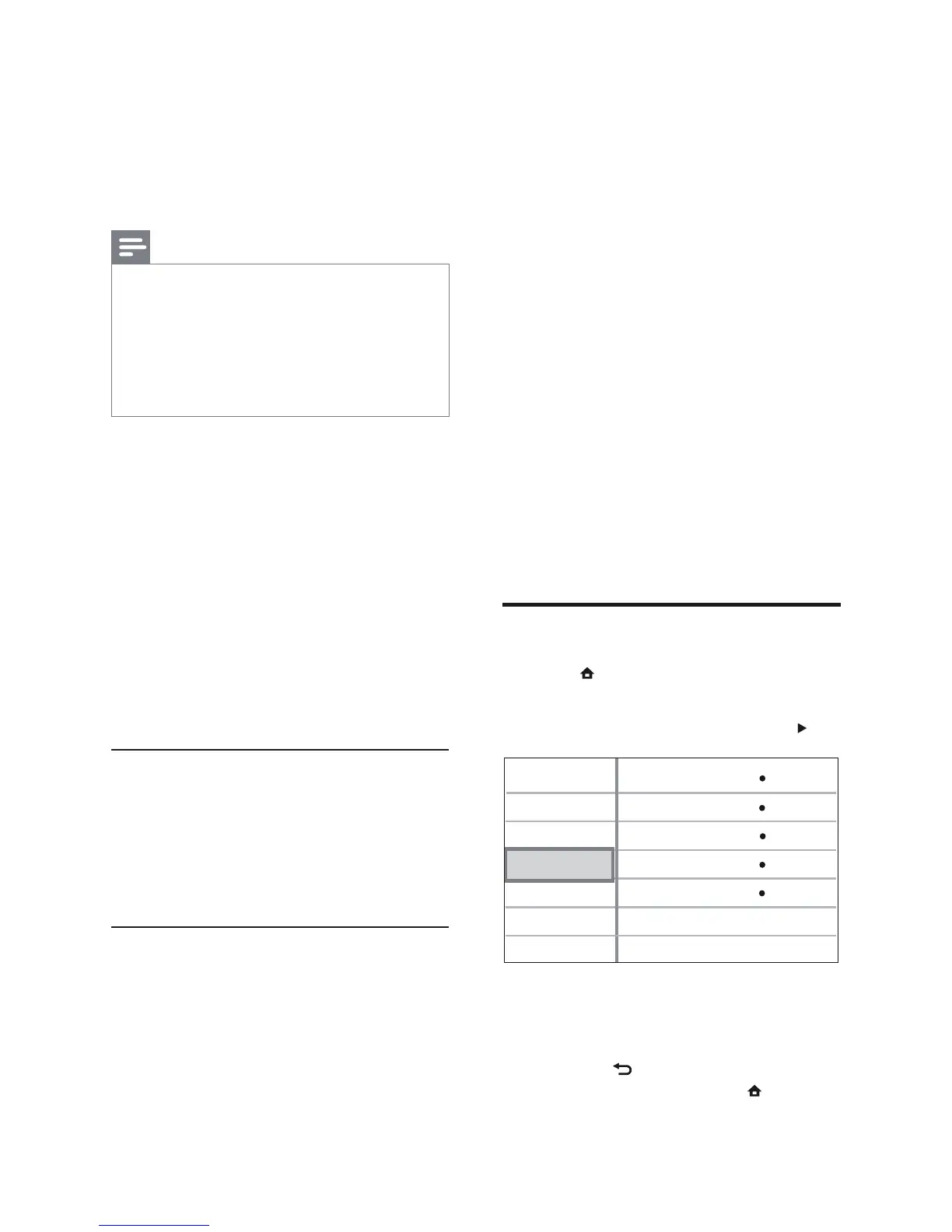
1 Press .
2 Select [Settings], then press OK.
3 Select [EasyLink Setup], then press .
4 Select an option, then press OK.
5 Select a setting, then press OK.
To return to the previous menu, •
press
BACK.
To exit the menu, press •
.
Video Setup
Advanced Setup
Audio Setup
Preference Setup
EasyLink Setup
One Touch Play
EasyLink
One Touch Standby
On
On
System Audio Control
Off
Audio Input Mapping
On
[Parental Control]
Restricts access to discs that are unsuitable
for children. These types of discs must be
recorded with ratings.
To access, enter your last set password or
‘0000’ using the keyboard on the TV.
Note
Rated discs above the level you set in • [Parental
Control] require a password to be played.
The ratings are country-dependent. To allow
•
all discs to play, select ‘ 8’ for DVD-video and
BD-Video.
Some discs have ratings printed on them but
•
are not recorded with ratings. This function
has no effect on such discs.
[Screen Saver]
Turns off or on the screen saver mode. Helps
to protect the TV screen from being damaged
due to over exposure to a static image for too
long.
• [On] - Sets the screen saver to appear
after 10 mins of inactivity (for example, in
pause or stop mode)
• [Off] - Disables screen saver mode.
[Change PIN]
Sets or changes the password.
1) Press the Numeric buttons to enter the
password or your last set password. If you
forget the password, enter ‘ 0000’, then press
OK.
2) Enter the new password.
3) Enter the same password again.
4) Move to [Confi rm] in the menu and press
OK.
[Display Panel]
Selects the brightness level of the front panel
display.
• [100%] - Brightest
• [70%] - Medium
• [40%] - Dimmest
EN



 To Next Page