21
Information on disc contents
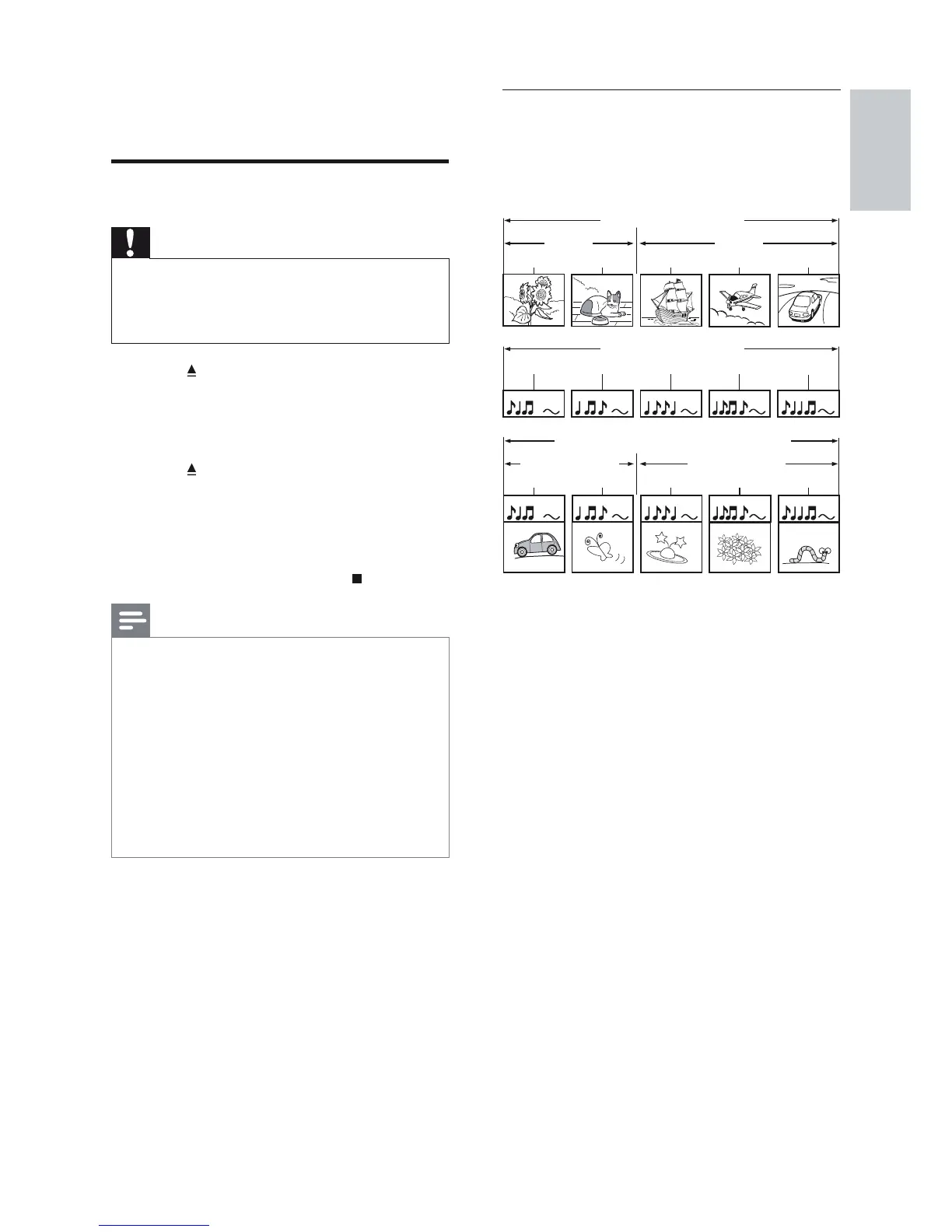
The contents of a disc are generally divided
into sections or folders (groups of titles/fi les)
as shown below.
‘Folders’ refers to the groups of fi les.•
‘Tracks’ refers to the contents recorded •
on the audio CD.
‘Files’ refers to the contents on a disc •
which are recorded in MP3, Windows
Media™ Audio/Video or JPEG fi le format.
BD-video, DVD-video
title 1
title 2
chapter 2
chapter 1 chapter 3
chapter 2
chapter 1
track 2track 1 track 5track 4track 3
Audio CD
MP3, Windows Media™ Audio, JPEG
folder (group) 1
folder (group)
2
file 3file 2file 1 file 2file 1
5 Play
Play a disc
Caution
Never place any objects other than discs into •
the disc compartment.
Never touch the disc optical lens inside the
•
disc compartment.
1 Press to open the disc compartment.
2 Insert a disc with its label facing up.
For a double-sided disc, load the side •
to play facing up.
3 Press to close the disc compartment
and start disc play.
To view disc play, turn on the TV to •
the correct viewing channel for this
Home Theatre System.
To stop disc play, press •
.
Note
Check the types of discs supported, (see •
‘Specifi cations’ > ‘Playback media’).
If the password entry menu is displayed, enter
•
the password before you can play the locked
or restricted disc (see ‘Adjust settings’ >
‘Preference Setup’ > [Parental Control]).
If you pause or stop a disc, the screen saver
•
appears after 10 minutes of inactivity. To
deactivate the screen saver, press any buttons.
After you pause or stop a disc and no buttons
•
are pressed within 30 minutes, this product
automatically switches to standby mode.
English
EN


 To Next Page