13
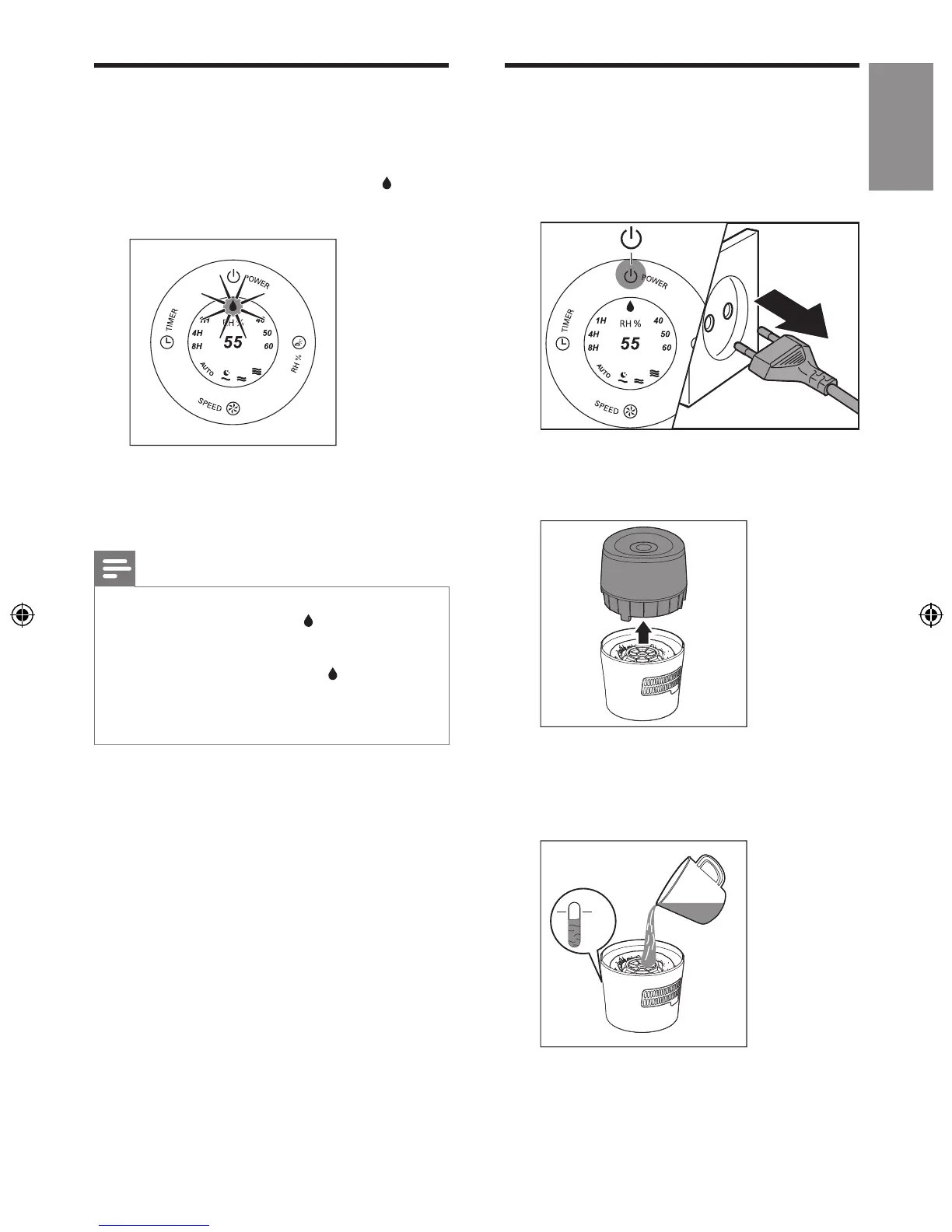
Water level
When there is not enough water in the water
tank:
• the water level drops and the red
indicator light starts blinking.
• the humidier continues to work for 30
minutes and then stops working.
You have to rell water into the water tank.
Note
•
The humidier stops humidifying if you do not rell the
water after 30 minutes. The red
indicator light stops
blinking and remains on.
• If the water tank is empty when the humidier is
plugged in and switched on, the red
indicator light
blinks for 2 minutes and then remains on before the
water tank is relled with water.
• It is normal to nd some water left in the tank.
Rell water
Water level can be observed through the
transparent water tank window.
1 Switch off the humidier and unplug it.
2 Remove the upper unit by holding it at
both sides.
3 Fill the water tank with cold tap water
until water reaches the maximum water
indication level.


 To Next Page