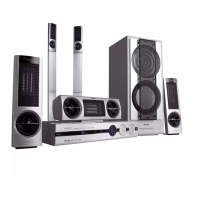
Need help?
Do you have a question about the Philips LX8500W/01 and is the answer not in the manual?
Guidance on changing fuses in a 13 Amp plug and handling unsuitable plugs.
Instructions for correctly wiring a mains plug using colour-coded wires.
Notes on copyright laws regarding material recording and playback.
Details on the laser type, wavelength, output power, and beam divergence.
Information for the customer regarding product use and TV compatibility.
List of all items included in the DVD system package.
Guidelines for safe operation, handling, and maintenance of the system.
Instructions on how to assemble the speaker units and attach them to stands.
Guidance on optimal placement of the front, rear, and centre speakers and subwoofer.
Connecting the DVD system, AV subwoofer, and front speakers using supplied cables.
Instructions for connecting the wireless rear speaker system for surround sound.
Options for connecting the DVD system to a TV using SCART, S-Video, or Composite cables.
Guide for connecting to a progressive scan TV using component video (Y Pb Pr).
Instructions for connecting FM and MW antennas for radio reception.
Final steps to connect the system to a power outlet after all connections are made.
How to connect external video sources like VCRs or satellite boxes to the system.
Instructions for recording DVD playback using a VCR, noting copy protection.
Guide on connecting digital audio devices such as CD recorders to the system.
Information on how to listen to audio from connected digital devices.
Detailed explanation of all buttons and functions on the remote control.
Description of the buttons, indicators, and display on the main system unit.
Step-by-step guide for installing batteries into the remote control.
How to use the remote control to select sources and operate the system.
Adjusting video output settings to match TV connections for optimal picture.
Matching the DVD system's colour system to the connected TV for correct display.
Configuring the aspect ratio (e.g., 4:3, 16:9) for the connected TV.
Customizing language for OSD, audio tracks, subtitles, and disc menus.
Adjusting speaker delay times and volume levels for optimal surround sound.
Key information on disc compatibility, regional codes, and proper handling.
List of supported disc formats including DVD, VCD, SACD, MP3, and DivX.
Explanation of regional coding systems for discs and players.
Steps to load a disc and initiate playback on the DVD system.
Functions for pausing, resuming, selecting tracks, and stopping playback.
How to set different repeat modes (one, all) and shuffle playback for discs.
Using the REPEAT A-B function to loop playback of a specific section.
Advanced features for video playback including disc menus and information display.
Enlarging and moving within the video picture for detailed viewing.
How to resume playback from the last stopped point for up to 10 discs.
Selecting different soundtrack languages and subtitle options for DVDs.
Switching between available camera angles if recorded on the DVD.
Starting playback from a specific title on a DVD, often via a title menu.
Enabling or disabling PBC for interactive playback and menu navigation on VCDs.
Instructions for playing various media file types from discs.
Playing music and displaying pictures from a disc concurrently.
Information on playing SACD discs and their different layer types.
Using preview, zoom, multi-angle, and scan effect features for picture discs.
Accessing and configuring general system settings like disc lock and OSD language.
Customizing the playback order by programming specific tracks from a disc.
Preventing playback of specific discs using parental control or disc lock.
Setting the on-screen display language for menus and prompts.
Enabling or disabling the screen saver to protect the TV display.
Information on obtaining and using a DivX VOD registration code for video rentals.
Configuring audio output settings, including analogue output and speaker setup.
Optimizing surround sound by adjusting speaker volume and delay settings.
Enhancing music CD quality by converting to a higher sampling rate.
Adjusting audio output dynamics for low-volume listening, useful for movies.
Accessing video configuration options, including TV type and display settings.
Selecting the correct TV colour system and aspect ratio for optimal picture.
Enabling progressive scan for improved picture resolution and smoother motion.
Customizing picture colour settings with predefined or personal options.
Accessing settings for audio, subtitle, parental control, and navigation preferences.
Choosing the video output type (YUV or RGB) based on the TV connection.
Setting playback limitation levels based on age ratings for discs.
Setting or changing the password for disc lock and parental controls.
Selecting standard or Cyrillic subtitle fonts for DivX disc playback.
Resetting all system settings to their original factory defaults.
Ensuring FM and MW antennas are properly connected for optimal reception.
Methods for automatically or manually tuning into radio stations.
Storing favourite radio stations in memory for quick access.
Using automatic installation to store all available radio stations.
Manually tuning and storing preferred radio stations.
Choosing a stored preset radio station for playback.
Removing a stored preset radio station from the system's memory.
Choosing between multi-channel and stereo surround sound options.
Applying preset sound effects for movies, music, or TV modes.
Customizing the low (bass) and high (treble) tone settings for audio output.
Changing between active, standby, and eco power modes.
Controlling the system volume and temporarily muting audio.
Adjusting the brightness level of the system's display panel.
Using the remote to control basic functions of a compatible Philips television.
Selecting a transmission channel for wireless rear speakers to avoid interference.
Steps for connecting and recording audio/video from the system to external gear.
Configuring the system to automatically switch to standby at a preset time.
Technical details for the amplifier's output power, sensitivity, and frequency response.
Technical details for the tuner's reception range, sensitivity, and signal-to-noise ratio.
Technical details for disc playback, including laser type, video decoding, and audio formats.
Physical dimensions, power ratings, and driver details for the main unit and speakers.
Solutions for power connection, channel selection, and basic video problems.
Troubleshooting distorted pictures, colour issues, and aspect ratio display.
Resolving issues with no sound, distorted audio, or unavailable features.
Steps to resolve issues when a disc fails to start playback.
Solutions for no surround sound and poor radio reception.
Troubleshooting remote control malfunctions and DivX file playback.
Definitions of audio, video, and disc-related terms like Analogue, Aspect Ratio, and Bit Rate.
Definitions for terms like Disc Menu, DivX, Dolby Digital, and DTS.
Definitions for terms like Parental Control and Playback Control (PBC).
Definitions for terms like Plug and Play, Progressive Scan, Region Code, and Surround.
 General
| Brand | Philips |
|---|---|
| Model | LX8500W/01 |
| Category | Home Theater System |
| Type | 5.1 Channel |
| Audio formats supported | Dolby Digital, DTS |
| RMS rated power | 1000 W |
| Total Power Output | 1000 W |
| Video D/A Converter (DAC) | 12-bit/108 MHz |
| Subwoofer | Yes |
| Wireless Subwoofer | Yes |
| Bluetooth | Yes |
| HDMI Input | Yes |
| USB Port | Yes |
| Playable formats | DVD, CD, MP3 |

 To Next Page