Direction of Use
7-2
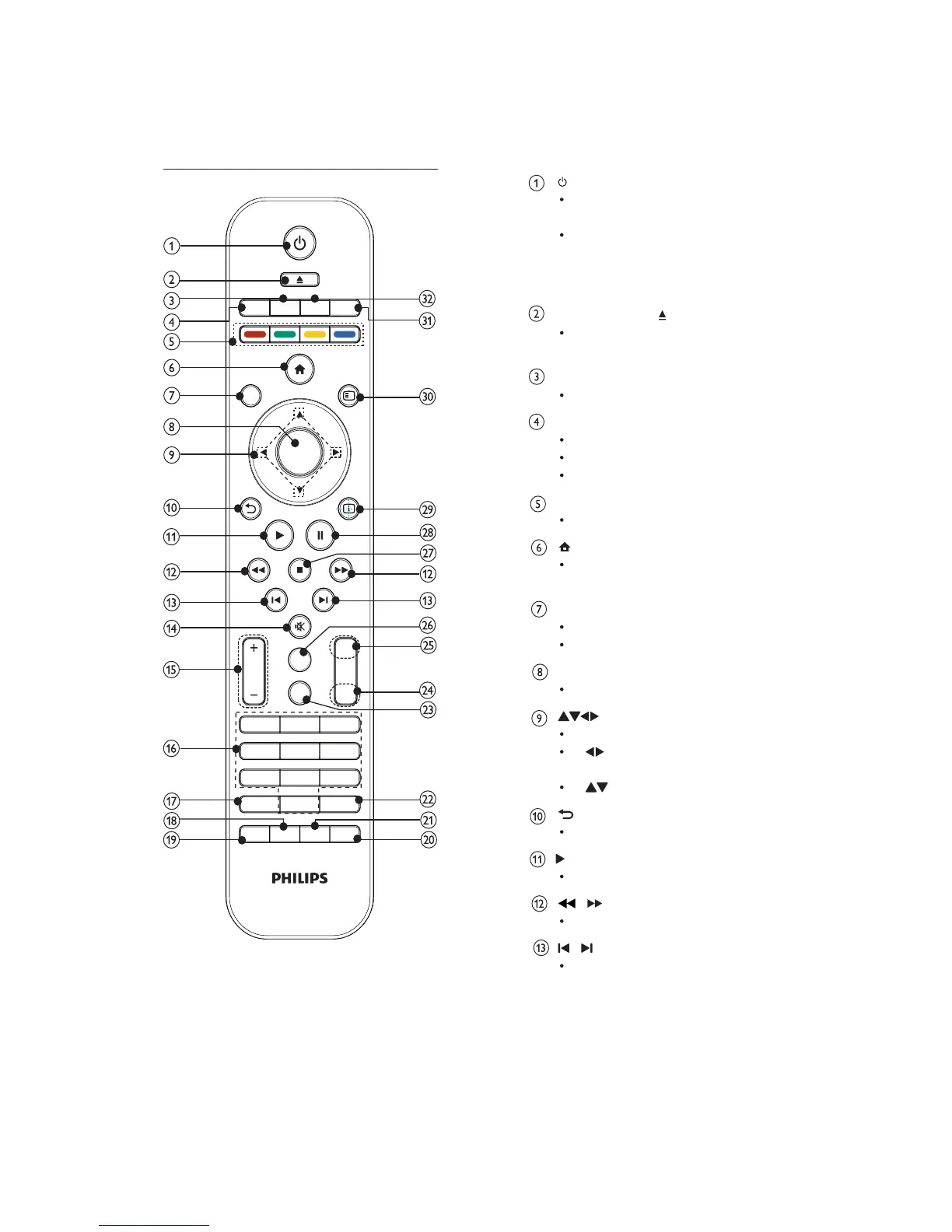
Turn on this product or switch to the
Eco Power standby mode.
When EasyLink is enabled, press
and hold for at least three seconds
to turn all connected HDMI CEC
compliant devices to standby.
OPEN/CLOSE
Open or close the disc
compartment.
RADIO
Switch to FM radio.
DISC/TOP MENU
Switch to the disc source.
BD: Display the top menu.
DVD: Display the title menu.
Color buttons
BD: Select tasks or options.
Access the home menu of this
product.
DISC/POP-UP/MENU
BD:Accessorexitthepop-upmenu.
DVD: Access or exit the disc menu.
OK
Confirm an entry or selection.
Navigate through the menus.
: Search forward or backward for
aradiostation.
: Tune to a radio station.
BACK
Return to a previous display menu.
Start or resume play.
/
Search backward or forward.
/
Skip to the previous or next title,
chapter, or track.
Remote control
0
1
2
3
5
6
9
8
4
7
OPEN/CLOSE
AUX
USBRADIO
DISC
TOP MENU MP3 LINK
MENU
BACK
DISC/
POP-UP
INFO
AUDIO
TREBLE
BASS
VOL
REMITKCOLC
SLEEP
DIM
PROGRAM
MODEHDMI
BONUS
VIEW
SUBTITLE
OPTIONS
OK
LOUDNESS


 To Next Page