Direction of Use
7-8
Connect a USB device
1
Connect a USB device to the (USB)
jack on the front panel of this product.
Note
Press ,andselect[BrowseUSB]inthemenu
Connect a USBdeviceonlytothe
jack on
the front panel of this product.
Philips does not guarantee compatibility with
all USB devices.
Connect a network
With a wired or wireless connection (see
“Get started” > “Set up a network”), you
can connectthisproducttotheInternet for
software update/BD Live.
Note
Internet access to Philips website for software
updatemaynotbeallowed,dependingon
therouteryouuseortheInternetService
Provider’s policy. Contact your Internet
Service Provider for more information.
Connect power
Caution
Risk of product damage! Ensure that the
powersupplyvoltage correspondstothe
voltageprintedontheback of theunit.
Before connecting the AC power cord, ensure
you have completed all other connections.
Note
Thetypeplateislocatedonthebottom of the
product.
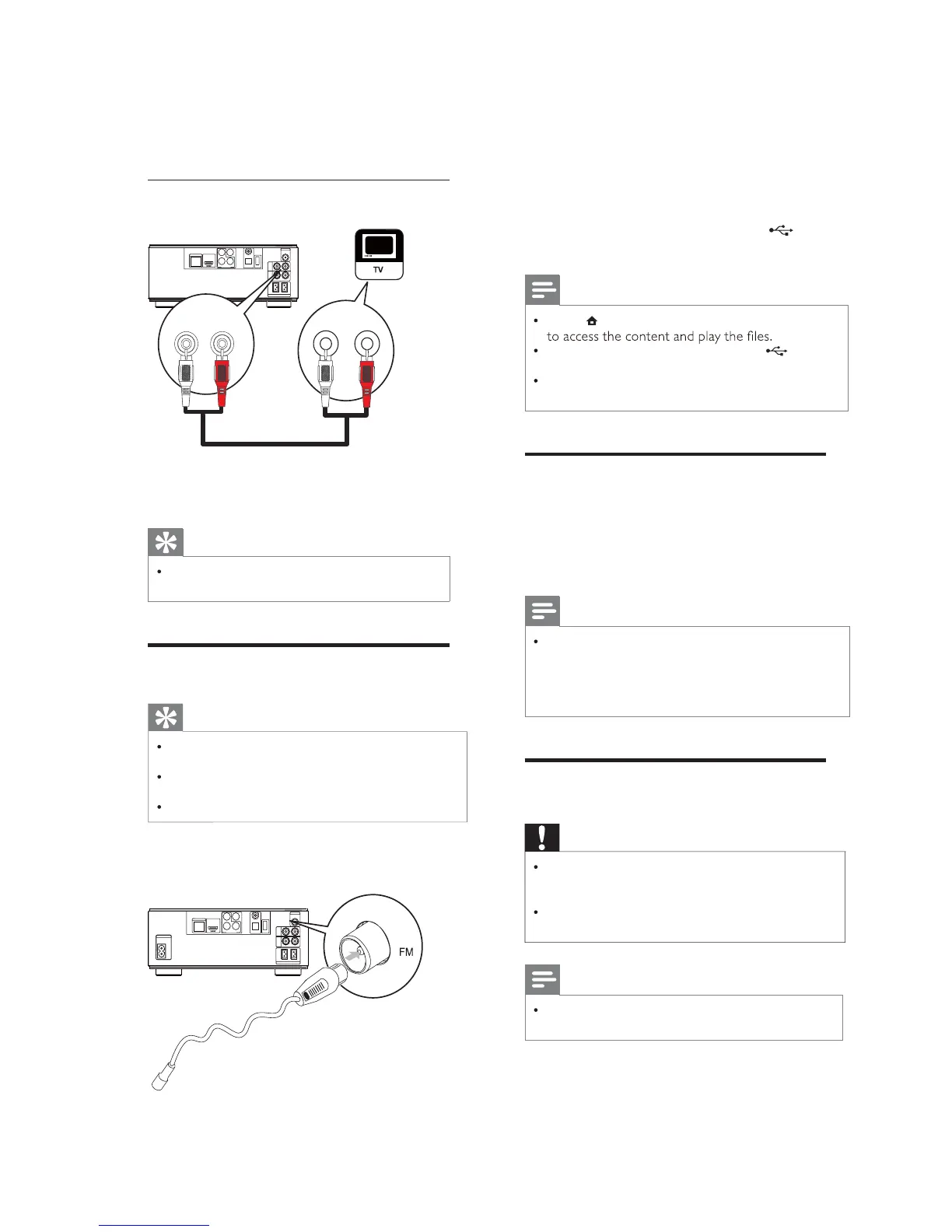
Connect audio fromTV or other devices
COAXIAL
Pr/Cr
Pb/Cb
COMPONENT
Wi-Fi
Y
OPTICAL
DIGITALAUDIOOUT
O
E
D
I
V
T
U
O
DIGITALAV OUT
LAN
AUX
IN
LINE
OUT
LR
LR
ANTENNA
FM
SPEAKER OUT
R
L
AUX IN
R
L
RL
LINE OUT
UsethisproducttoplayaudiofromtheTVor
otherdevicesuchas a cablebox.
Tip
Press AUXtoselecttheaudiooutput of
your connection.
Connect FM antenna
Tip
Foroptimalreception,fullyextendandadjust
the position of the antenna.
ForbetterFMstereoreception, connectan
outdoorFMantennatotheFMjack.
The unit does not support MW radio reception.
1 Connect the supplied FM wire antenna to
the FMsocket on the unit.
COAXIAL
Pr/Cr
Pb/Cb
COMPONENT
Wi-Fi
Y
OPTICAL
DIGITALAUDIO OUT
O
E
D
I
V
T
U
O
DIGITALAV OUT
LAN
AC
~
AUX
IN
LINE
OUT
LR
LR
ANTENNA
FM
SPEAKER OUT
R
L


 To Next Page