3 - 4
CONNECTION AND CONTROLS
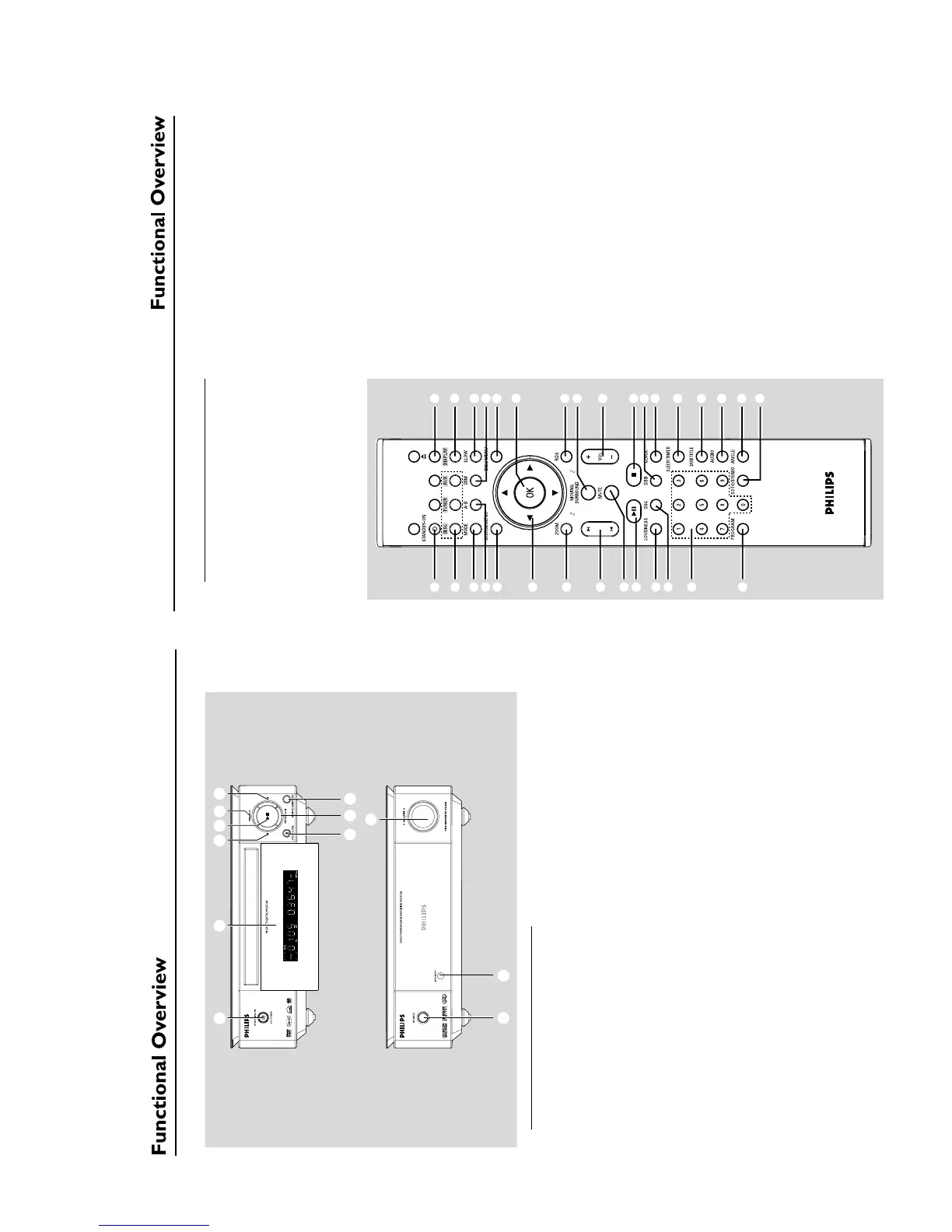
DVD player and power amplifier
1 ECO POWER/STANDBY-ON
y
– switches on the system or puts it on to Eco
power/normal standby mode.
2
Display
– shows the current status of the DVD player.
3
ÉÅ
– starts or interrupts disc playback.
4
PRESET +
–
in tuner mode, selects a preset radio station
f
orward.
5
PRESET-/9
–
stops disc playback or erases a program.
– in tuner mode, selects a preset radio station
backward.
–
in Demo mode (on the system only), activates/
deactivates the demonstration.
6
MOVING SURROUND
–
enables/disables the surround sound effect with
moving speakers.
7
¡/™
Disc:
–
skips to the previous/next chapter/title/track.
Tuner:
–
tunes to a higher/lower radio frequency.
–
press and hold, then release the key to
start automatic search for a radio frequency
downward/upward.
8 OPEN•CLOSE
ç
– opens or closes the disc tray.
–
switches the system on.
9
SOURCE
– selects the respective sound source: DVD/AUX/
TUNER.
– switches the system on.
0
IR SENSOR
– point the remote control towards this sensor.
!
V
OLUME -/+
–
adjusts the volume upward/downward.
– adjusts the hours and minutes in clock/timer
setting mode.
–
switches the set timer ON or OFF.
1
5
7 7
2
!
8
9 0
34
6
21
4
8
7
0
⁄
•
∞
§
≤
£
™
¡
)
^
º
@
3
5
9
!
#
$
%
&
≥
(
*
ª
6
Remote control
1 STANDBY
B
– switches on the system or puts it on to Eco
power/normal standby mode.
2 0
– opens or closes the disc compartment
3 DISC/TUNER/AUX
–
selects the respective sound source for DVD/
AUX/TUNER.
– exits P-SCAN (progressive scan). (Only for
DISC)
4 DISPLAY
– displays information on TV screen during
playback
5 MODE
–
mode for a disc.
6 A-B
– repeats playback of a specific section on a disc.
7
DIM
– selects different levels of brightness for the
display screen.
8 SLOW
– selects different slow playback modes for a
DivX/VCD/SVCD/DVD.
9 SYSTEM MENU (disc mode only)
– enters or exits the system menu.
0 DISC MENU (disc mode only)
–DVD/VCD: enters or exits the disc contents
menu.
–
or off .
–
!
4 /
3 / 2
/ 1
– selects an item in a menu.
–m
oves an enlarged picture up/down/left/right.
–(
2
/ 1
; Tuner) tunes to a higher/lower radio
frequency.
–(
2 / 1
; T
uner) press and hold, then release the
key to start automatic search for a radio
frequency downward/upward.
–(2 / 1; Disc) searches backward/forward in a
disc at different speeds.
@ OK
–
confirms a selection.


 To Next Page