Remote controls
* AVAILABLE IF CONNECTED
5
8.
9.
10.
11.VOL-
12.TUNE-
13.TUNE+
1.
2.MUTE
3.0~9
4.SOURCE
5.BASS-/+
6.EQ
7.VOL+
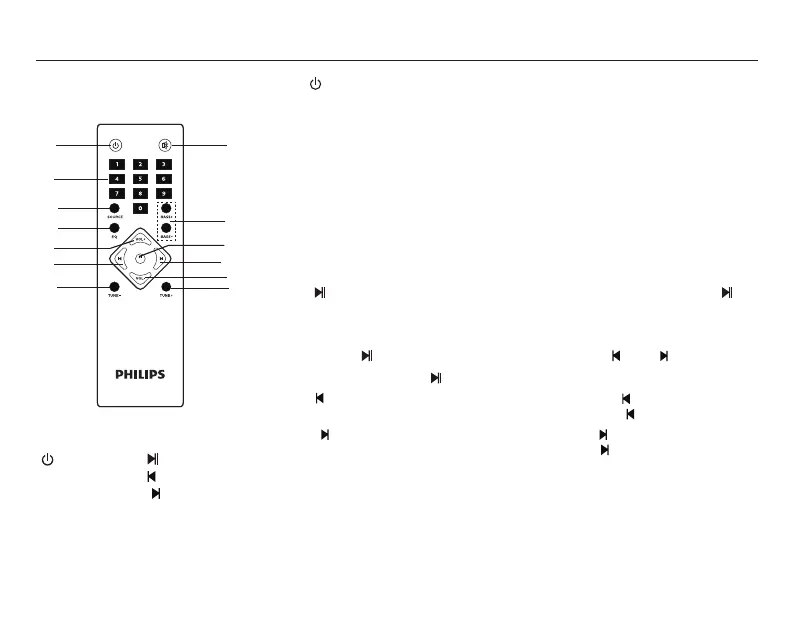
1. ----- Turn on/Stand-by the speaker.
2. Mute----- Press “MUTE ” to activate or deactivate mute.
3. 0-9 ----- Numeric keys, with the help of these keys you can select
song or track in USB*. In FM, you can key in frequency, i.e. 927 for 92.7.
4. SOURCE ----- Select the input/source- AU for Audio-in, Cd for CD,
Ud for USB*, Sd for SD*, 88.3 for FM, bt for Bluetooth.
5. BASS-/+ ----- To decrease/ increase the bass.
6. EQ ----- Normal, Classic, Country, Pop, Jazz, Rock mode.
(works only in USB*/SD*/BT mode)
7. VOL+ ----- Volume up.
8. ----- Short press To play or to pause songs. Long press “ ” in
FM mode, it will automatically search and save channels.
For manual storage, user can press frequency (eg. 106.4) and
press “ ”, station number will ash, press “ ” or “ ” to choose
the serial, press “ ” again to store the station.
9. ----- Play the previous song by pressing “ ” at USB*/BT
mode. Choose previous channel by pressing “ ” at FM mode.
10. ----- Play the next song by pressing “ ” at USB*/BT
mode. Choose next channel by pressing “ ” at FM mode.
11. VOL- ----- Volume down.
12. TUNE- ----- Each time to search channel step by step ( each
step- 0.1 MHz), press “TUNE-” and hold to search previous
channel, it will stop and play once previous channel been searched.
13. TUNE+ ----- Each time to search channel step by step ( each
step+ 0.1 MHz), press “TUNE+” and hold to search next channel,
it will stop and play once next channel been searched.
(1)
(3)
(4)
(6)
(7)
(9)
(12)
(2)
(5)
(8)
(10)
(11)
(13)
SCN


 To Next Page