6EN
3 Get started
Caution
•
Use of controls or adjustments or performance of
procedures other than herein may result in hazardous
radiation exposure or other unsafe operation.
Always follow the instructions in this chapter in
sequence.
Connect power
The CD Soundmachine can be powered by
either AC power or batteries.
Option 1: AC power
Warning
•
Risk of product damage! Make sure that the power
supply voltage corresponds to the voltage printed on
the back or the underside of the CD Soundmachine.
• Risk of electric shock! When you disconnect the AC
power, always pull the plug from the socket. Never pull
the cord.
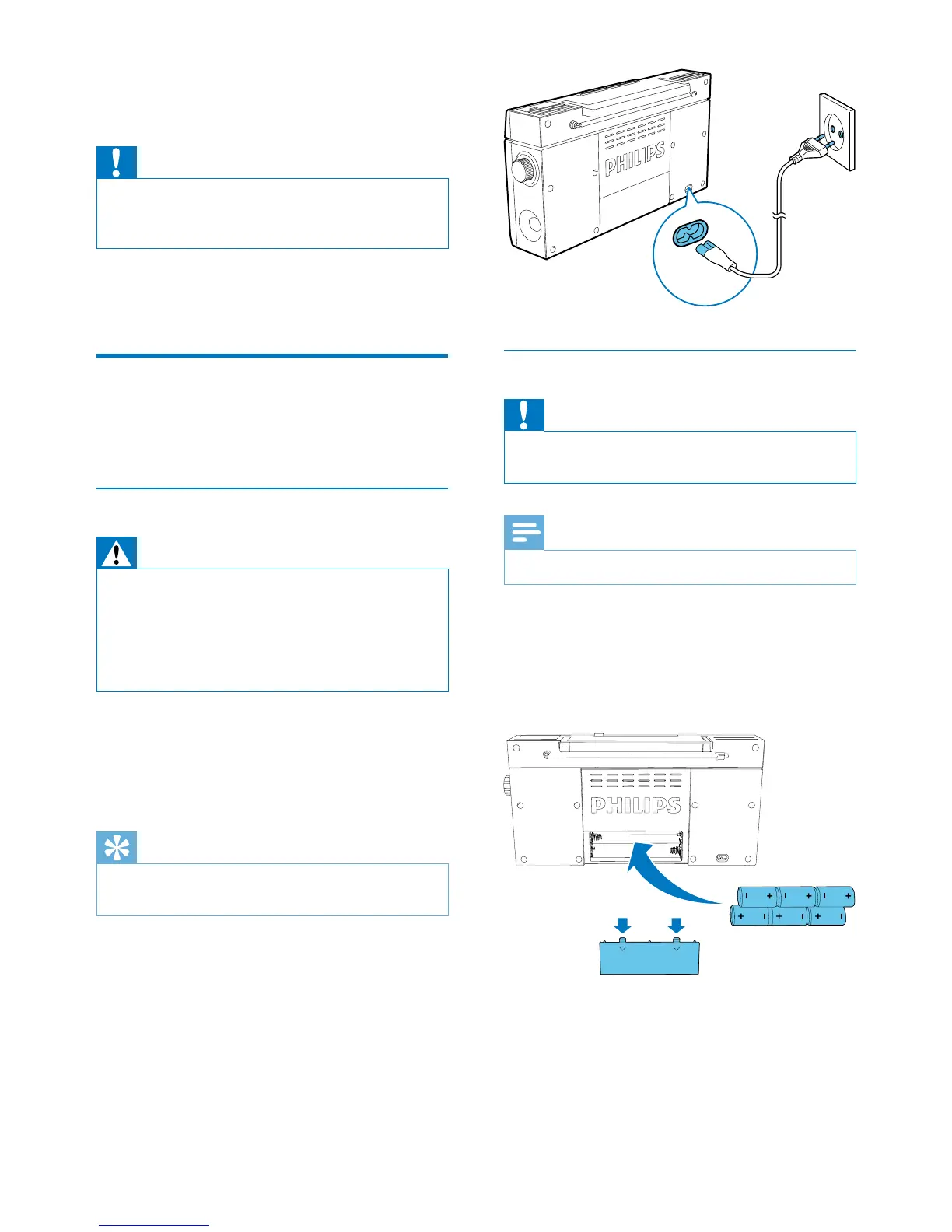
Connect the AC power cord to:
• the AC~ MAINS socket on the back of the
CD Soundmachine.
• the wall outlet.
Tip
•
To save energy, turn off the CD Soundmachine after
use.
Option 2: Battery power
Caution
•
Batteries contain chemical substances, so they should
be disposed of properly.
Note
•
Batteries are not supplied with the accessories.
1 Open the battery compartment.
2 Insert6batteries(type:R14/UM2/CCELL)
withcorrectpolarity(+/-)asindicated.
3 Close the battery compartment.


 To Next Page