8EN
Play from an external audio
device
You can also listen to an external audio
device such as an MP3 player through this CD
Soundmachine.
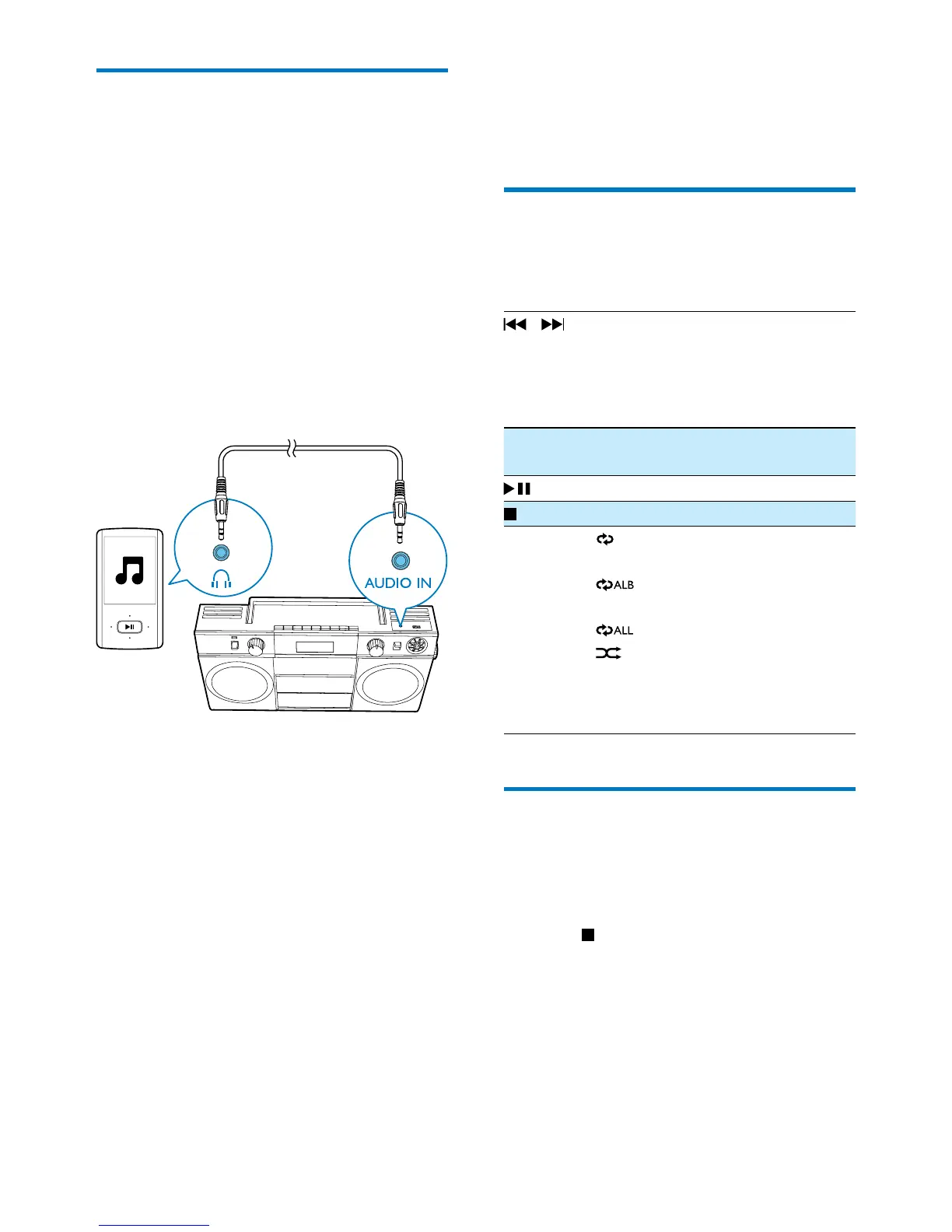
1 Connect an audio cable (3.5mm, not
supplied)to:
• the AUDIO IN socket on the CD
Soundmachine.
• the headphone socket on an external
device.
» The CD soundmachine switches to
Audio-in mode automatically.
2 Play the external device (see the user
manualofthedevice).
5 Play options
Control play
In CD or USB mode, you can control play
through the following operations.
/ Selectanaudiole;
Press and hold to fast-forward
or fast-reverse the track during
playback, then release to resume
play.
ALB-/
ALB+
Skip to the previous or next MP3/
WMA album.
Start or pause play.
Stop play.
MODE [
]: Play the current track
repeatedly.
[
]: Play the current album
repeatedly.
[
]: Play all tracks repeatedly.
[
]: Play tracks randomly.
To return to normal play, press
MODE repeatedly until the repeat
orshufeiconsdisappear.
Program tracks
In CD or USB mode, you can program the play
sequence of tracks. A maximum of 20 tracks
can be programmed.
1 Press to stop playback.
2 Press PROG to activate the programming
mode.
» [PROG] is displayed and [P01] begins
to blink.
3 For MP3/WMA tracks, press ALB -/ALB +
to select an album.


 To Next Page