10 EN
Customize the Home screen
To access functions quickly from the Home
screen, you can add and rearrange items.
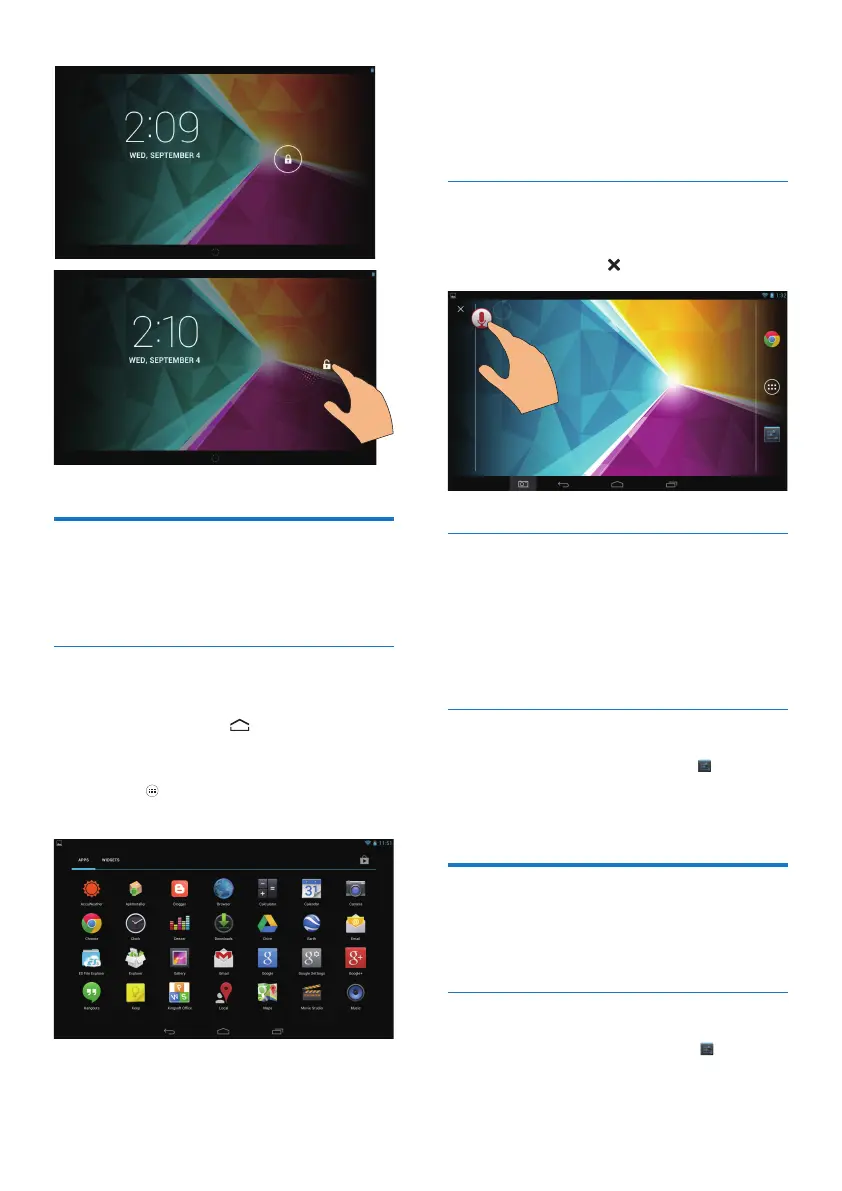
Add app icons and widgets
1 Swipe left/ right to select a page.
• If necessary, tap to return to the
Home screen.
• Make sure that the page isn't lled.
• Tap . Tap APPS or WIDGET to open
the list of apps or widgets.
2 Tap and hold an icon or widget until the
page is displayed.
» The icon or widget is added to the
selected page.
Delete items
1 Tap and hold an item to unlock.
2 Drag the item to .
Relocate items
1 Tap and hold an item to unlock.
2 Drag the item to a space on the page.
3 Release the item.
» The item moves to the space.
Add wallpapers
1 From the Home screen, go to > Display
> Wallpaper.
2 Select your options.
Text entry
With the onscreen keyboard, you can enter
text in multiple languages.
Select input methods
1 From the Home screen, select Settings
> Language & input.



 To Next Page